Chapter D - ADJUSTMENT & CALIBRATION
Planmeca Proline EC X-ray unit D-29
AUTOMATIC EXPOSURE CONTROL (AEC) CALIBRATION
Technical Manual
8.2 Base value adjustment
The default kilovolt value, i.e. the value that is used when the AEC exposure starts, is 68 kV.
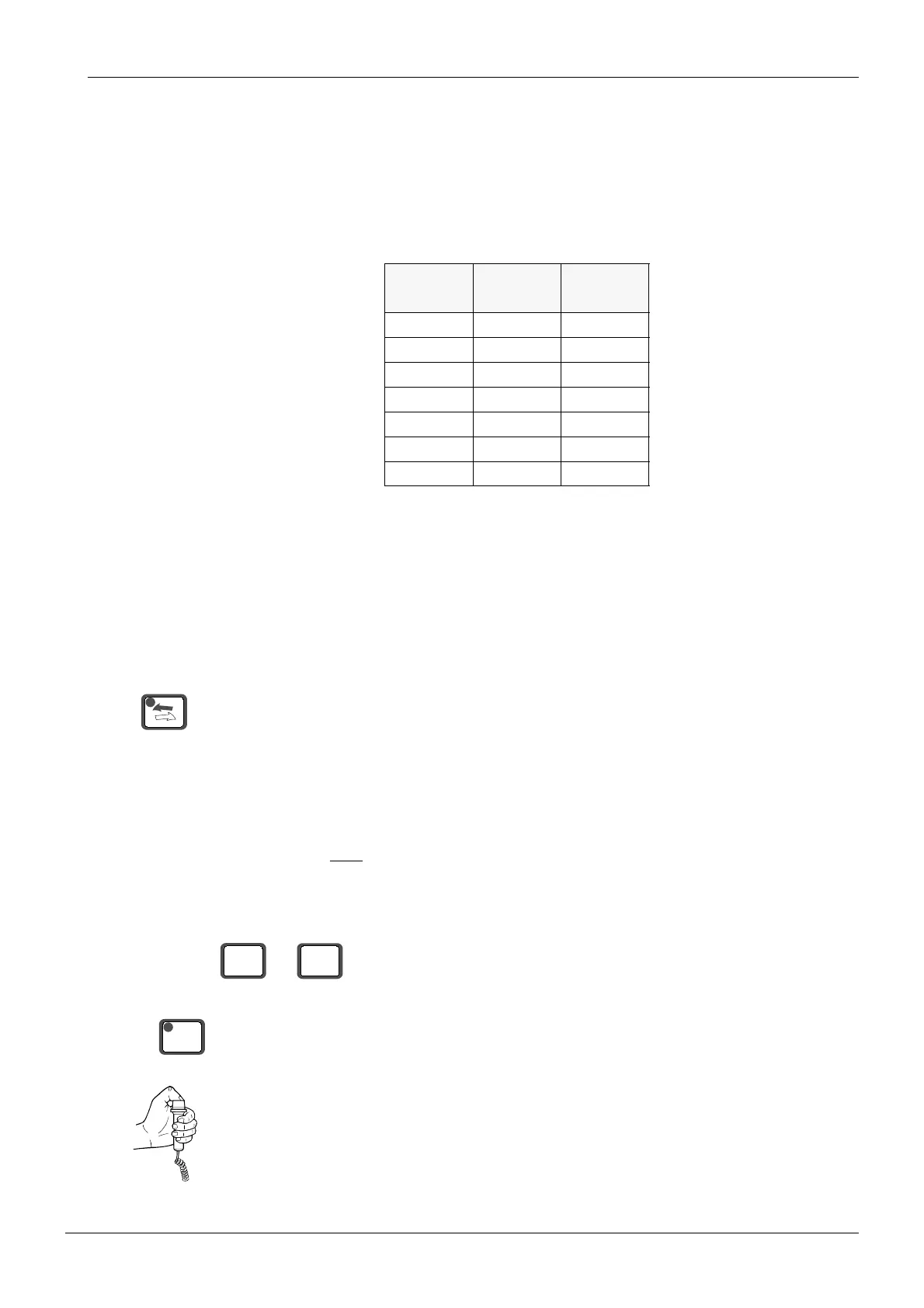
The film density is adjusted by changing the default milliampere value. The adjustment range
is from -3 to +3. The density value 0 corresponds the mA value 8. Changing the density value
will change the mA value as follows: one density step equals to one mA step. The negative
value decreases the mA value from the value 8mA, whereas the positive value increases it.
To find the exposure values that give the film density closest to value 1.0 ±0.1 OD the test
exposures are taken. The films are either compared to the reference film which density is
approx. 1.0 OD (supplied with the system), or the film density is measured using a film densi
-
tometer.
It is recommended to start with exposure values 68kV and 7mA and check the film density. In
case other exposures are needed, decrease/increase the mA value until the correct film den
-
sity is achieved.
Place the AEC calibration filter to the front of the primary slot.
Move the cassette carriage to the loading position.
In the darkroom open the cassette and place a film inside the cassette. Close the cassette.
Slide the cassette into the cassette holder.
NOTE The film density adjustment must be performed in normal panoramic mode. Make sure
that the unit is
NOT in the AEC mode.
Select a kilovolt value of 68 and a milliampere value of 7.
Drive the X-ray unit to the exposure position. The rotating unit will turn to the start position and
the indicator light will come on.
Take an exposure.
kV mA
Density
value
68 5 -3
68 6 -2
68 7 -1
68 8 0
68 9 1
68 10 2
68 11 3
kV
mA
768
READY
PRET














 To Next Page