1-28
November 2012
COVER FEEDER INSTALLATION
1.4.3 ENABLING THE COVER FEEDER
1. Turn on the power for the Booklet Maker.
2. Press the [Tools] button and then the [Service] button.
3. Key in password 107 and press the [OK] button.
4. Select BK5030 and press the [Enter] button.
5. Scroll to “CF5030 installed: No”.
6. Press the [CHG] button, so that it reads “CF5030 installed: Yes”.
7. Press [OK] button.
8. Scroll to [Sensors] and press the [OK] button.
9. Scroll to “CF-Q30 paper/dsd sensor”.
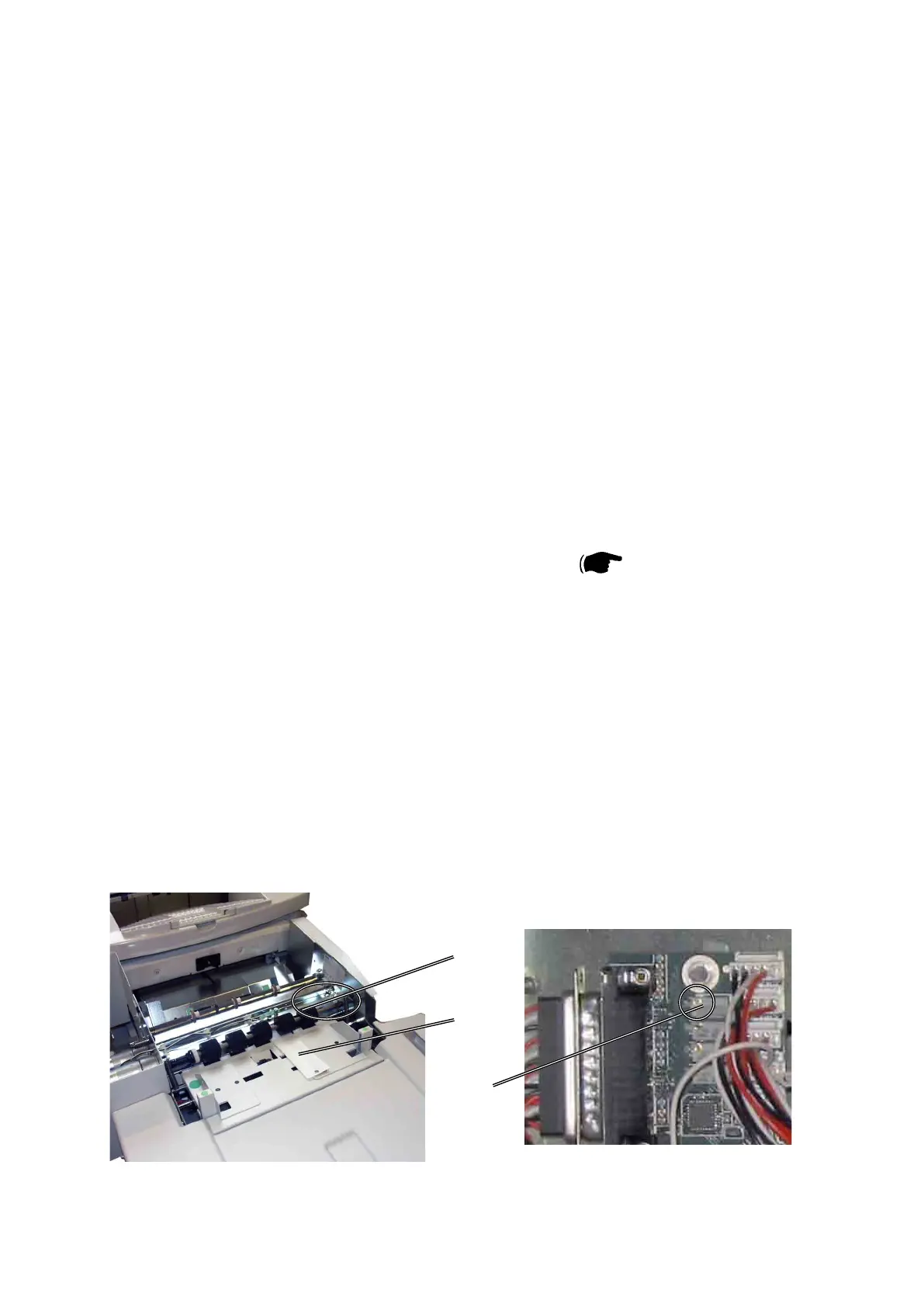
10. Place the DSD calibration strip, located behind the rear cover of the Booklet
Maker, as illustrated [A]. The calibration strip must be positioned between the
CF-Q30 (DSD sensor) LED and phototransistor [B] ( Service Manual
CF5010 6.1.2 ).
11. The value should be +4.7 ± 0.05. If not, turn the potentiometer [C] on the Ad-
don PCB until you reach the correct value.
12. Press the [Exit] button when adjustment is done.
13. Press [Exit] button once to go back to Service Program mode or twice to leave
Service Program mode.
[C]
[A]
Upper Top Cover removed for clarity
[B]



 To Next Page