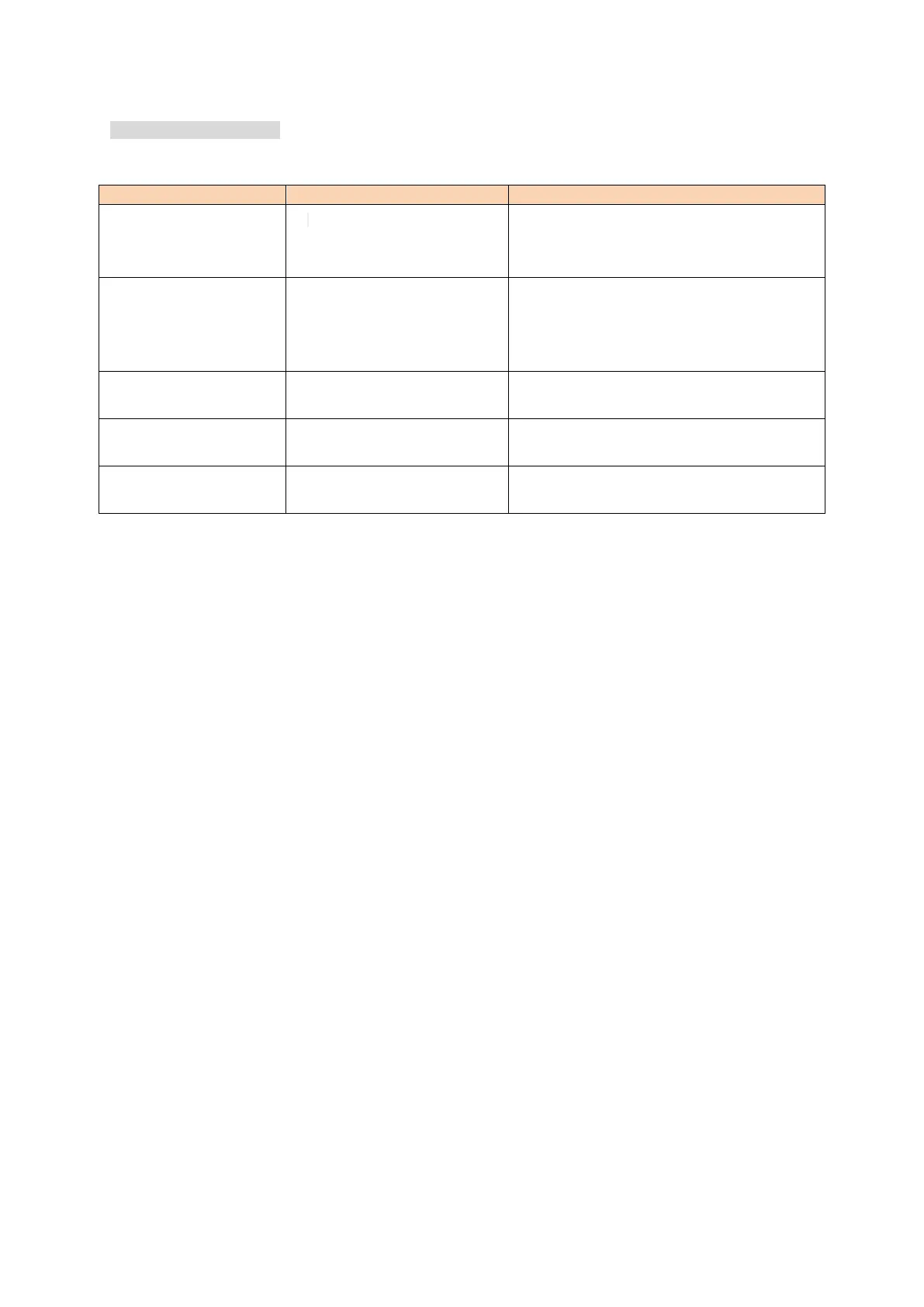
5.Trouble Shooting 故障排除
Power is on, nothing appears on
Display.
1. Power cable contact error.
2. Power cable of a root or more fuse
disconnect.
1. Connect the power cable correctly:Red(+);Black(-)
2 . Check and solve problem resulting in blown
fuse and replace fuse with new fuse.
The power supply voltage is too low.
Power supply voltage of DC 13.8 V ±15% (DC 11.7 V to
15.8 V). If the input voltage is beyond this range,
please adjust the voltage regulator power supply
device and check all the power cable connection.
Key and Dial do not function
1.Key-lock function is activated.
2.In the channel display mode
1.Cancel Key-lock function.
2. Reset, cancel some lock function.
Rotating Dial will not change
memory channel.
No storage memory channel
Settings are stored memory channel
PTT key is pressed but
transmission does not occur.
Microphone connection is poor.
Connect microphone properly.


 To Next Page