BF9500 车载台使用说明书
﹒Basic Functions
Change frequency, memory channel and scan direction etc
Display the menu, sfrequency, channel information etc..
TONE and CALL Function keys
Switches between 2TONE,5TONE and DTMF.
POWER and MHz Function keys
High/medium/low power switch;frequency regulation(MHz)
SQL and MONI Function keys
Set noise level and monitor function
Microphone connection port;PC programming port,
Reverse Frequency;Long press 2 seconds lock the keyboard;Amateur/Professional mode
switch;Channel deleted
Frequency and channel switch;Long press for 2 seconds to switch frequency and channel
scan; Channel deleted
Function of open;Long press for 2 seconds to enter the menu mode
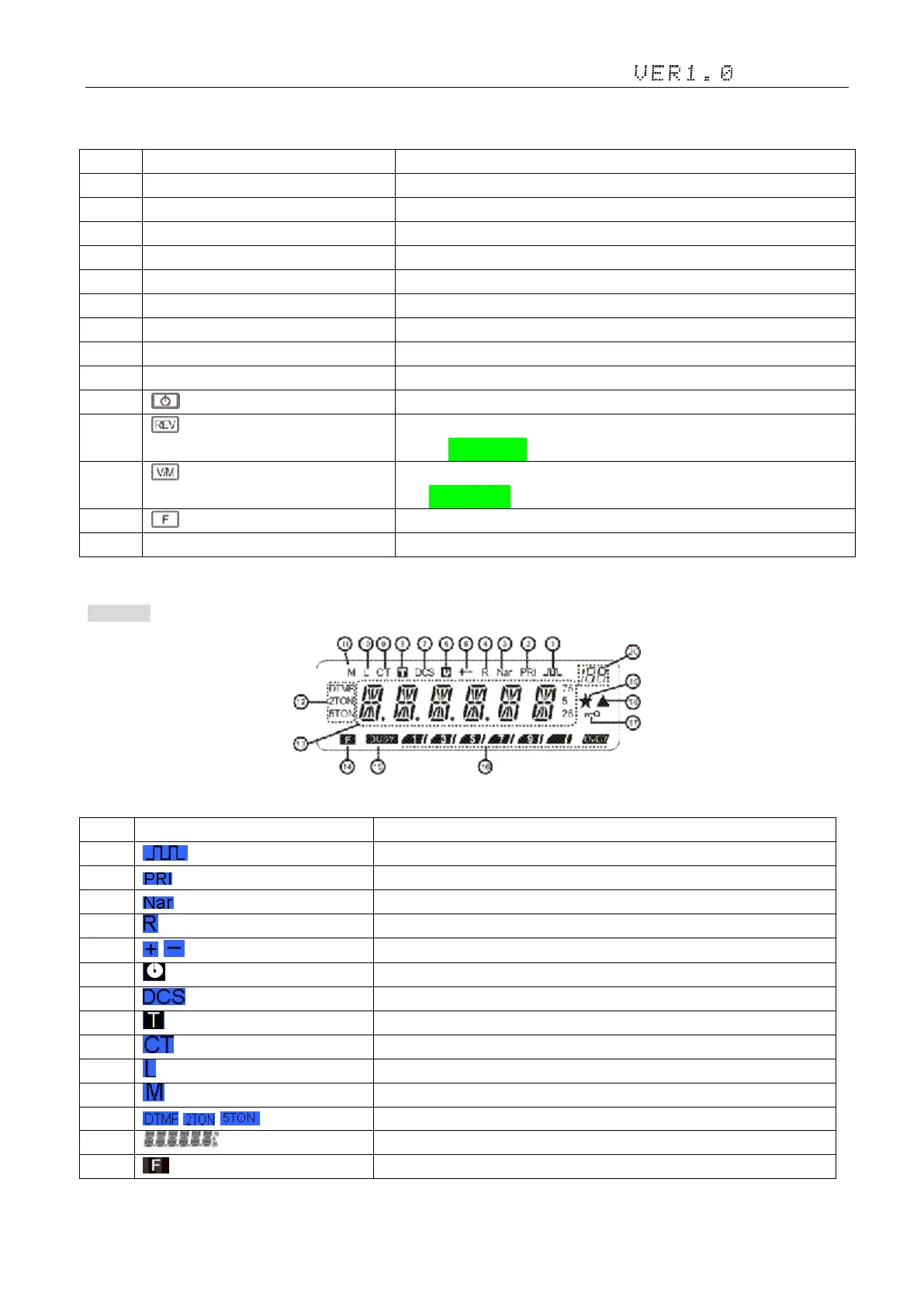
2. Display
Offset frequency direction
Set DTMF、2TONE、5TONE function
Indicates the frequency or memory name


 To Next Page