Point Grey Flea3 GigE Technical Reference 4 Flea3 GigE Physical Interface
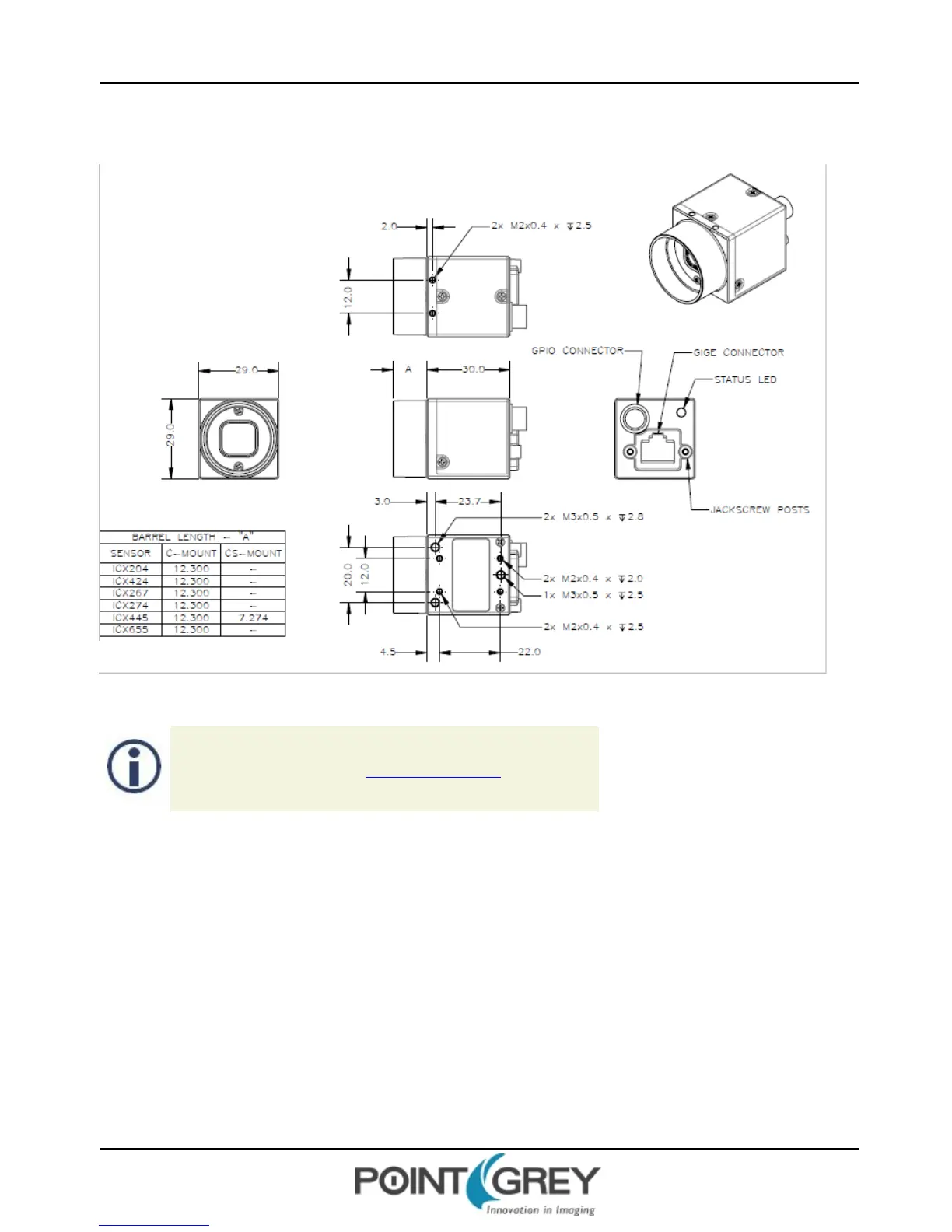
4.2 Flea3 GigE Dimensions
Figure 4.1: Flea3 GigE Dimensional Diagram
To obtain 3D models, contact support@ptgrey.com.
4.3 Mounting with the Case or Mounting Bracket
Using the Case
The case is equipped with the following mounting holes:
n Two (2) M2 x 2mm mounting holes on the top of the case
n Three (3) M3 x 2.5mm mounting holes on the bottom of the case
n Four (4) M2 x 2mm mounting holes on the bottom of the case that can be used to attach the camera directly to a
custom mount or to the tripod mounting bracket
Using the Mounting Bracket
Thetripod mounting bracket is equipped with two (2) M3 and one (1) M2 mounting holes.
Revised 10/29/2013
Copyright ©2010-2013 Point Grey Research Inc.
20



 To Next Page