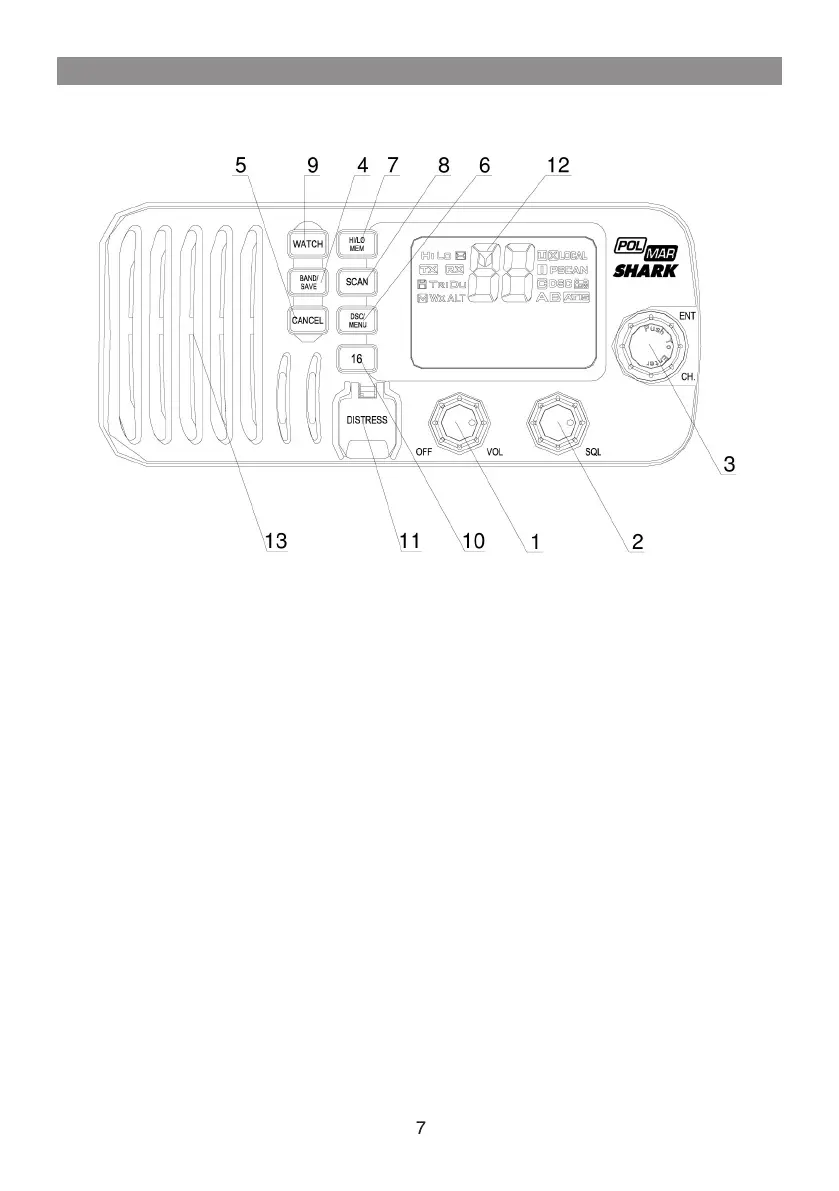
2. CONTROLS AND LCD DISPLAY
2.1 Base station (panel)
Volume and Power On/Off
0-270° rotary control knob, turn clockwise to power on. Continue to turn until a
comfortable audio level.
Squelch
Use this knob to set the squelch threshold.
CH/Enter
Rotary encoder (no stop) with momentary push
Rotate this knob to change the current number and change values in menu mode
or during programming. Press the knob to enter values
Band/Save
Select band and set memory channels.
Cancel
The key to cancel last selection or change without saving. It allows step back
one level on menu mode. It cancels DSC Distress calls & auto-retransmission of
DISTRESS calls.
DSC/Menu
Use this key to enter Menu Setup or DSC Call Menu
Call Mode is used for making DSC Calls. Menu Mode is used to setup the
radio.
Hi/Low/mem
Press and release HI/LO button to toggle between power output 25watt and
output 1 watt.
“HI” or “LO” icon appears on LCD display to indicate setting
Hold the key select memory channel mode
1
2
3
4
5
6
7



 To Next Page