EasyManua.ls Logo

Polycom VSX 3000 - User Manual

Polycom VSX 3000
219 pages
Print Icon
To Next Page IconTo Next Page
Loading...
March 2010 Edition
3725-20235-013/A
Version 9.0.6
Administrator’s Guide
for the VSX Series
Version 9.0.6
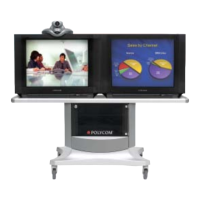
product pic here

Table of Contents

Other manuals for Polycom VSX 3000

Questions and Answers

  • T
    Terri HinesAug 23, 2025
    Why can't I navigate to Admin screens on Polycom VSX 3000 Conference System?
    • B
      Brooke BeasleyAug 23, 2025
      If you cannot navigate to the Admin screens on your Polycom Conference System because the System button is not displayed, press the button on the remote and select System at the end of the help message. Alternatively, access the system remotely using the system’s web interface, FTP, Telnet, or SNMP. From the web interface, you can add the System button back to the home screen by navigating to System Setup > Admin Settings > General Settings > Home Screen Settings, then select System. The change will take effect after you navigate away from the home screen and then back again on the system.

Polycom VSX 3000 Specifications

General IconGeneral
Audio StandardsG.711, G.722, G.728, G.729A
Network ProtocolsH.323, SIP
Data StandardsH.239
Frame RateUp to 30 fps
Bandwidth64 Kbps to 2 Mbps
Network Interface10/100 Ethernet
Video Inputs1 x S-Video, 1 x Composite
Remote ControlIncluded
Video StandardsH.263, H.264
CameraIntegrated
MicrophoneIntegrated microphone
ConnectivityEthernet, ISDN
Video Resolution Formats4CIF, VGA, QVGA
Video OutputsComposite video, S-Video
Audio InputsLine in, microphone
Audio OutputsLine out, speaker
Network Interfaces1x RJ-45
Display OutputS-Video, Composite
Camera InputIntegrated
Power Supply100-240V AC
DisplayExternal display required (not included)

Related product manuals