Poseidon SE7EN+ User Manual Appendix 3 Page 117
Managing gases
In the M28 there is a gas list of eight different gas congurations (Gas-1 to Gas-8) plus one
Oxygen conguration (Oxygen-1). When the M28 is connected to SE7EN, the M28 will syn-
chronize the diluent and oxygen conguration from SE7EN, such that the M28 Oxygen-1 con-
guration is replaced by the SE7EN oxygen conguration, and the Gas-1 conguration is
replaced by the SE7EN diluent conguration.
This ensures that the M28 will have a gas conguration that includes the SE7EN onboard gas
supply gases, which is relevant for back-up purpose. In case the M28 would lose contact with
the SE7EN during a dive, these gas congurations are still available to the M28 for deco cal-
culations. When you start up the SE7EN, you shall push both buttons for entering the menu
system. Choose Dive Cong.
Now you can change the on-board oxygen (SE7EN O2) and diluent (SE7EN DIL) conguration
parameters. Here you can also dene up to seven different bailout gases (Gas-2 to Gas-8).
Different bailout gases are only used by divers doing decompression diving. For this you need
proper education. The changes you make in the Dive Cong menu will be saved into the
SE7EN+ settings. These changes must be made before the diluent helium and oxygen frac-
tions are conrmed in the pre-dive test 51 and 52. After these tests it is no longer possible to
change gas conguration since the gases are veried in test 53.
If you disconnect your M28 from your SE7EN+ you will not be able to make these changes.
The SE7EN needs to be connected and powered up. You can edit SE7EN onboard gas con-
guration from the Apps/System, Edit SE7EN settings. Any changes made to SE7EN onboard
gas conguration in Edit SE7EN settings will be reected in the Dive Cong list.
Per default the selected OC gas will always be your SE7EN+ predened diluent. When in OC,
meanwhile performing a bailout, the diver now also has the possibility to change the OC bailout
gas to any of the congured gases by accessing the menu structure and selecting OC Gas
select. Then select any of the predened and enabled gases in the list. The selection can
always be veried from the Dive view by altering the center icon, see gure 3-35. This selection
will remain as long as you stay in the OC mode. If you decide to go back to CC the gas will
automatically be restored to your SE7EN+ predened diluent. This means that if you again
decide to go to OC you need to alter the OC Gas to what you intend to breathe at this stage.
Changing settings in your SE7EN+ through the M28
The SE7EN+ unit settings can be changed using the M28 when it is connected to the SE7EN+.
The settings are accessed by opening the System app and selecting “Edit SE7EN+ reg” from
the menu.
Figure 3-36. Edit SE7EN+ reg.
Changes made to the SE7EN+ settings will not take effect until you have restarted the SE7EN+
and completed a full pre dive test sequence.
After pre-dive test 51 and 52 some of the items in this menu will be locked for editing. The
menu item “Edit SE7EN+ reg” is not available while diving.
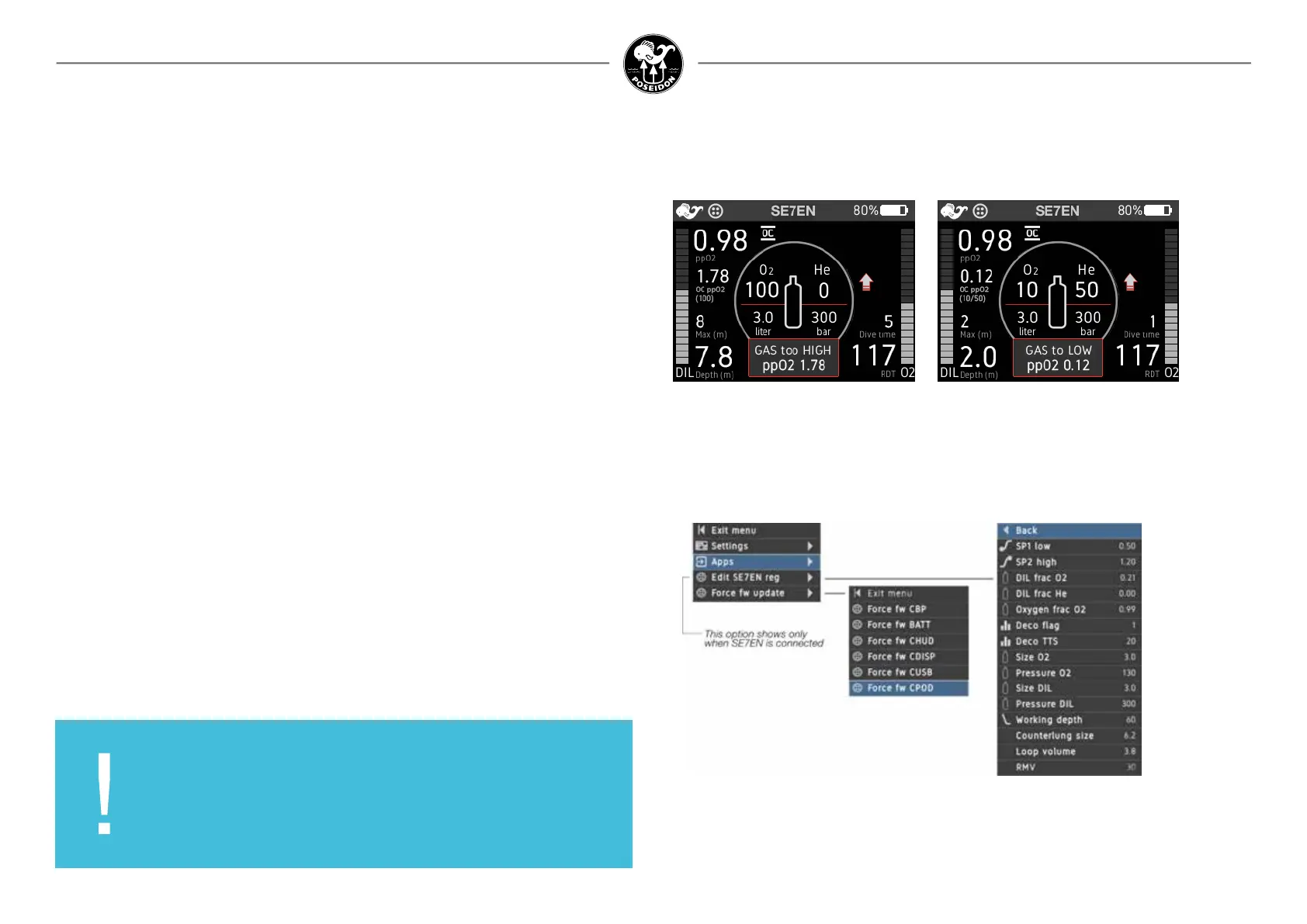
If you by coincidence select a gas with a too high or too low PO2 at the existing depth the M28
will warn you by overlaying a message window covering parts of the center icon saying GAS
to HIGH/LOW ppO2.
Figure 3-35. Gas too HIGH/LOW
IMPORTANT:
If you change or update any settings in the SE7EN+ through
the M28/Reef app you need to restart the SE7EN+ to apply the
changes.



 To Next Page