29
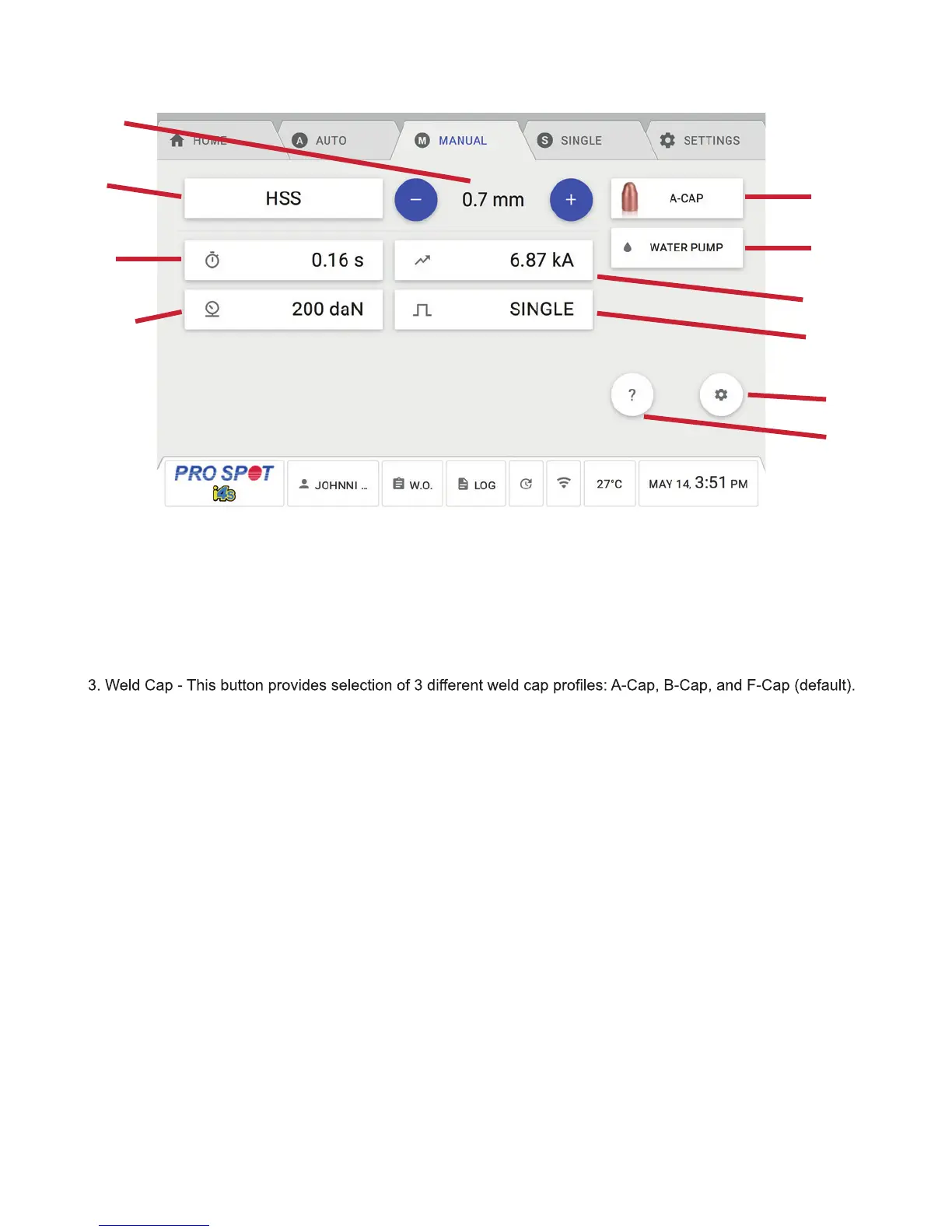
1. Weld Thickness - This button provides selection of 6 different weld thickness (0.7, 1.0, 1.2, 1.5, 2.0, 2.5 mm).
The thickness setting is chosen by the thickest layer in your weld stackup. Remember: Satisfactory weld set-
tings are always determined by vehicle OEM instructions and destructive testing.
2. Weld Material - This button provides selection of 4 different materials (HSS, Mild Steel, Weld Bond, Boron) as
well as a Custom setting for you to create your own presets.
The presets are all unique to each cap, therefore, an HSS 0.7mm setting while the A-Cap is selected will be
different than with the B-Cap or F-Cap selected.
4. Weld Time - This button allows the user to adjust the amount of time that the welder provides current.
5. Water Pump Shutoff - This button allows the user to temporarily disable the water pump so that an arm or
weld caps can be changed on the PS-700W weld gun. The screen will prompt a countdown for you to wait, after
it expires, you can make your necessary changes to the Weld Gun. After the change is complete, you can press
DONE to continue and the water pump will turn back on.
6. Weld Current - This button allows the user to change the current anywhere between 1.00 kA and 13.00 kA.
Keep in mind, the current output will be determined by the power installation in your building.
7. Electrode Force - This button allows the user to adjust the force applied at that tips of the weld gun. The units
are daN also known as dekanewtons. This setting can be adjusted between 160 and 600 daN. Keep in mind,
the force the welder is able to reach is based on the input supply pressure from your compressor. See Figures 8
and 9 for the necessary input supply pressure to your machine.
8. Weld Type - This button allows the user to change between 3 different weld types: Single, Dual, and Pulse.
Single: The welder attempts to provide the set weld current for a set amount of time.
Dual: The welder attempts to provide a set preheat current for a set amount of time and then a set weld current
for a set amount of time. This may be used for coated steels or weld bonding applications. See section 5.5
below.
Pulse: The welder attempts to provide the set weld current for a set amount of ON time with a set of amount of
OFF time pauses in between for a set number of repetitions. See section 5.6 below.
5.4 Manual Mode Welding Menu Guide
1
3
5
7
2
4
6
8
9
10
5.4 Manual Mode Welding Menu Guide
Figure 5.4



 To Next Page