41
NOTE: Extension arms marked “optional” are available through your local distributor
or online at www.prospot.com.
REMARQUE: Bras d’extension portant la mention «facultatif» sont disponibles à
partir de votre Distributeur régional ou en ligne à www.prospot.com
7.2 Extension Arms
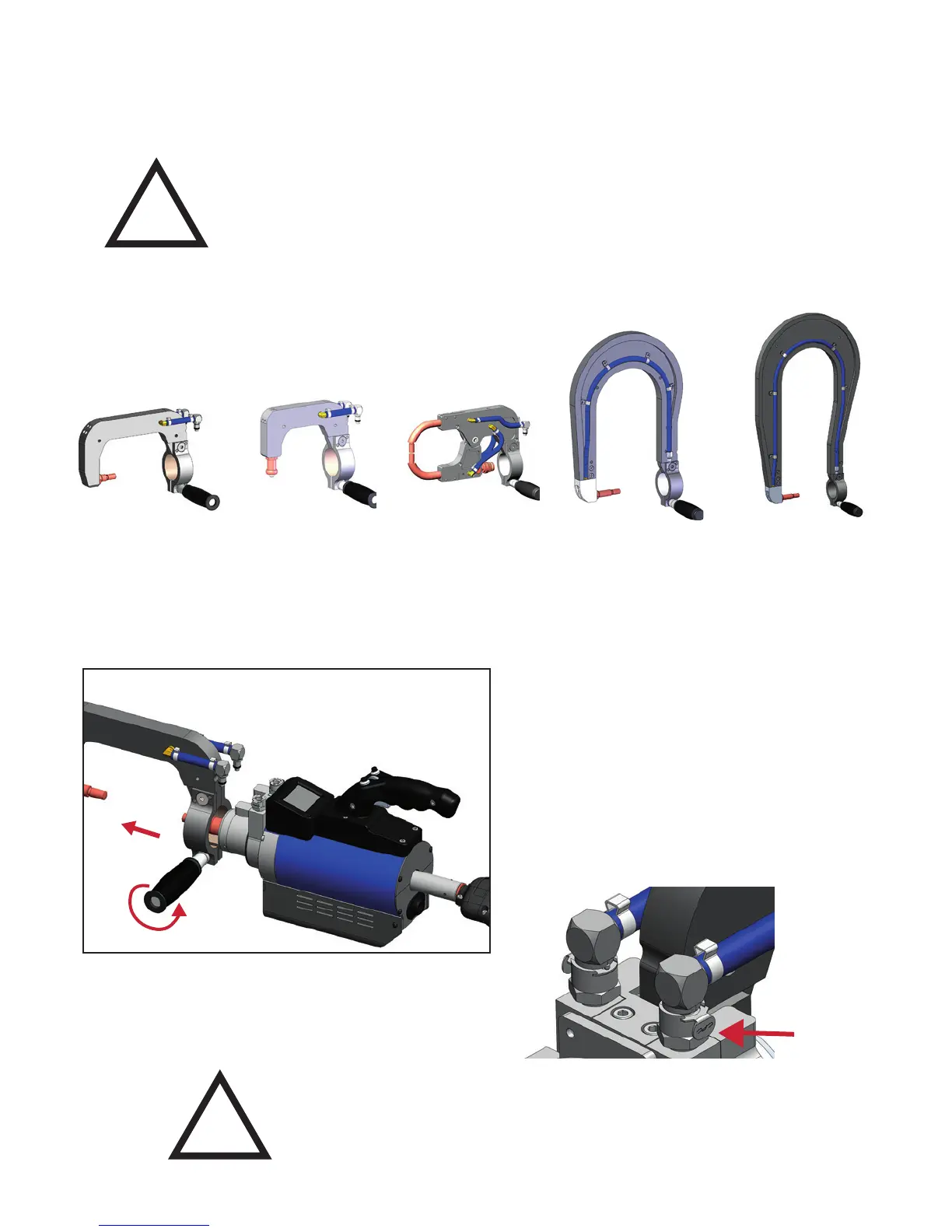
i4s Extension Arms
The i4s has a variety of extension arms to accommodate most welding applications.
Changing Extension Arms
Turn off the water pump before disconnecting water lines.
Make sure to properly secure all water hoses before welding.
!
!
How To Change Extension Arms:
1. Make sure the Water Pump is off.
2. Disconnect water lines by pressing release button.
3. Loosen the extension arm handle.
4. Slide the extension arm off.
5. Replace with the arm you wish to weld with by
sliding it on.
6. Reconnect water lines.
7. Tighten the handle to secure the welding arm..
8. Check electrode alignment.
PSW-WH-090
Wheelhouse Arm
PSW-WH-090
Wheelhouse Arm
PSW-CXS1
C-X Arm
PSW-320
320 Extension Arm
PSW-520
520mm Extension Arm
To remove
the water
lines: Press
the release
button on
each line.
7.2 Extension Arms
Figure 7.11
Figure 7.12



 To Next Page