36
Single Sided (SS) Mode can be used for many different applications in auto repair, such as rust and dent
repair. With the i4s, you’re able to access 16 programs associated with each selectable SS weld adapter.
6.0 Single Sided Welding
6.0 Single-Sided Welding 6.1 Single-Sided Welding Menu Guide
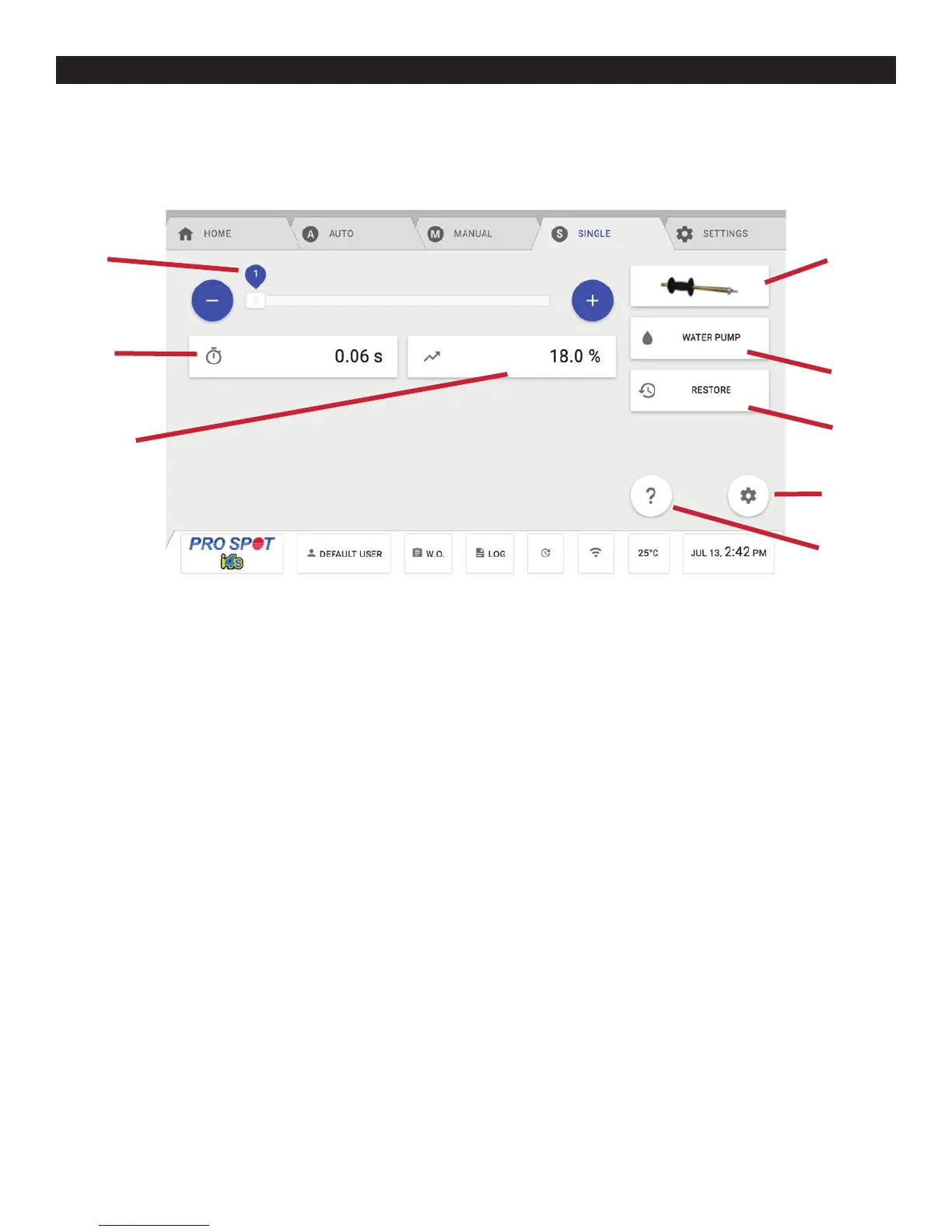
1. Program Number - This number indicates the program number for the chosen single sided adapter. Press the
+ and - buttons to increase or decrease the program number. Program number 1 is lowest setting and program
16 is the highest setting. It is best to start low and work your way up in power. The user can edit and overwrite a
program by changing the Weld Time and Weld Power and pressing the Save button.
2. Single Sided Adapter Menu- This button provides selection between 11 different attachments: Slide Hammer,
Pro Pull (optional), Single Sided, Carbon Shrink, Contact Shrink, Stitch Weld, Nail Weld, Rivet Weld, Bolt Weld,
Nut Weld, and Washer Weld. Read more about each application in the sections below.
3. Weld Time - This button allows the user to change the weld time anywhere between 0.1 and 1 second.
4. Water Pump Shutoff - This button allows the user to temporarily disable the water pump so that an arm or
weld caps can be changed on the PS-700W weld gun. The screen will prompt a countdown for you to wait, after
it expires, you can make your necessary changes to the Weld Gun. After the change is complete, you can press
DONE to continue and the water pump will turn back on.
5. Weld Power - This button allows the user to change the weld power anywhere between 5 and 50%.
6. Single Sided Advanced Settings - This button allows the user to change Trigger Delay, Rise Time, and Fall
Time. The user will need the admin password in order to access this setting.
Trigger Delay: The amount of time between when the weld trigger is pressed and held and when the weld current
is provided.
Rise Time: The amount of time it takes for the welder to reach full current.
Fall Time: The amount of time it takes for the welder to fall down from full current to 0.
7. Single Sided Weld Help - This button shows the user help information that applies to the Single Sided Weld
screen.
1
3
5
8
7
2
4
6
6.1 Single Sided Weld Menu Guide
Figure 6.1



 To Next Page