38
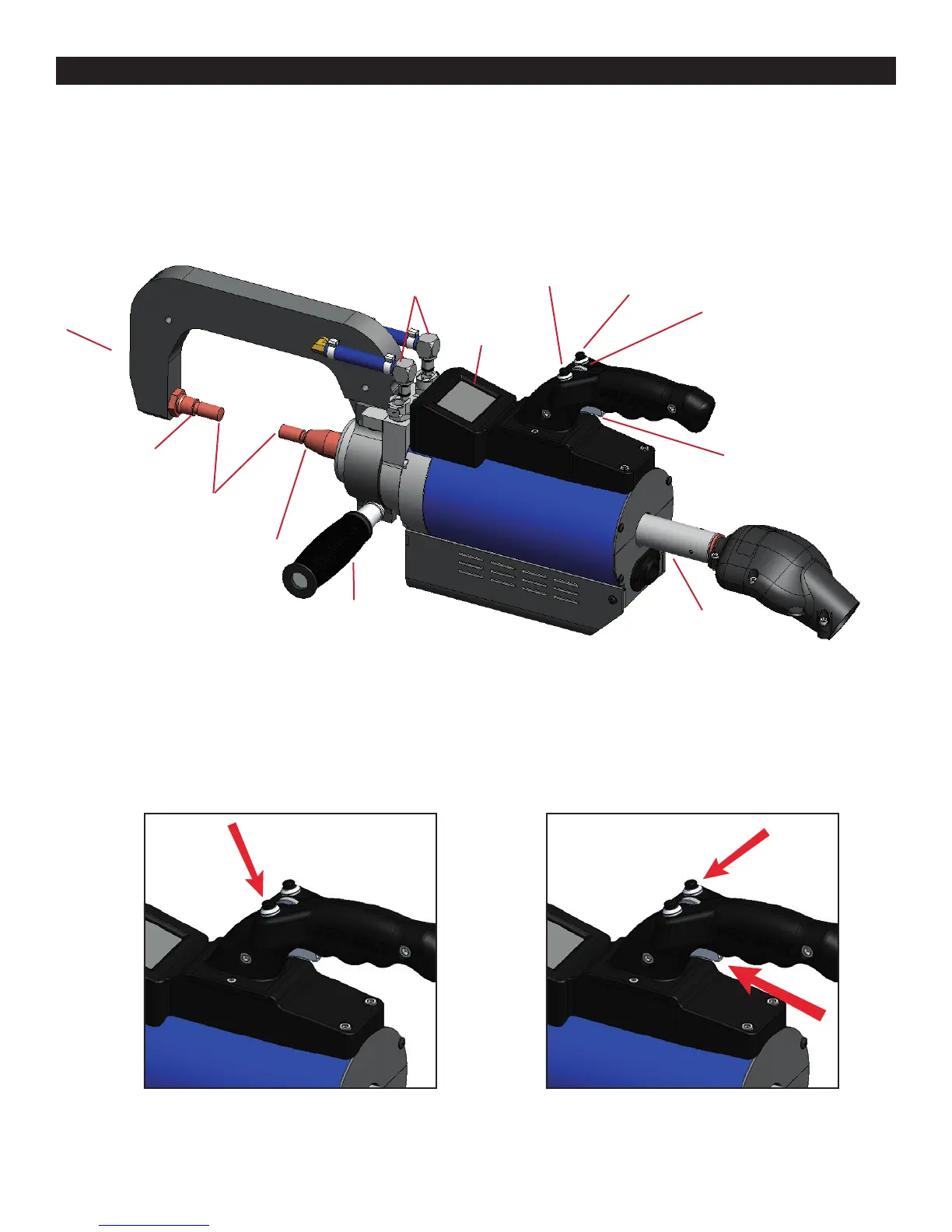
7.0 i4s Weld Gun
Release Trigger Button
Gun Display
Screen
Menu Trigger Button
Scroll Wheel
Water Lines
Welding
Caps
Shank
Weld Trigger Switch
Cable / Tube Input
Double-Acting Spot Gun (Part #: PS-700W)
The spot gun is used for Double Sided Welding programs:
HSS Galvanized Steel, Mild Steel, Weld Bonding, Boron Steel, Pulse Welding, OEM Required Programs and Cus-
tom Programs.
Welding Arm
Welding Arm
Electrode
Clamping
Handle
Using the Double-Acting Gun:
Press and hold the Release Trigger Button
to open electrodes wide.
Press and hold BOTH, the Weld Trigger AND
top right (Menu Trigger) button on the gun to
close electrodes and weld.
Double-Acting Spot Gun Component Diagram
1. Select the program you wish to weld in and calibrate if needed.
2. Bring the weld gun to the material you wish to weld or test on.
3. Press the Release Trigger Button to open the electrodes.
4. Press and hold both, the Weld Trigger AND top right (Menu Trigger) Button to weld.
7.0 i4s Weld Gun
Figure 7.1
Figure 7.2 Figure 7.3



 To Next Page