26
!
!
5.0 Double Sided Welding Programs
Auto Mode on the i4s automatically detects the thickness and resistance of the weld stack up.
Once properly calibrated, the user only needs to press and hold the weld trigger and the top
right button on the gun and the i4s will determine the correct power levels and duration.
IMPORTANT!
the coolant tank before turning on the welder.
IMPORTANT! Make sure the water cooling hoses are securely clipped into place before
welding.
IMPORTANT! If the thermal breaker has switched off the welder, please contact Pro
Spot’s authorized service personnel.
IMPORTANT! N’éteignez pas le soudeur pendant que le système de refroidissement est
activé!
IMPORTANT! Si le disjoncteur thermique a éteint le soudeur, s’il vousplaît contactez
personnel de service autorisé Pro Spot.
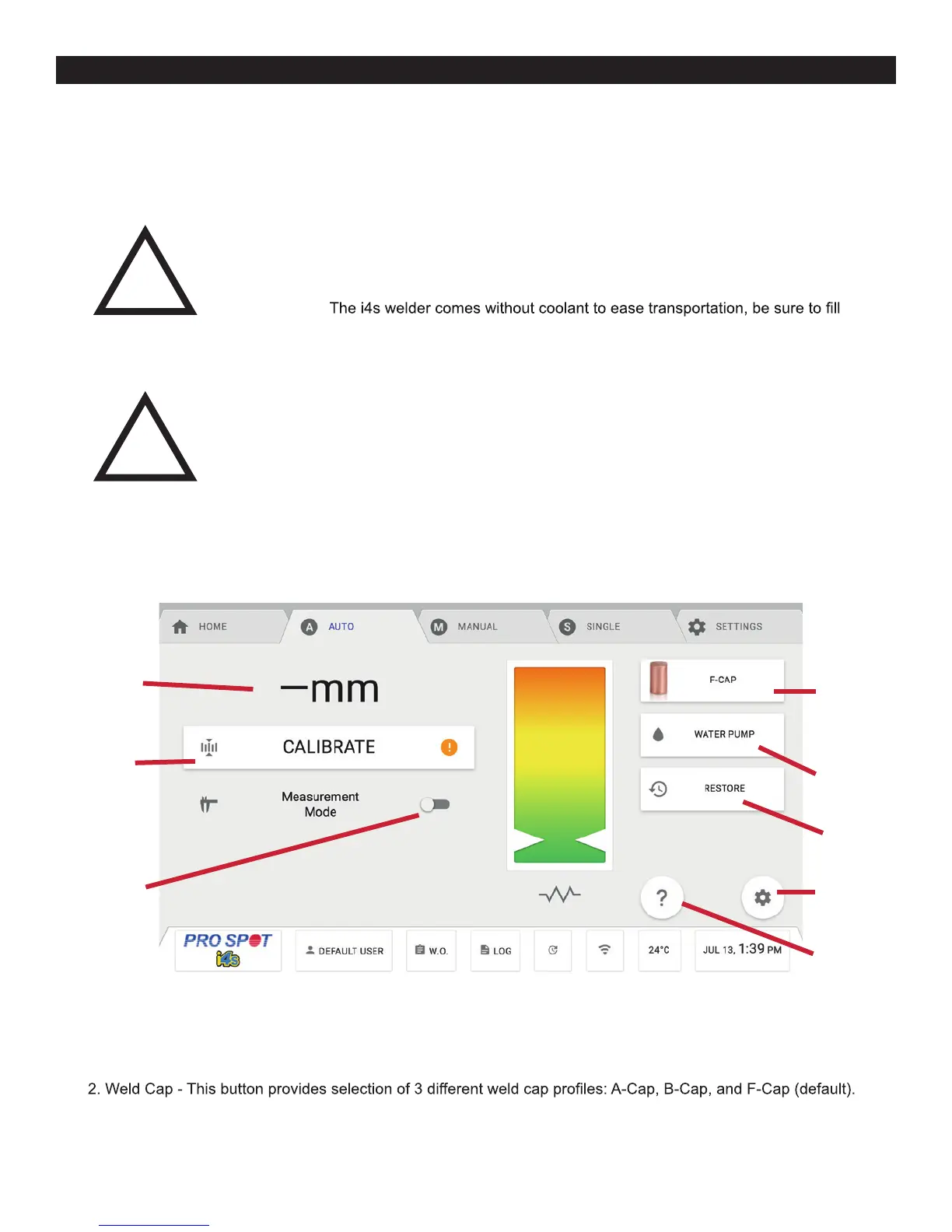
5.0 Double Sided Welding Programs 5.1 Auto Menu Guide
1. Thickness Measurement - This displays the thickness in millimeters of the material between the tips when
welding.
The presets are all unique to each cap so an HSS 0.7mm setting while the A-Cap is selected will be different
than with the B-Cap or F-Cap selected.
1
3
5
7
8
2
4
6
5.1 Auto Mode Menu Guide
Figure 5.1



 To Next Page