39
7.1 i4s On-Gun Screen & Gun Controls
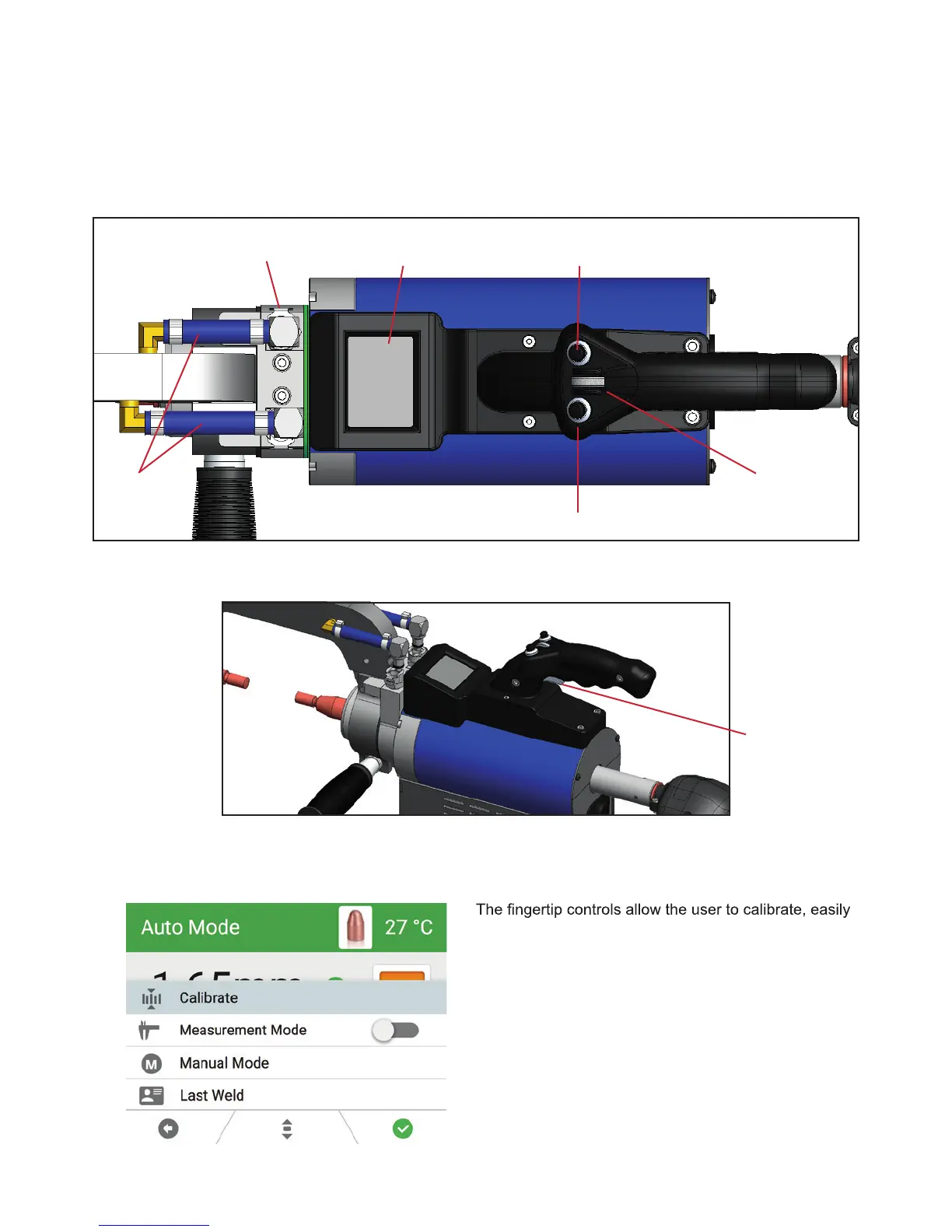
The i4s gun has an on-gun screen that can show the user exactly which settings and what kind of welds they
are producing. This feature gives users the options to make changes to weld settings directly from the gun
without needing to go back to the machine.
i4s Gun Controls
navigate between programs, turn on Measurement
Mode and check the results of the last weld.
To access the Options Menu from the gun:
1. You must be in Auto or Manual Mode.
2. Press and hold down the Menu Trigger Button on the
gun. Use the scroll wheel to pick your selection. To go
back, press the Release Trigger Button.
NOTE: A guide at the botton of the on-gun screen
shows icons indicating the functionality of each button
when in the Options Menu.
Weld Trigger
Gun Display Screen
Quick Release
Disconnect
Water
Lines
Menu Trigger Button
Navigation Wheel
Release Trigger Button
Top View of i4s Gun
Side View of i4s Gun
7.1 i4s On Gun Screen & Gun Controls
Figure 7.3
Figure 7.4
Figure 7.5



 To Next Page