ProtaSteel 2021 - Quick Start Guide 21
18. Stiffened End Plate Connection
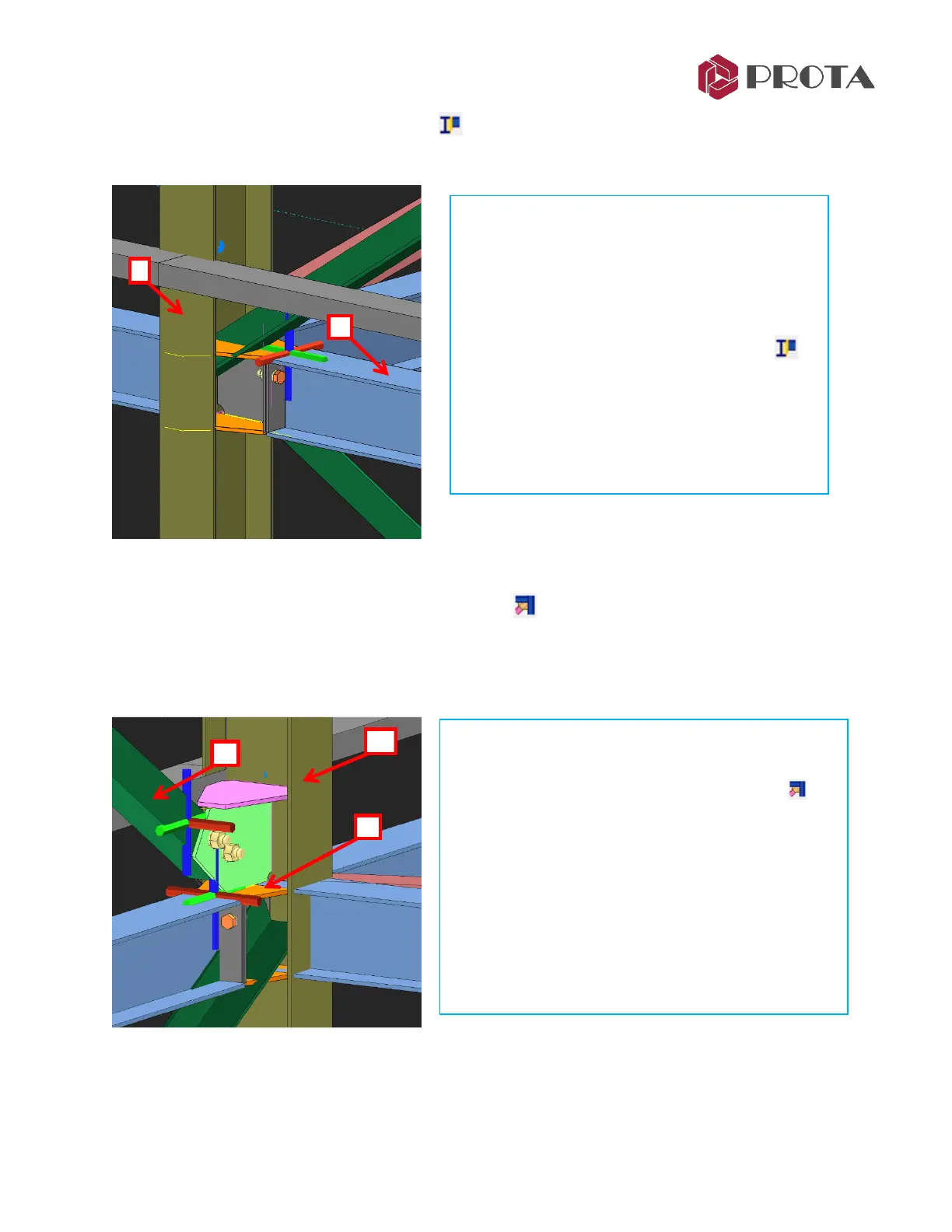
We will create a stiffened end plate connection at the column beam joint at grid C/3.
19. Corner Bolted Gusset Plate Connection
We will connect the diagonal brace at the same joint. There is problem because the existing connection
is getting in the way, i.e. we cannot connect the diagonal brace directly to the column due to the top
stiffener plate. This can be solved by using the Corner Bolted Gusset Plate Connection.
➢ Double-click on Axis 3 view to open view
➢ Zoom in the joint where the column, beam & 2
diagonal braces meet at grid C/3
➢ Press F9 on this joint to set the point of interest
➢ Rotate the view slightly about this joint
➢ Pick Stiffened end plate connection icon
➢ 1 – Pick the column
➢ 2 – Pick the beam
➢ Right-click
→
Connection is created
➢ Rotate the view around so the connection is not
obstructed by the girt
➢ Pick Corner Bolted Gusset Plate Connection
➢ 1 – Pick the column
➢ 2 – Pick the top brace
➢ 3 – Pick top orange plate
A logical & constructible gusset plate connection will
be created joining the top plate of the previous
connection.



 To Next Page