ProtaSteel 2021 - Quick Start Guide 37
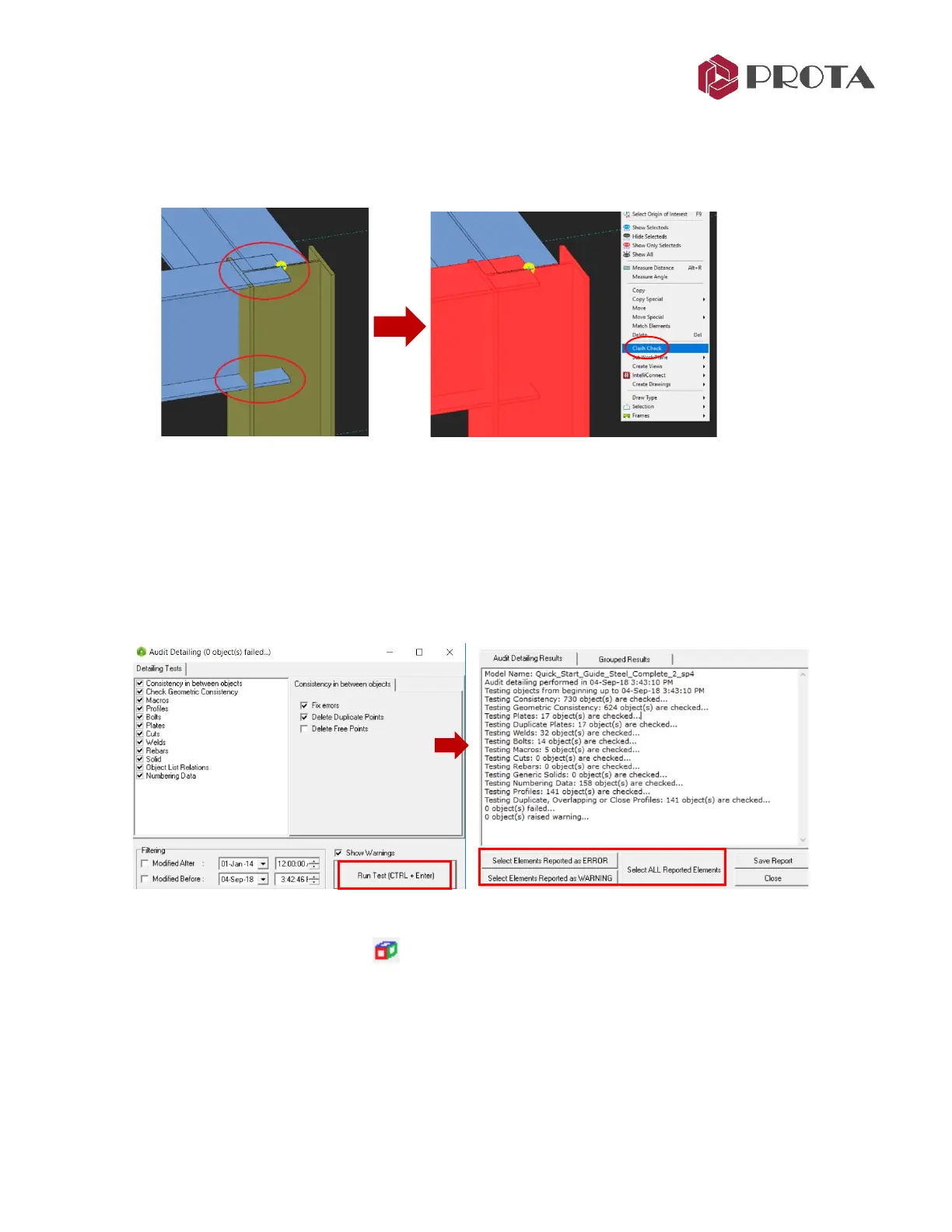
As a result, the clashing elements will be left selected (in red). Generally, collision occurs when two or
more elements overlap each other. It usually occurs when connections are not made yet. For example,
before the haunch connection was made, the beam end flange & web plate is overlapping into the
column (as shown below).
If a Clash Check is performed by selecting both the elements, they will remain selected after the check.
29. Audit Model
Before creating detail drawings, it is important to determine errors and inconsistencies that may exist in
the model. This function will perform several model tests, such as duplicate points :
➢ Go to Tools (top menu)
→
Diagnostic Tools
→
Audit Model
➢ Select the checks desired
→
Run Test
You can select the object(s) specified in the result report and automatically navigate to it in the model.
30. Detail Item Manager
The Detail Item Manager creates and manages detail items such as the connections. We can use this
function to create exploded drawings of the connection with different views & detail information such
as dimensions, location of bolts, welds, etc.



 To Next Page