ProtaSteel 2021 - Quick Start Guide 38
This box controls the various directional views that we want to show in the drawings. The view is shown
in 3 colors, red, blue and green. Each color has a front & back view. Hence there is a total of 6 possible
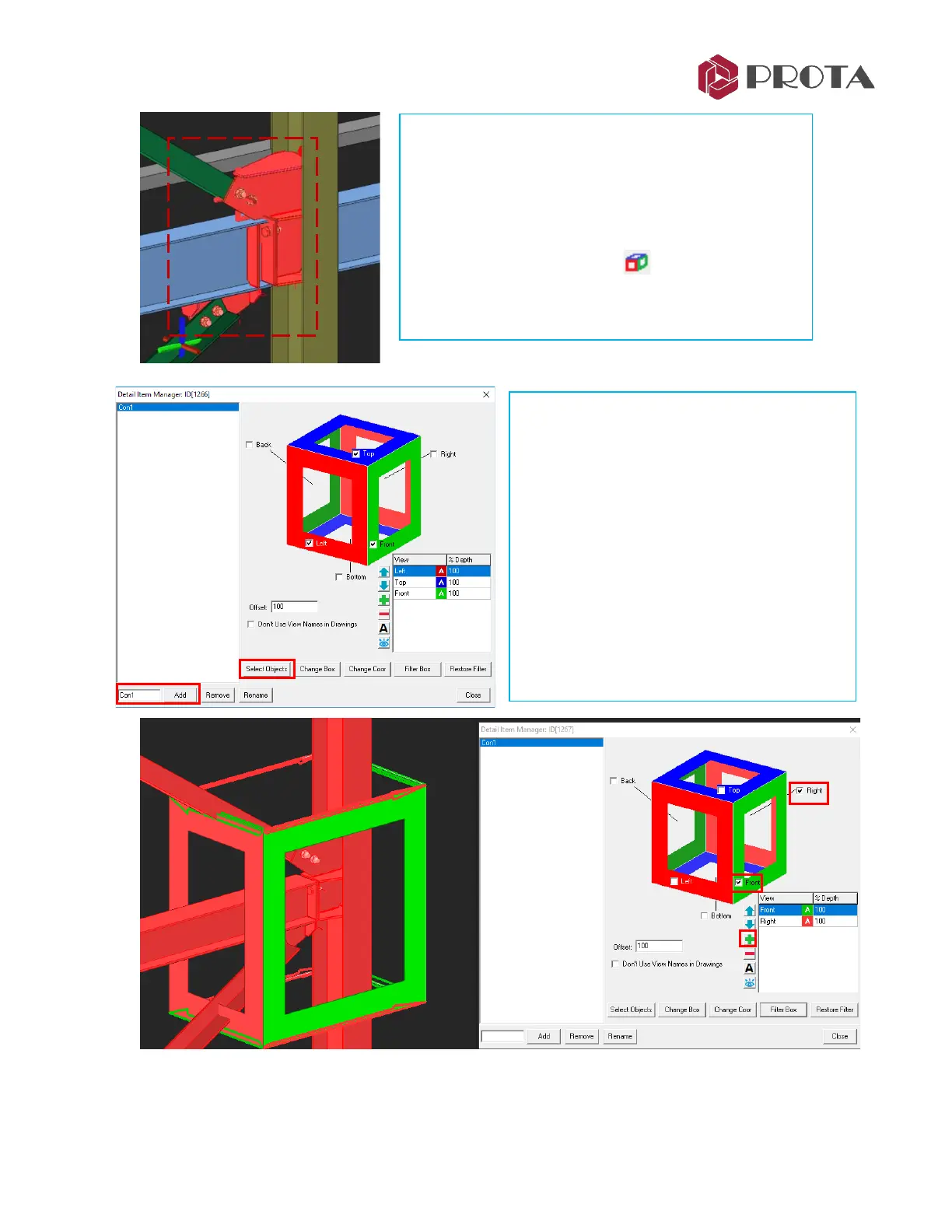
In the Detail Item Manager :
➢ Type the name “Con1” at the bottom
➢ Pick Add
→
Con 1 will be added
➢ Pick Select Objects
➢ Select the beam, the column & the 2
braces
➢ Right-click
The moment we do so, a “3D detail box”
appears around the connection in the 3D view
(as shown below)
➢ Zoom into the connection that we have created at
Grid C
➢ Click & drag a window to select all components of
the connections, including all the plate, bolts &
welds
➢ Pick Detail Item Manager
The Detail Item Manager dialog will appear.



 To Next Page