ProtaSteel 2021 - Quick Start Guide 7
If you have multiple views opened, you can manage them, e.g, fit them into the screen by going to
Windows (top menu) → Tile Horizontal / Tile Vertical / Cascade.
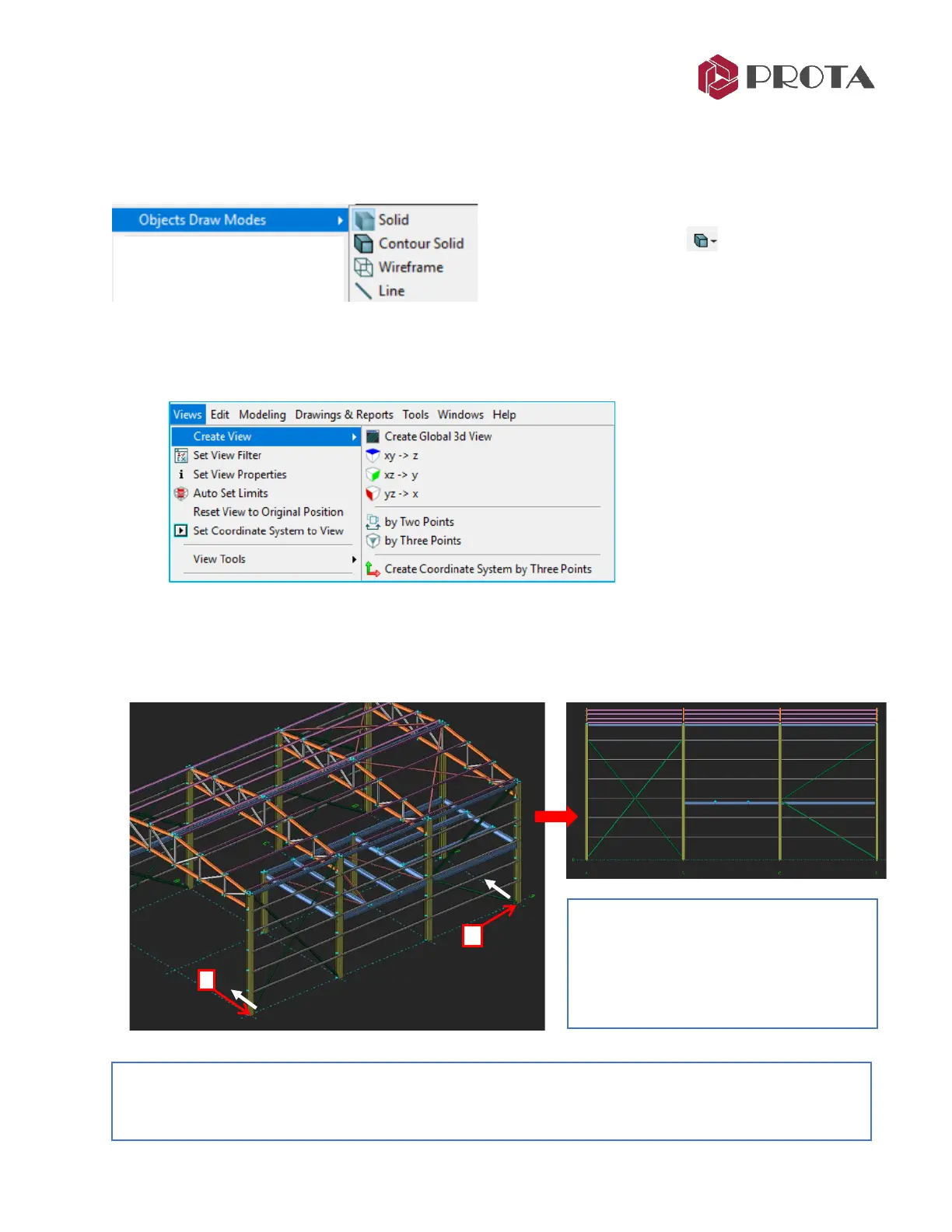
You can change the Object Draw Mode by going to Views (top menu) → Object Draw Modes
The shortcut icon can also be found on the right-
hand most vertical toolbars
➢ Press Alt + D continuously will cycle through
the draw modes.
7. Creating new Views
New views can be created by going to Views → Create View
Let us create a new sectional view along grid 3 :
➢ Go to Views
→
Create Views
→
By Two Points
➢ Click two points to define a plane
→
the view will be created as shown below
Note : The sectional view is actually created from the same 3D model but viewed from a different camera
angle or orientation. Changes made to the active view are automatically reflected in all other views. The
extent, boundary and objects to display can be set via View Properties.
Tip: A white line arrow will appear once
the mouse cursor hovers on 2
nd
point.
This white line indicates the direction of
viewing. In this case, the above view is
looking into the building.



 To Next Page