ProtaSteel 2021 - Quick Start Guide 13
12. Adjustment of members orientation & coordinates
All member position & orientation can also be changed without creating new points. We will make such
minor adjustments to some of the floor braces:
➢ Double-click on Storey 1 view to open that view
➢ Right-click & drag to rotate it a 3D view
➢ Zoom to the joint GL 2/B-C where the secondary, main beam & 2 horizontal “L” brace meet
➢ Press F9 & click on the joint to set it as point of interest so that rotation is about this point
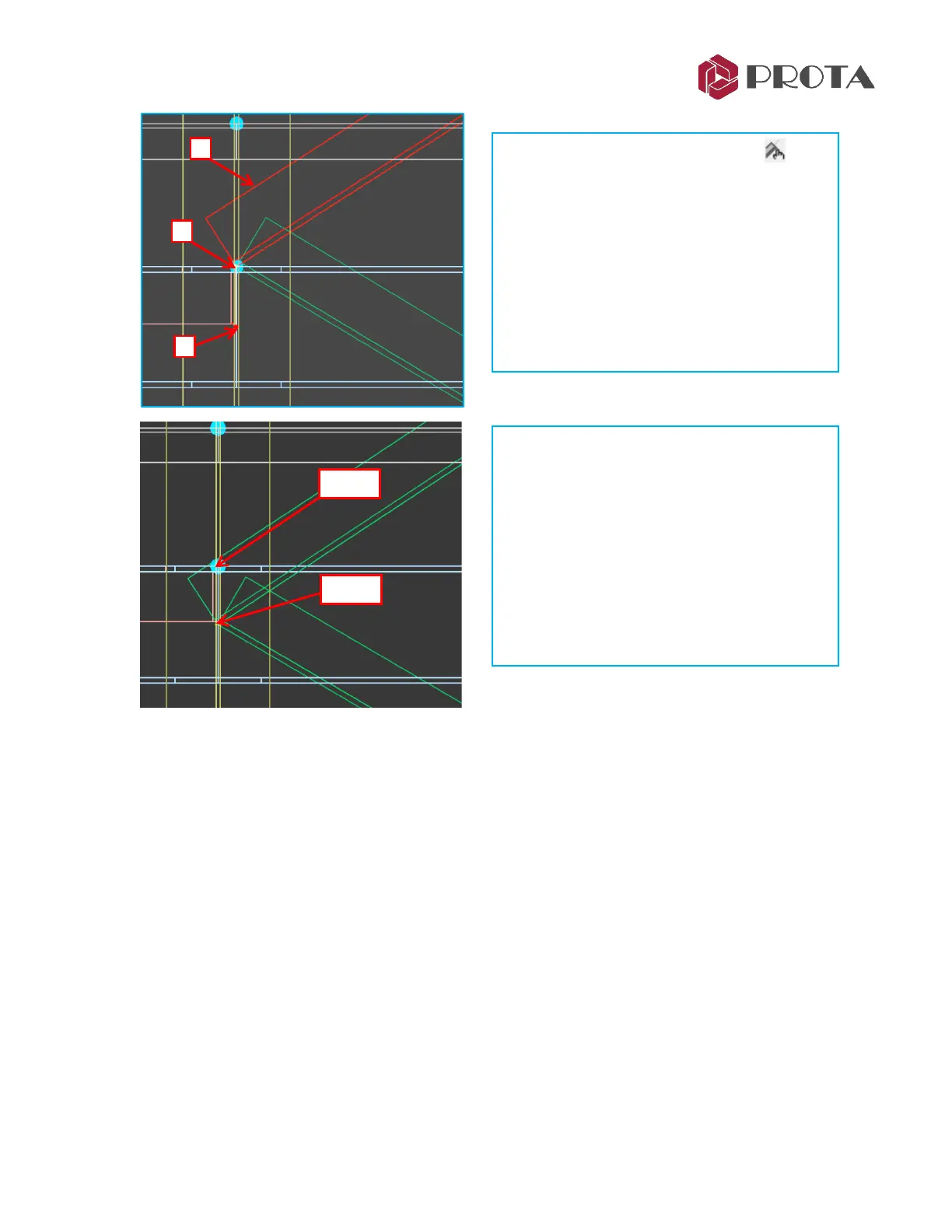
➢ Click Adjust Profile Manually icon in
the top menu toolbars
➢ 1 – Select the diagonal top bracing
➢ 2 - Click on existing end point
➢ 3 - Click on the new point
The brace end will be shifted to the new
point.
➢ Repeat the above Step 1 to 3 for the other
bottom diagonal brace.
The final positions of the diagonal braces are
as shown in the left figure.
➢ Double-click on PS View 1 in the Explorer
pane to go to the 3D view.
➢ Zoom in the same location & check the
diagonal braces final positions to ensure
they are correct.



 To Next Page