ProtaSteel 2021 - Quick Start Guide 12
You can use Sag Rod Connection or Sag Rod Holes macros to create connections to sag rods and
girts/purlins.
11. Adjustment of members by creating points
In ProtaSteel, you might also want to adjust the position of members that are not exactly at the correct
position, i.e. fine-tuning of final member positions for detailing purposes.
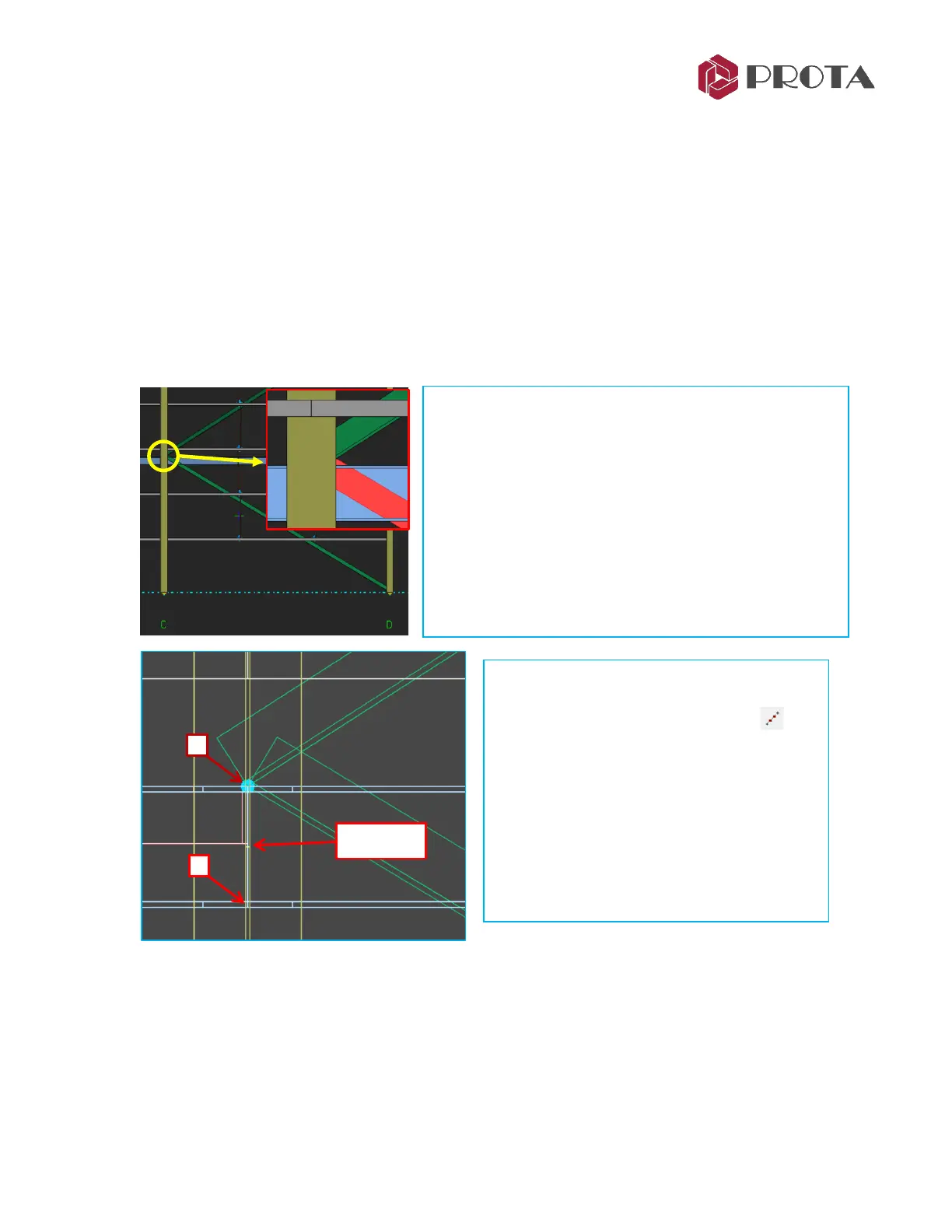
In ProtaStructure, all the braces inserted will join at the top of beams instead at the middle (centroid) of
the beam. This is because the analytical position of any beam in elevation is at the top of the beam.
➢ Double-click on previously created Axis 3 view in the Explorer pane
➢ Zoom in to the location of the diagonal braces between grid C & D
➢ Press Alt + D until you see the outline of
members only (wireframe mode)
➢ Click “Create Dividing Points” icon at
the right-hand tool bar
➢ 1 – Click top point of the beam
➢ 2 - Click bottom point of the beam
A new point “+” is created as shown in the
left figure.
➢ Press ESC to stop the function
As you can see, the diagonal bracings are connected to the
top of the beam. It is more accurate for the bracings to join
at the middle of the beam.
To do that, we must create a point (or node) in the middle
of the beam.
With the point created, we can then move the ends of the
bracing to this point.
TIP : Press Alt + D continuously will cycle through the
draw modes.



 To Next Page