ProtaSteel 2021 - Quick Start Guide 25
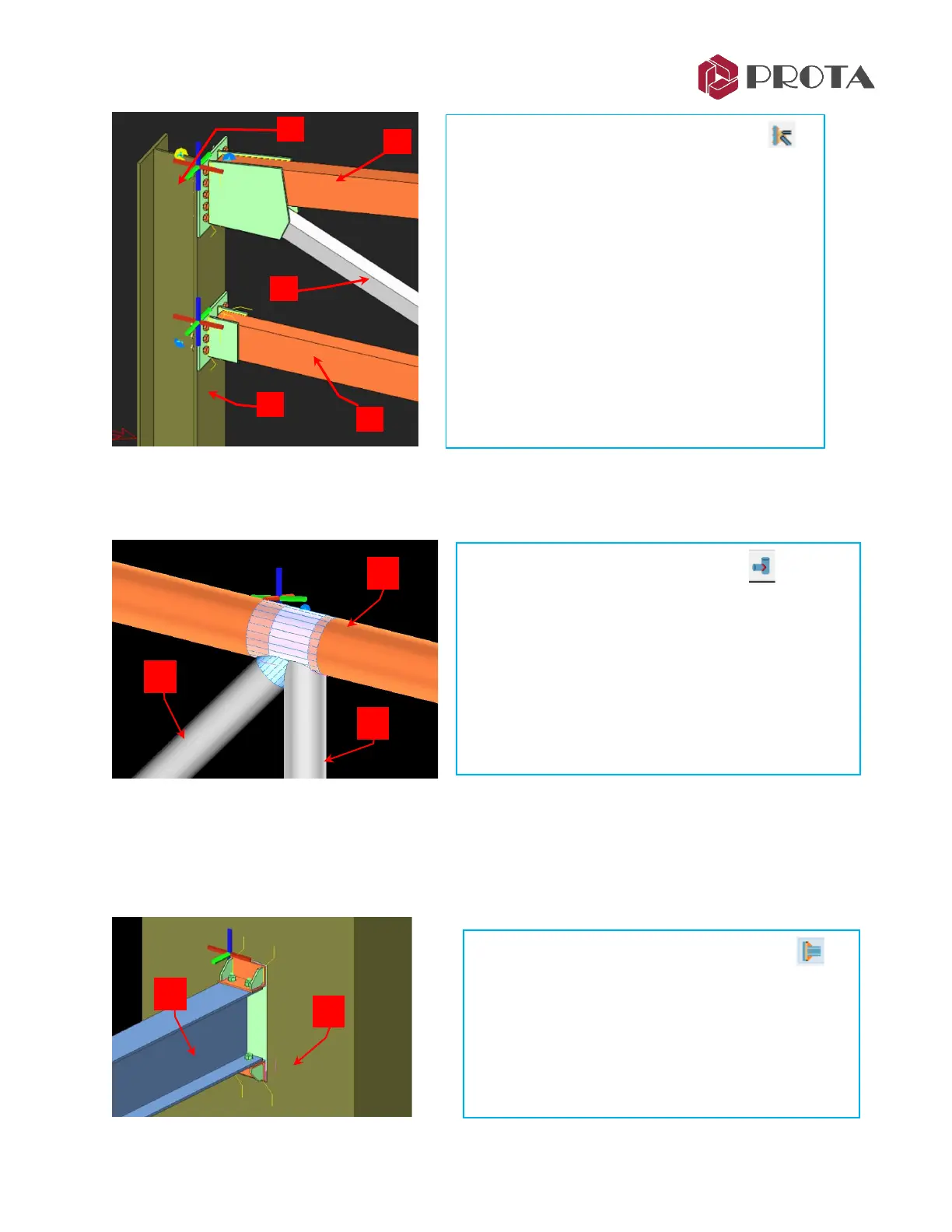
23. Welded Pipe Connection (info only)
Welded pipe connection macro can be used to connect tube profiles.
24. Beam to (RC) Wall/Column Connection (info only)
This connection macro creates & designs an embedded steel connection between a steel beam and a
concrete wall or column. The steel member must be perpendicular to the reinforced concrete surface. It
is important to have enough space on the concrete surface, else the macro will not work.
➢ Pick Truss End Plate with Gusset Plate
➢ 1 – Pick the main column
➢ 2 – Pick the top chord
➢ 3 – Pick the diagonal
➢ Right-click to end & create the connection
➢ 4 – Pick the main column
➢ 5 – Pick the bottom chord
➢ Right-click to end & create the connection
The two connections are created as shown.
➢ Click on Welded Pipe Profile macro
➢ 1 – Select the main top member
➢ 2 + 3 – Select the secondary profile, e.g. diagonal
and vertical element.
➢ Right-click to end & create the connection
Profiles are automatically cut & trimmed around the
joint.
➢ Click on Beam to Wall Connection macro
➢ 1 – Select the concrete wall or column
➢ 2 Select the steel beam
➢ Right-click to end & create the connection



 To Next Page