ProtaSteel 2021 - Quick Start Guide 8
To access the View Properties:
➢ Double-click anywhere on the new view
→
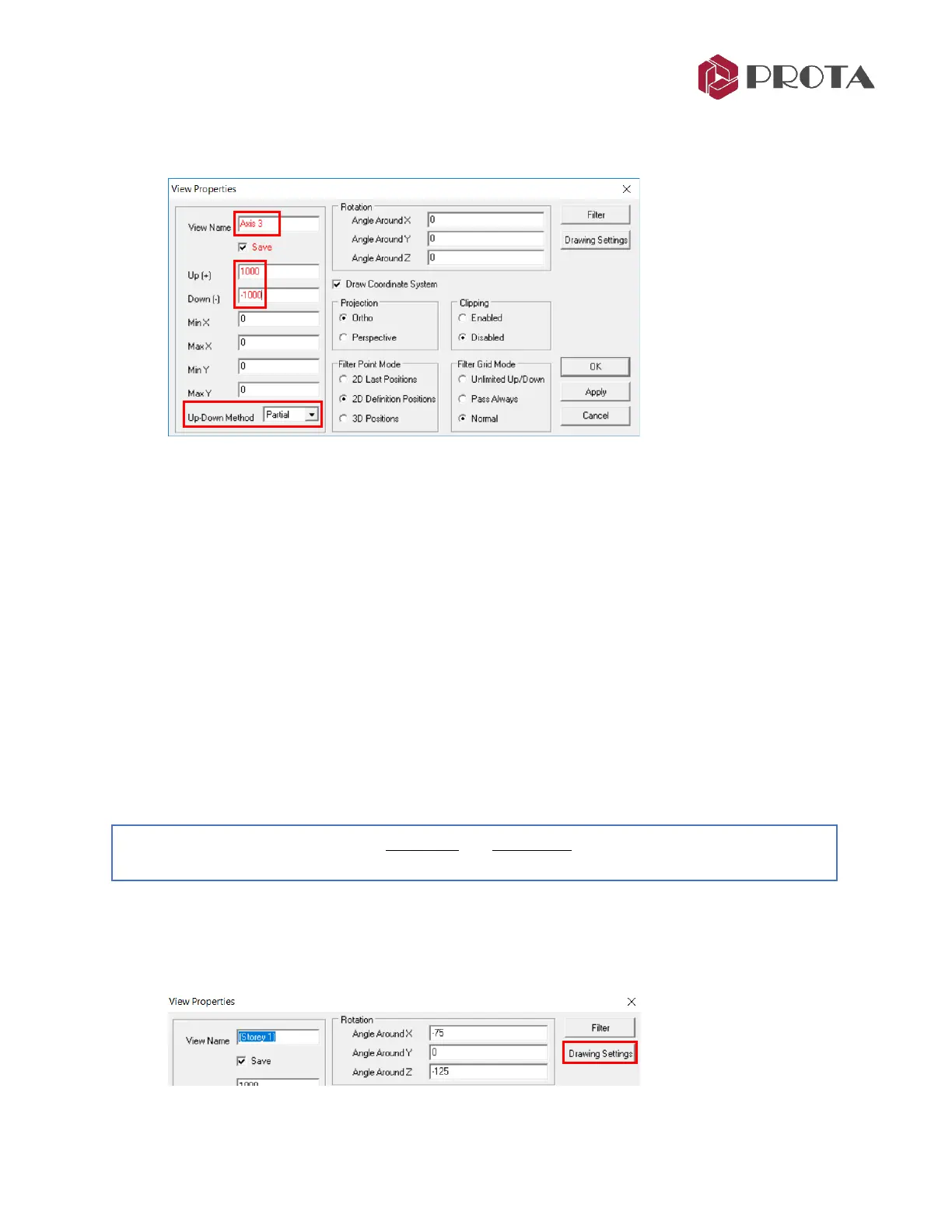
The View Properties will appear
➢ Give the view a new name “Axis 3”
➢ Change the Up(+) & Down (-ve) to 1000mm & -1000mm respectively
This means that the view will only show elements 1m into & out of the plane. This will make the
view less cluttered as elements along other grids will be hidden. If zero values are entered, then
it will be unlimited.
• Up-Down Method :
- Partial : Any element that exists partially within the set extents will be shown
- Full : Only elements that exist fully within the set extents will be shown
➢ Click OK to close the dialog & view will be updated.
Any sectional view is inherently a 3D view, hence you can still rotate the view.
➢ Right-click & drag to rotate the Axis 3 view
Notice that only members within the 1 m extent is shown.
➢ Go to View Properties again
➢ Change the Up-Down method in View properties to FULL
→
Apply
Notice all the beams out of the plane of Axis 3 will hidden.
➢ Press F4 to restore lookup (i.e. restore to original viewing direction)
8. Visibility & Selectability
You can control what objects are visible and selectable by assessing the Drawing Settings dialog :
➢ Pick Drawing Settings in View Properties dialog



 To Next Page