ProtaSteel 2021 - Quick Start Guide 23
21. Splice Connection
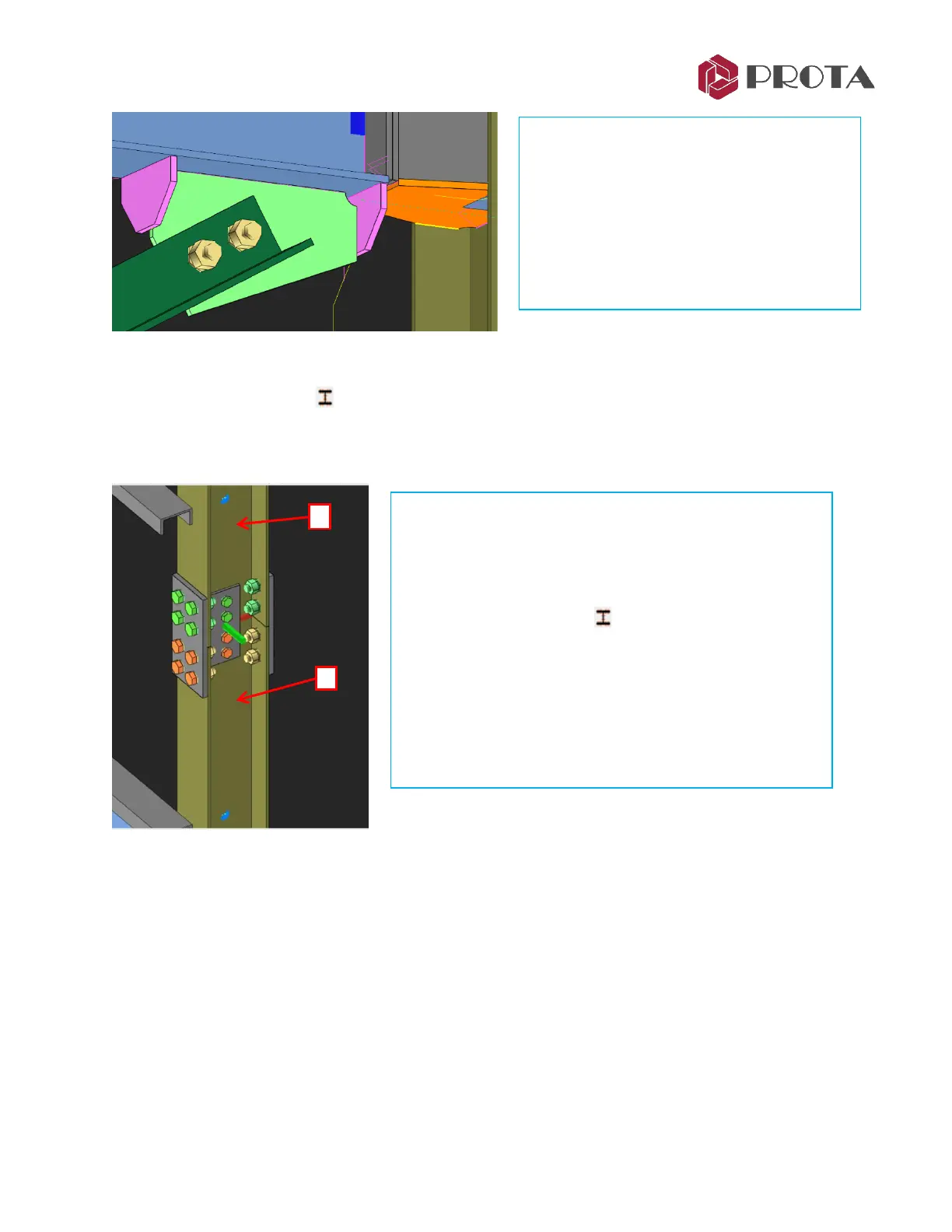
Splice connection must first be inserted in a column or beam in ProtaStructure. For this model a splice
connection has been inserted at the corner column at GL D/3 at 800mm above the 1
st
Storey.
• The green color bolts are called Workshop Bolt. These bolts are pre-installed in workshop before
being brought to site.
• The orange bolts represent the bolts to be assemble on site.
The above setting & other bolt parameters can be viewed & changed in the Bolt Group property :
➢ Double-click on any of the bolt
→
Bolt Group property will appear
➢ Go to Settings 2 tab
→
Assembly Location
→
two choices are in the dropdown menu :
• Workshop
• Site
• This is more constructible because the
gusset plate & stiffenner can be assembled
off-site as part of the beam assembly.
• The previous stiffened end plates will be
part of the column assembly.
• Hence, when the column & beam are
brought to site, it’s easy & quick to install &
“connect” them together.
➢ Zoom the corner column at GL D/3, slightly above
Storey 1
Notice the column is broken into 2 separate elements as a
column splice was created in ProtaStructure.
➢ Pick Splice Connection
➢ 1 – Pick the top column
➢ 2 – Pick the bottom column
The column splice connection is added.
➢ Press ESC to cancel the macro



 To Next Page