17 Q80A_8_2017
PROTECO S.r.l.
Via Neive, 77 - 12050 Castagnito (CN) ITALY Tel. +39 0173 210111 - Fax +39 0173 210199 info@proteco.net - www.proteco.net
(min)
....
(max)
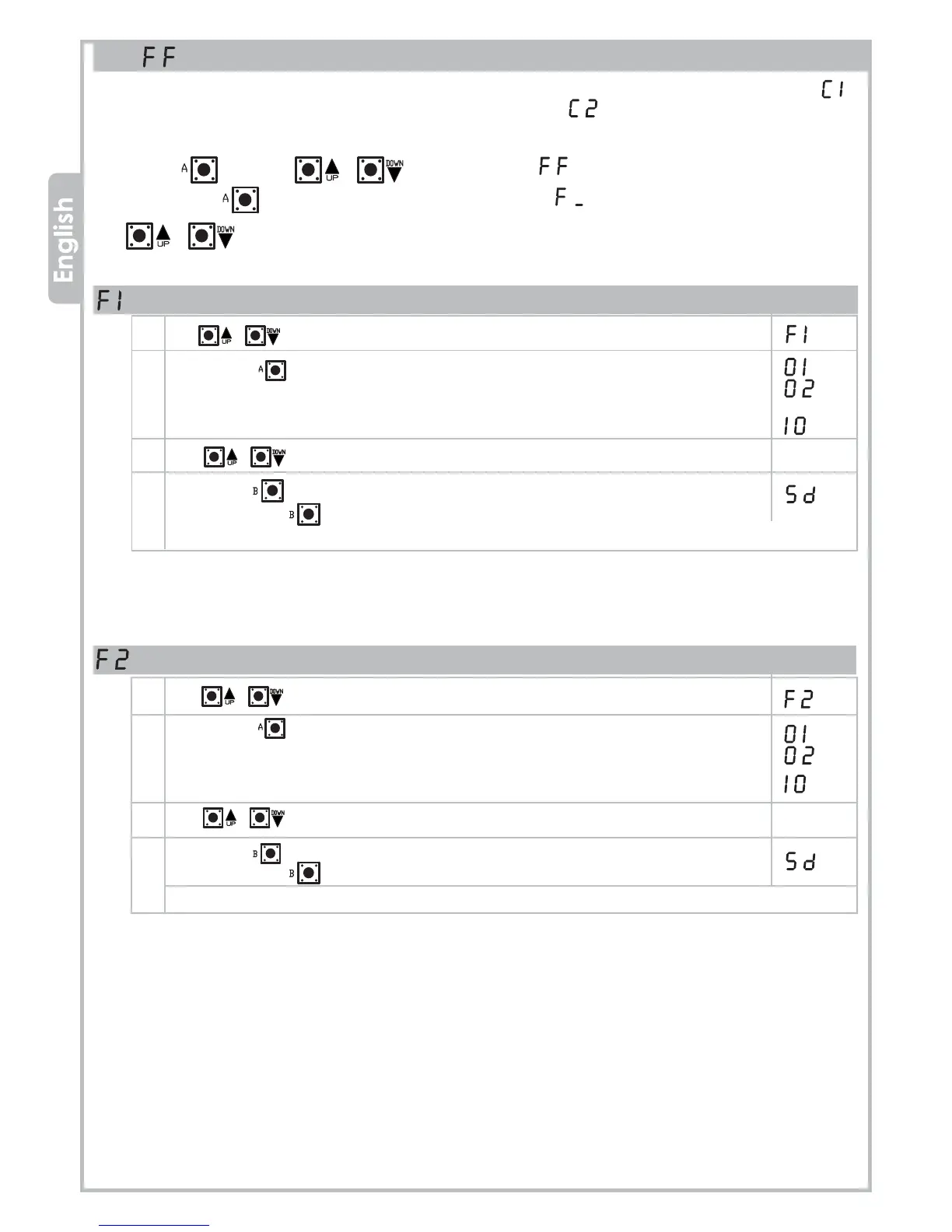
TORQUE/POWER adjustment - MOTOR 2
1 Use buttons to move inside the menu, till the display shows:
2 Press button to confirm.
The display now shows the current torque/power level for Motor 2:
3 Use buttons to change the Motor 2 torque/power level.
4 Press button to go back to the top level menus,
then press button again till the display shows:
or wait the timeout (20 seconds) to exit.
4.3 FORCE menu
Use this menu to adjust the sensibility level of the obstacle detection in case of AUTOMATIC Programming mode ( )
or to adjust the motors force in case of SEQUANTIAL Programming mode ( ).
Press button and use to select menu ,
then press button to enter the FORCE menu: display will show
Use buttons to scroll the lower level menus:
TORQUE/POWER adjustment - MOTOR 1
1 Use buttons to move inside the menu, till the display shows:
2 Press button to confirm.
The display now shows the current torque/power level for Motor 1:
3 Use buttons to change the Motor 1 torque/power level.
4 Press button to go back to the top level menus,
then press button again till the display shows:
or wait the timeout (20 seconds) to exit.
(min)
....
(max)


 To Next Page