....
....
27 Q80A_8_2017
PROTECO S.r.l.
Via Neive, 77 - 12050 Castagnito (CN) ITALY Tel. +39 0173 210111 - Fax +39 0173 210199 info@proteco.net - www.proteco.net
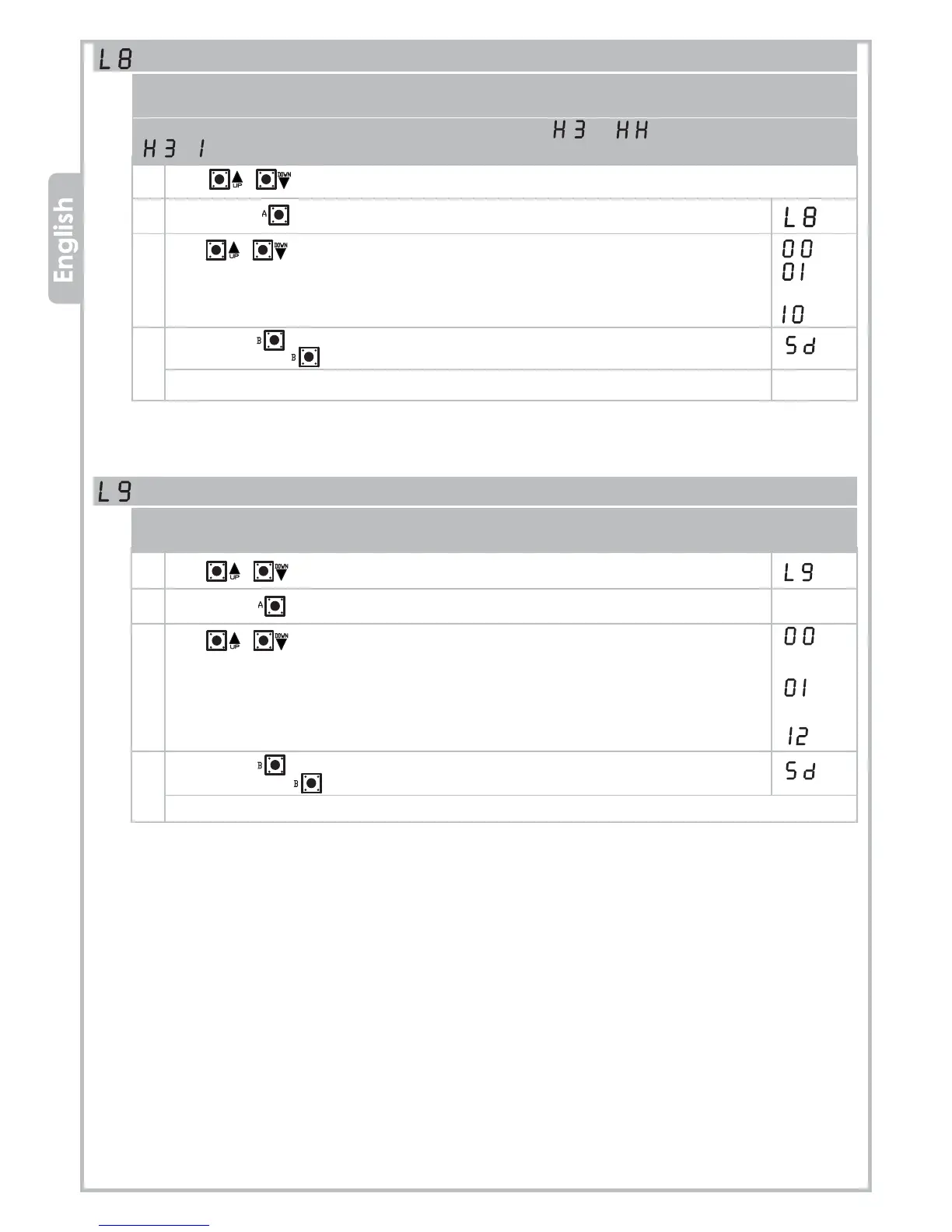
DECELERATION TIME - Motor 2
Use this setting to adjust opening/closing deceleration time for Motor 2 (from 1 to 10 seconds).
Before adjusting this setting, please make sure that parameter in FUNCTIONS menu is:
= Deceleration ON
1 Use buttons to move inside the menu, till the display shows::
2 Press button to confirm.
3 Use buttons to reduce/increase Motor 2 deceleration time:
4 Press button to go back to the top level menus,
then press button again till the display shows:
or wait the timeout (20 seconds) to exit.
(OFF)
....
PEDESTRIAN OPENING TIME
Use this setting to adjust operating time for Pedestrian Opening for Motor 1 (from 1 to 12 seconds).
1 Use buttons to move inside the menu, till the display shows:
2 Press button to confirm.
3 Use buttons to set Motor 1 Pedestrian opening time:
4 Press button to go back to the top level menus,
then press button again till the display shows:
or wait the timeout (20 seconds) to exit.
(total opening)
(min)
(max)
(min)
(max)


 To Next Page