30
been put into the countersunk head holes. Use the prepared screws④ to lock the
host upward from the bottom of the trolley platform.
2) Installing the 15 inch display screen assembly: install the 15 inch display ② into the
fixing seat above the main unit, tighten fixing screw to fix the display screen.
3) Installing the mechanical arm: tighten the mechanical arm ①
holder on the side of the main unit, and lock the mechanical arm screws.
4) Install the humidifier: insert the humidifier⑤to the bracket on the middle of the pole.
2. Disassembling:
1) Loose the fixing screws to remove the display screen assembly.
2) Loose the screws reversely to disassembly the mechanical arm.
3) Loose the host fixing screw ④ to separate the ventilator’s mainframe and trolley.
4) The humidifier can be pulled out directly.
3.4 Battery module
1. Assembling:
VGA/OU
T
C
O
2
Sp
O
2
No
Obstruc t
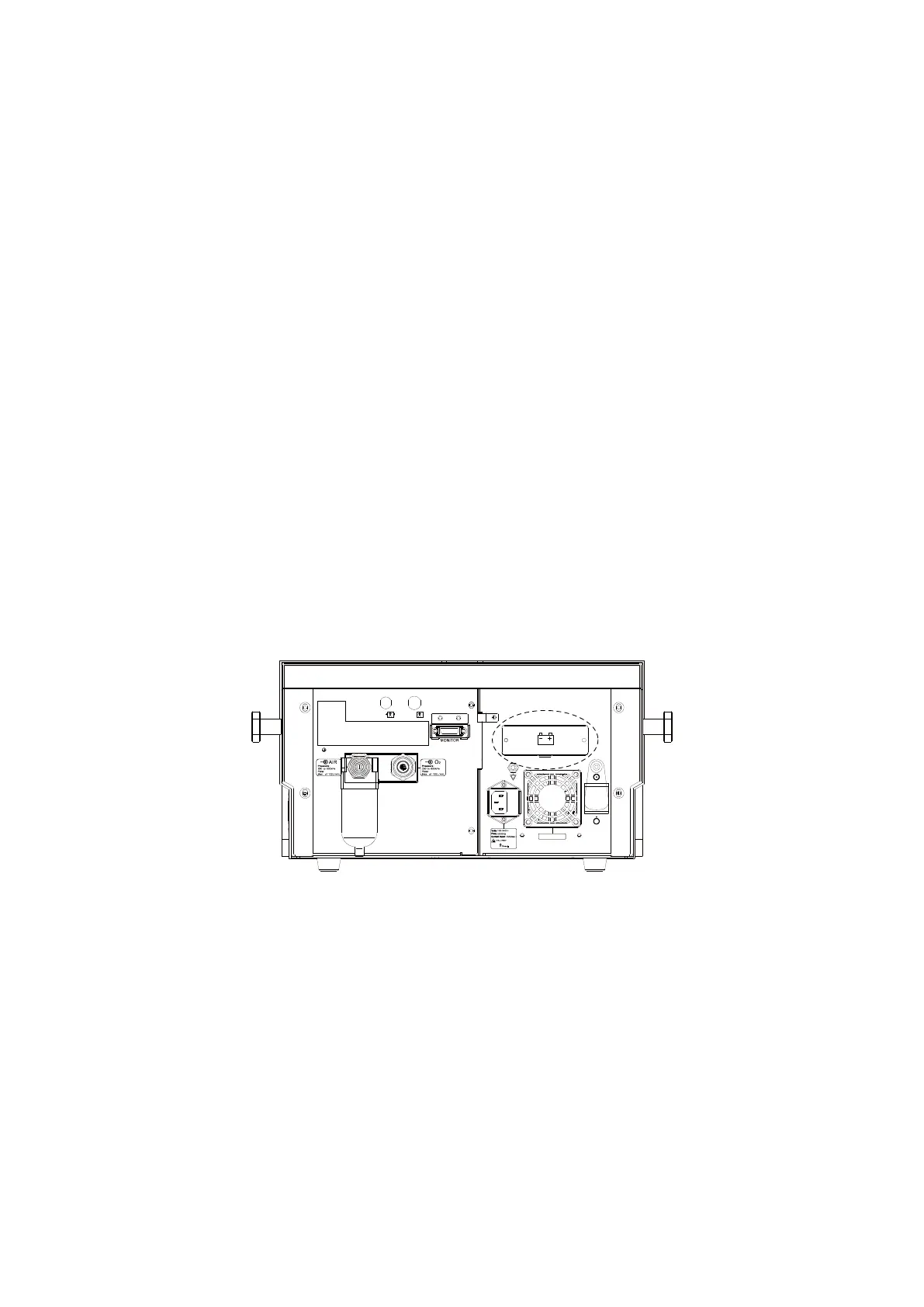
Figure 3-4 Battery module position view
Assembling procedure:
1) As the diagram shown above, remove the battery cover.
2) Insert the battery module into the hole, and press it to lock.
3) Install the battery cover, tighten the screws.
2. Disassembling:
Remove the battery cover, push down the lock, and pull the strap to remove the battery
module.



 To Next Page