Rand Tablet User Manual 19
3. Rand Navigation 2.0
7
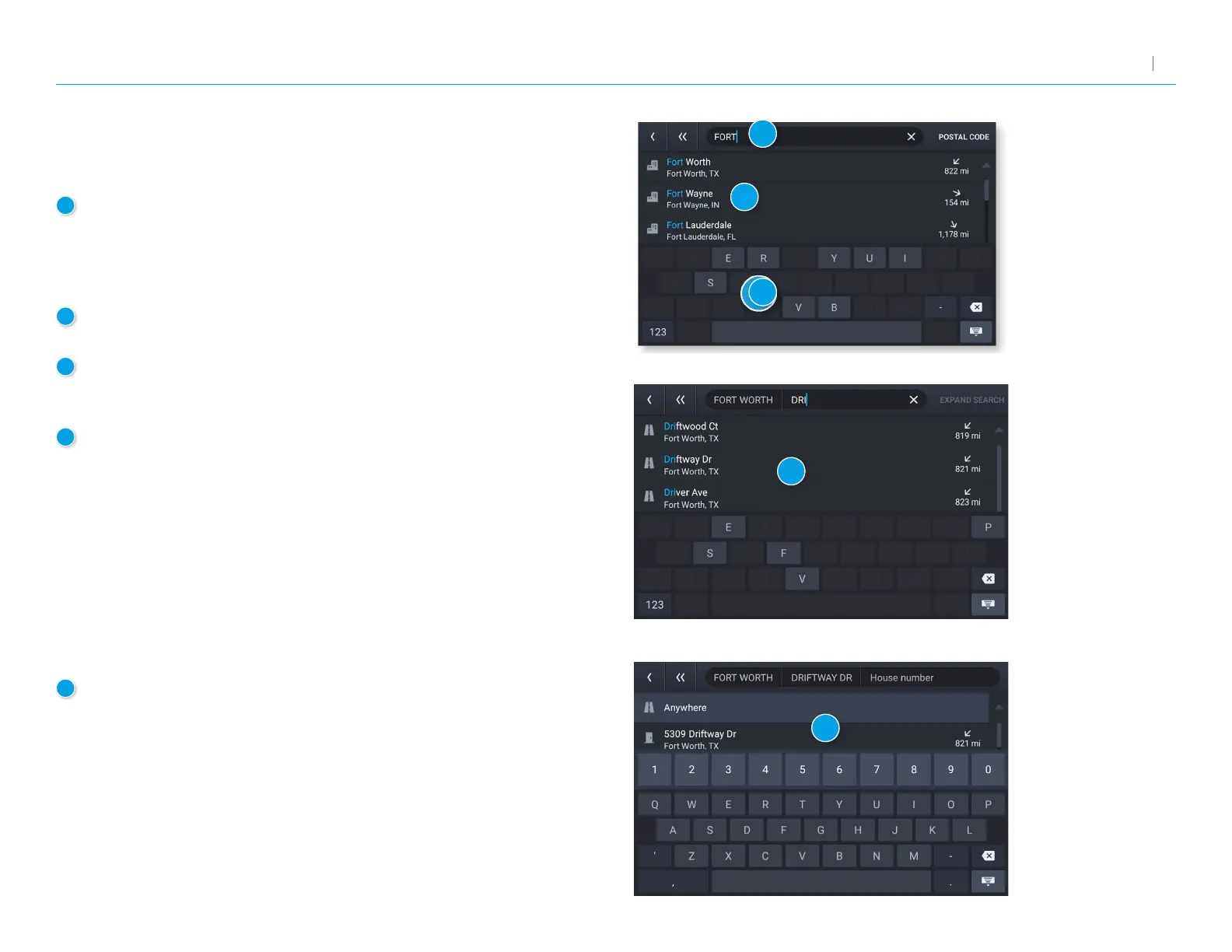
Entering a New Location
The Guided Search Keyboard helps you quickly locate your destination.
1
Auto-Complete Keyboard
As you key in characters, the keyboard only displays
next possible letters or numbers. Letters and numbers
that cannot be entered in sequence are disabled. Search
results are displayed as you key in characters.
2
Destination Entry
The top bar displays the current search entry.
3
Guided Search: City/Postal Code
Displays the available city/postal code selections based
on the information you entered. Tap a result to advance.
4
Guided Search: Street
Displays the available street name selections based on
the city you selected, and the information you entered. If
the next letter in the street name cannot be selected on
the keyboard, tap Expand Search to search a larger area.
Tap a result to advance.
5
Guided Search: House Number
Displays the available house numbers based on the city
and street selected, and the information you entered.
Tap a result to advance.
1
2
3
4
5



 To Next Page