Rand Tablet User Manual 24
1
2 3
4
5
6
7
3. Rand Navigation 2.0
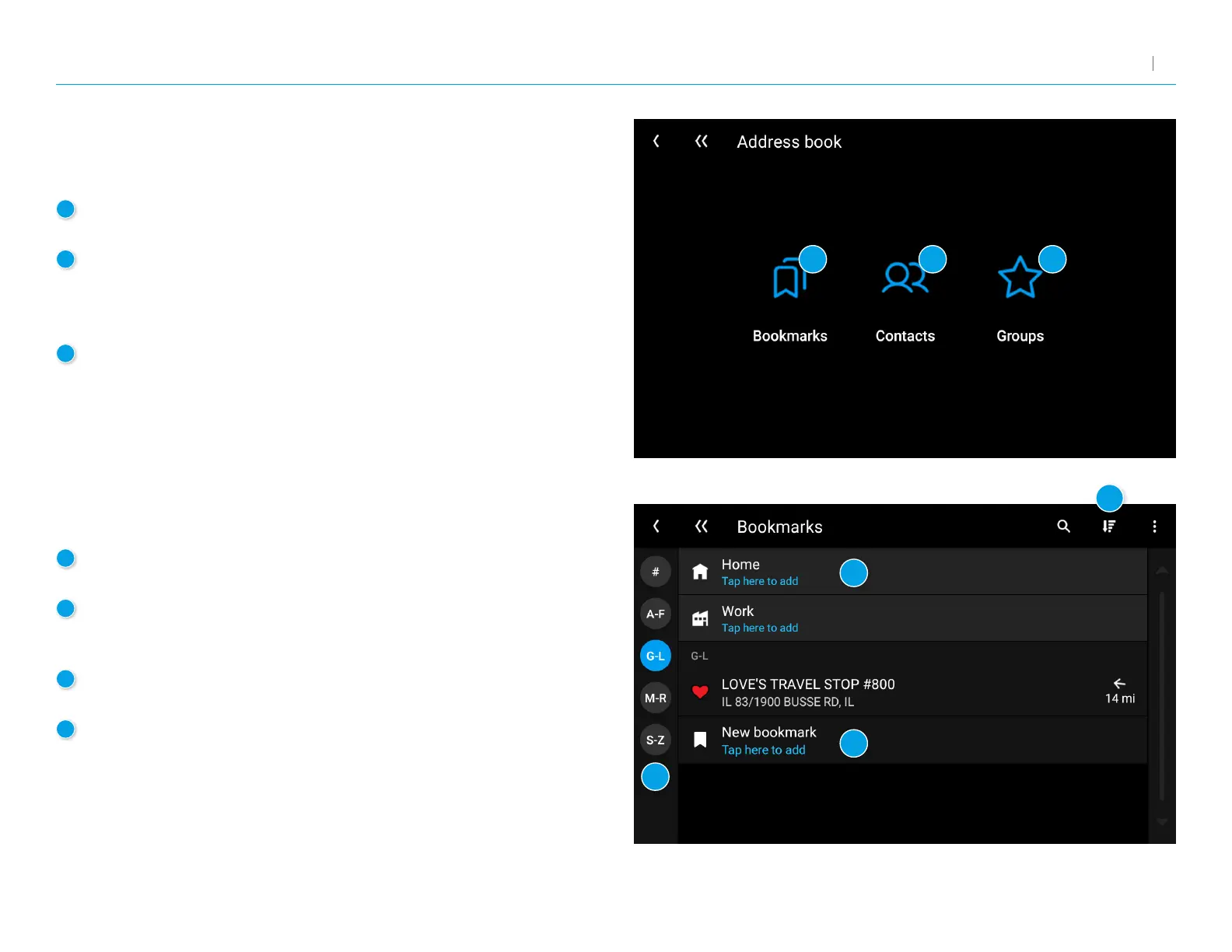
1
Bookmarks
Navigate to a saved address.
2
Contacts
Navigate to a stored address from a saved contact.
Note: ContactsarestoredintheContactsapp.Youcanaddcontacts
manually or import them.
3
Groups
Organize your bookmarks and contacts in groups.
4
Destinations
Tap a bookmark to navigate to the destination.
5
Alphabetic Organization
Tap a letter group to view bookmarks alphabetically. This is useful
if you have a lot of bookmarks and they are difcult to nd.
6
Options
Tap to search, sort, edit, add or delete bookmarks.
7
New bookmark
Tap to add a new bookmark.
Address Book: Menu
Displays your saved bookmarks, contacts, and groups.
Address Book: Bookmarks



 To Next Page