Instructions for Use MPR1 DATALOGGER
Manufacturer: zwo-399EN
RAUMEDIC AG, Hermann-Staudinger-Strasse 2, 95233 Helmbrechts, Germany Rev. 9, 2020-10-16
Page 42 of 98
If another (second) pressure sensor is connected, the measuring location allocated to P1 is not
available any more in this menu. The same applies corresponding, if you want to connect a third
pressure sensor.
If you have determined a measuring location, have adjusted the pressure sensor to zero and
thus have started the measurement, a subsequent modification of the measuring location is not
possible easily. If you want to re-define the measuring location nonetheless, remove the
connector of the connecting cable for the pressure sensor on the MPR1 and reconnect.
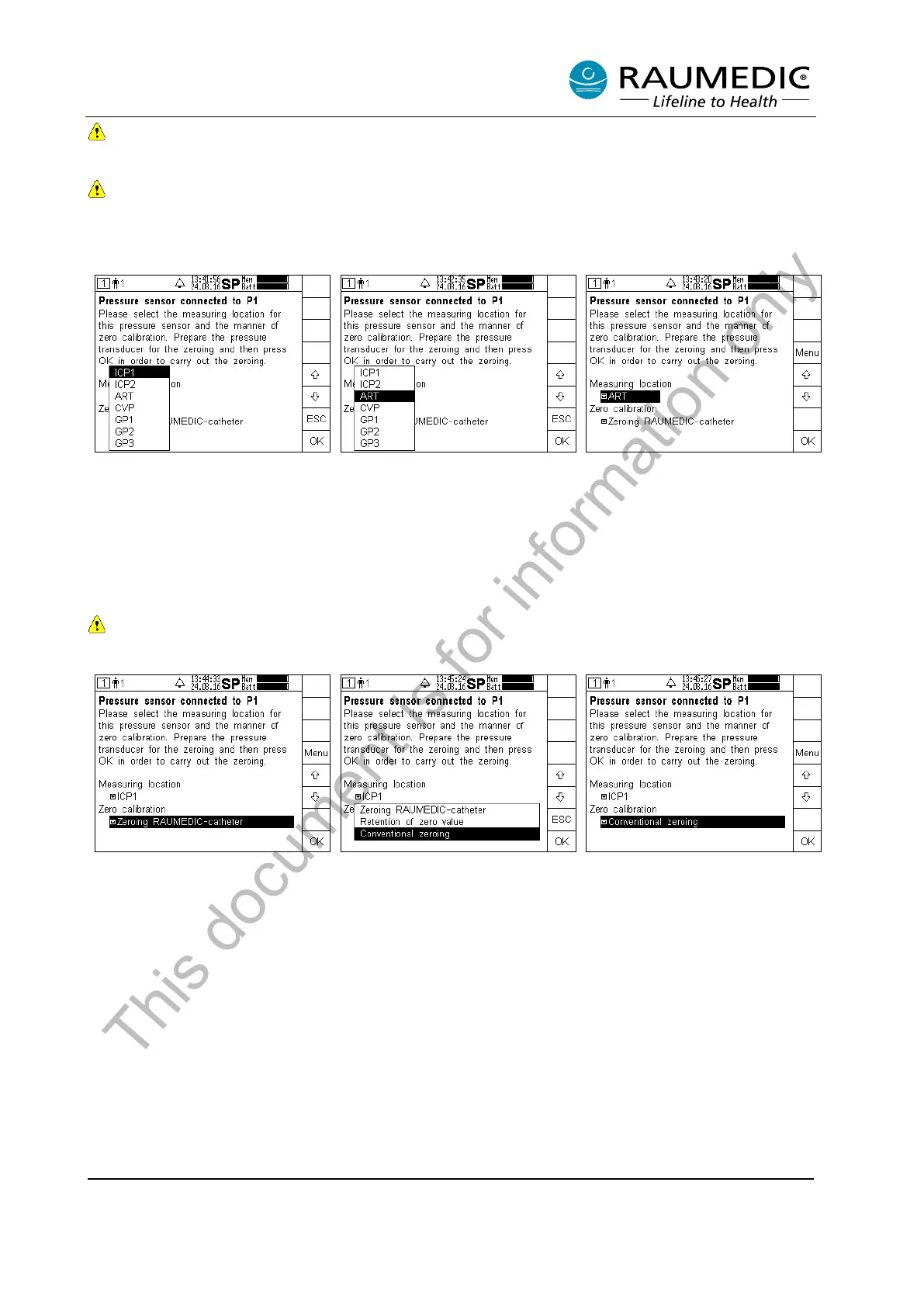
Press the Menu key.
Select the measuring location and
acknowledge by pressing OK.
Display of the
selected measuring
location.
In the next step, the pressure sensor has to be zeroed. For this purpose, skip to the Zero calibration pull-
down menu. Press the Menu key and selected the zeroing procedure recommended for the pressure
sensor. The default setting in this menu is “Zeroing RAUMEDIC catheter”. Prior to zeroing, please ensure
that the pressure sensor is subjected to the pressure conditions described in the instructions for use.
Please observe the instructions in the instructions for use of the manufacturer of the pressure
sensor. Faulty zeroing will lead to systematic measuring errors.
Press the Menu key.
Select the zeroing procedure and
acknowledge by pressing OK.
Display of the selected zeroing
procedure.
Now trigger the zeroing process by pressing the OK key which will be confirmed by two short beeps. The
display will automatically skip to the overview screen with the display of the measured values.
If no other sensors have been connected, the selected measuring location will be displayed.
This document is for information only



 To Next Page