Instructions for Use MPR1 DATALOGGER
Manufacturer: zwo-399EN
RAUMEDIC AG, Hermann-Staudinger-Strasse 2, 95233 Helmbrechts, Germany Rev. 9, 2020-10-16
Page 60 of 98
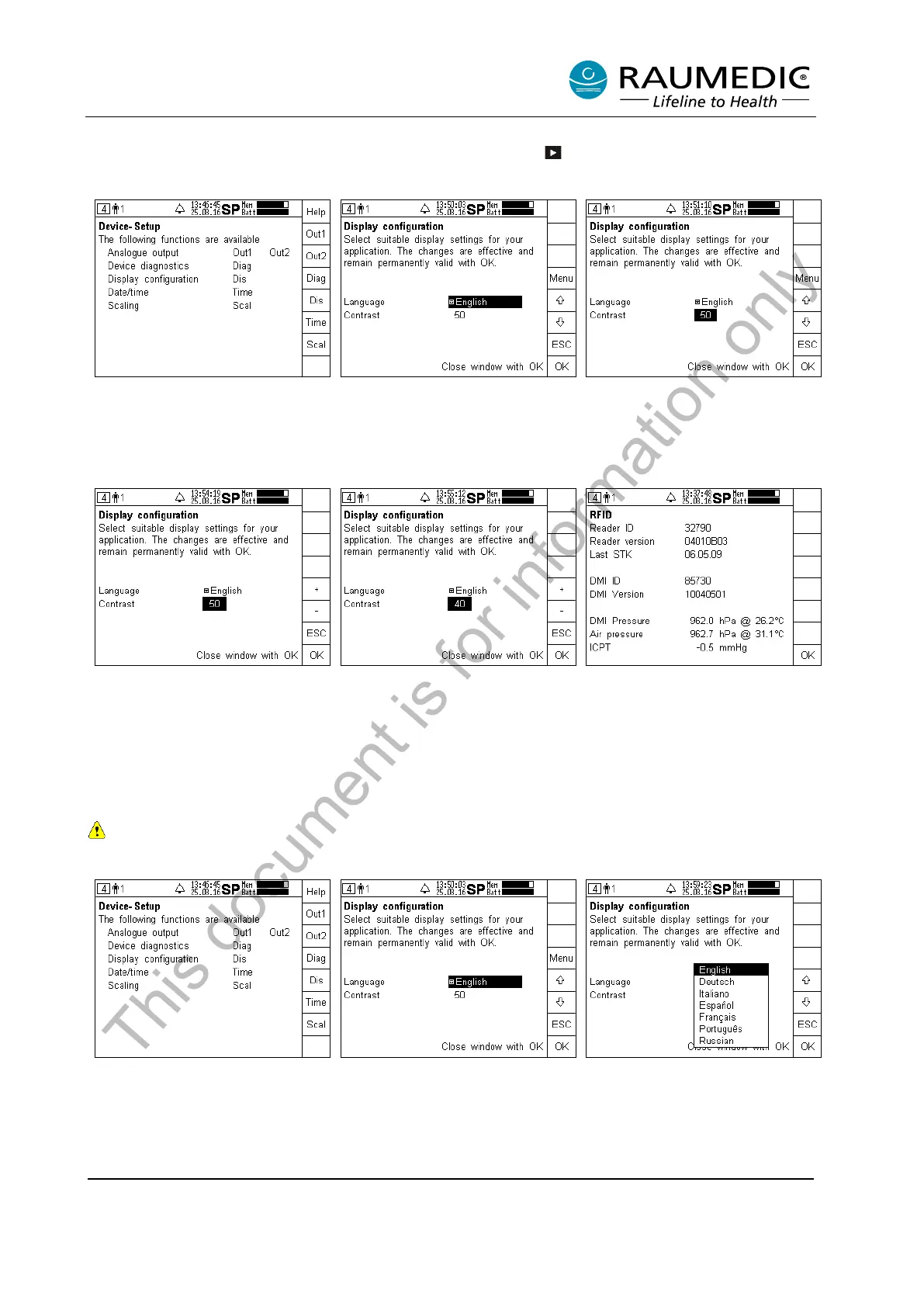
4.6.3 Setting the LCD contrast
Now skip to the setup screen by pressing the screen selector key several times, if and when required,
and carry out the following steps 1 to 6:
Step 1:
Call the Device setup
the Dis key.
Step 2:
Use the arrow keys to access the
contrast number.
Step 3:
After having changed to contrast,
press the Menu key.
Step 4:
By pressing the + or –
keys, the
contrast value set can be
changed.
Press the ESC key to
return to the previous step.
Step 5:
Set a new contrast value (press
the ESC key to abort the change).
Accept the new value by pressing
Step 6:
The new contrast value is
displayed.
4.6.4 Setting the language version
Currently the following language versions are stored: German, English, Italian, Spanish, French,
Portuguese, Russian.
Step 1:
Call the device setup
the Dis key.
Step 2:
Press the Menu key.
Step 3:
Use the arrow key
the requested language.
This document is for information only



 To Next Page