Use and maintenance manual Touch Radio Hydro
Pag.40
Rev.0 18/05/2021
EN
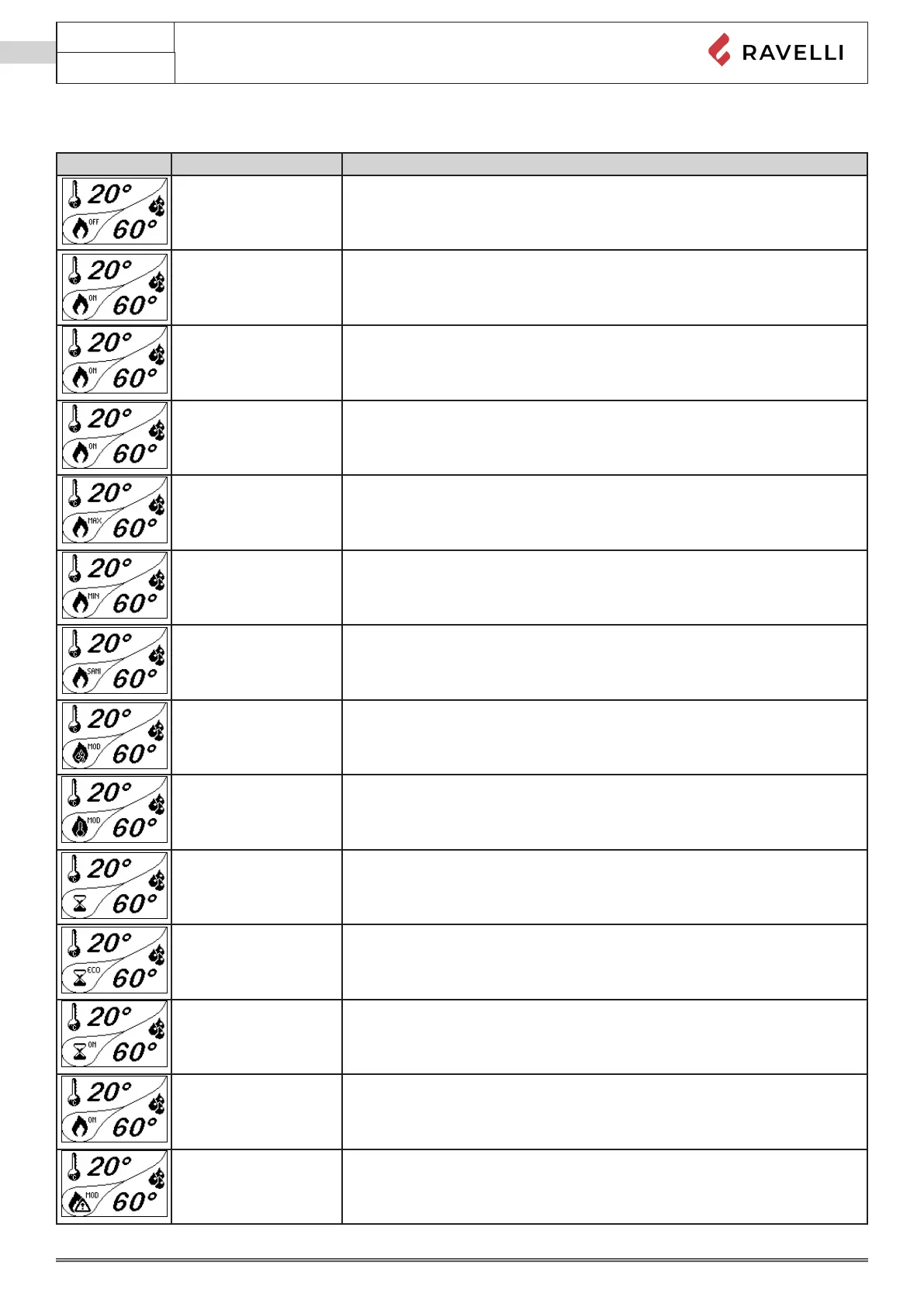
Stove phase general layout
Phase Description
FINAL CLEANING
The stove is in the switch o phase and the cooling phase has not been completed
yet.
SWITCH ON The heater pre-heating phase has started and the pellets start to fall into the grate.
WAITING FOR FLAME
The pellets ignite and take advantage of the heat in the intake air that passes through
the incandescent heater tube.
FLAME PHASE The ame develops in the grate.
WORK AT MAX P The stove has completed the switch on phase and runs at maximum set power
WORK AT MIN P The stove works at the operating power set after ignition.
WORK AT DHW P
The stove works at an operating capacity dedicated to DHW
(ow switch request with DHW kit or DHW boiler)
MODULATE H2O The desired boiler water set temperature has been reached.
ROOM TEMPERATURE
MODULATION
The room temperature set has been reached.
THE GRATE Brazier cleaning phase is active (periodic function).
ECO STOP
With Climate Comfort active, the stove switches to automatic switch-o mode when
the room temperature set is reached (see the dedicated section).
START/RESTART WAIT
Switch-on is requested but with the stove in cooling phase; once this condition is
met, it restarts automatically.
SWITCH ON RESTART
The HOT restart phase is activated.
Functioning is similar to the SWITCH ON phase
HOT SMOKE
The maximum fume temperature threshold has been reached. To facilitate cooling,
the stove brings the capacity to a minimum with ventilation at power level 5, leading
to a decrease in fume temperature.



 To Next Page