28
Regency
®
Model 4720 Control/Communicator Installation Manual (P/N 150476, Rev. A) Revised 10/98
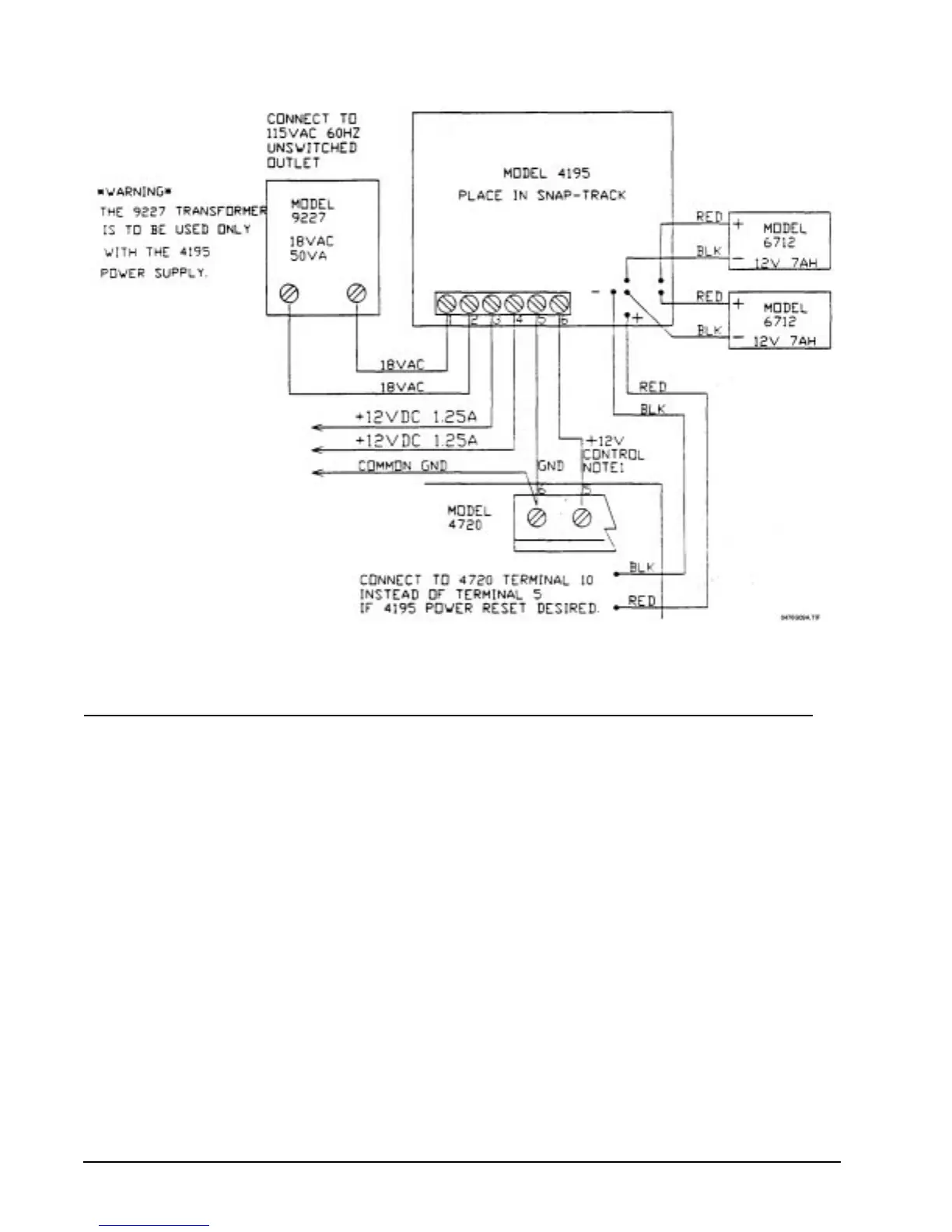
Figure 6.4a: Wiring the Model 4195 Auxiliary Power Supply
7 Touchpad Installation
Note 1: In a UL installation, the touchpads must be mounted on a dual gang electrical box.
Note 2: If a touchpad is removed from a Model 2605/2607 and then connected to a Model 4720, the CHM and CODE2
keys won't function. The touchpad is programmed by the 2605/2607 and must be reprogrammed at the factory
before it can be used with a 4720.
7.1 Mounting the Touchpads
To mount a touchpad, follow this procedure:
1. Separate the top section from the rear mounting plate. First, insert a small flat-blade screwdriver into the
slot(s) located on the bottom edge of the frame. Push in, then lift up the top section.
2. Secure the mounting plate to the wall using the proper screw (either a #6 or a #8) with a thread
appropriate for the type of material it is going into.
The mounting plate should be oriented so that the protruding tab and the three (3) posts are towards the
bottom. Pull the wires through the hole in the rear mounting plate.
3. Wire the touchpad as explained in Section 7.2.
After all the wires are connected to the Model 4720 terminal strip, set the top of the touchpad frame
over the tabs at the top of the mounting plate, then press on the bottom until you hear it snap into
position.



 To Next Page