Regency
®
Model 4720 Control/Communicator Installation Manual (P/N 150476, Rev. A) Revised 10/98
53
14.2 Model 4150 Environment Control
See the Model 4150 Auxiliary Control Module Installation Manual (P/N 150475).
14.3 Printing Devices
14.3.1 Model 5255 On-Site Printer (Discontinued)
For 5255 installation instructions, refer to the Model 5255 Installation Manual (P/N 150296).
Note: The Model 5255 uses printer paper with the part number 005257. The LCD shows the message
PAPER when the printer runs out of paper.
14.3.2 Model 5260 Printer Interface
The Model 5260 Printer Interface attaches to the Model 4720 expansion bus to print activity reports
on a standard parallel or serial interface printer, or to send information to a serial computer port. For
5260 installation instructions, refer to the Model 5260 Installation Manual (P/N 150591).
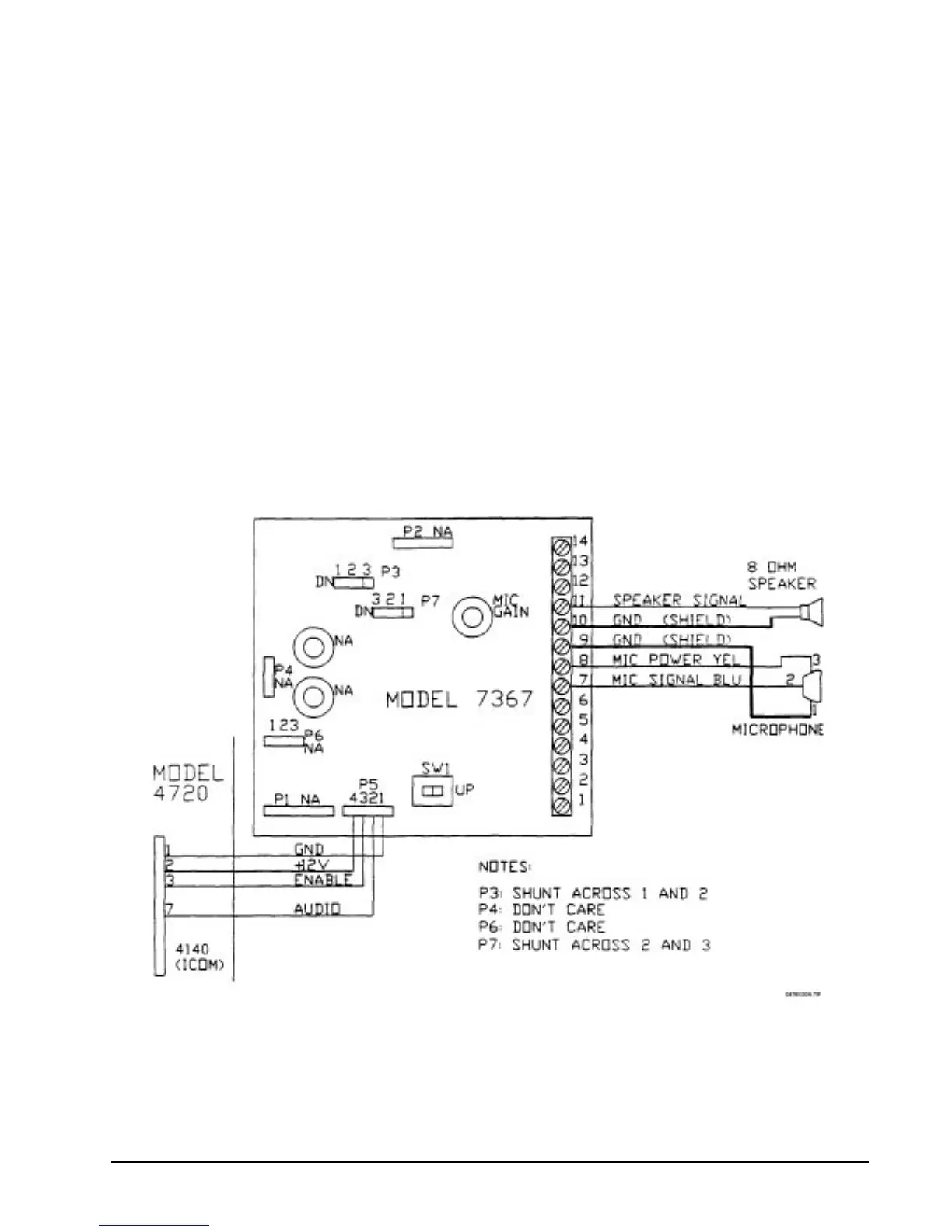
14.4 Model 7367 Two-Way Audio Listen-in Module
Figure 14.4a shows how to wire the Model 7367 Two-Way Audio Listen-in Module using the supplied
microphone. Figure 14.4b shows how to wire the Model 7367 using the Model 4640 Speaker and
Microphone. Refer to the Model 7367 Installation Instructions (P/N 150572) for additional information.
Figure 14.4a: Model 7367 with Speaker and Supplied Microphone



 To Next Page