16
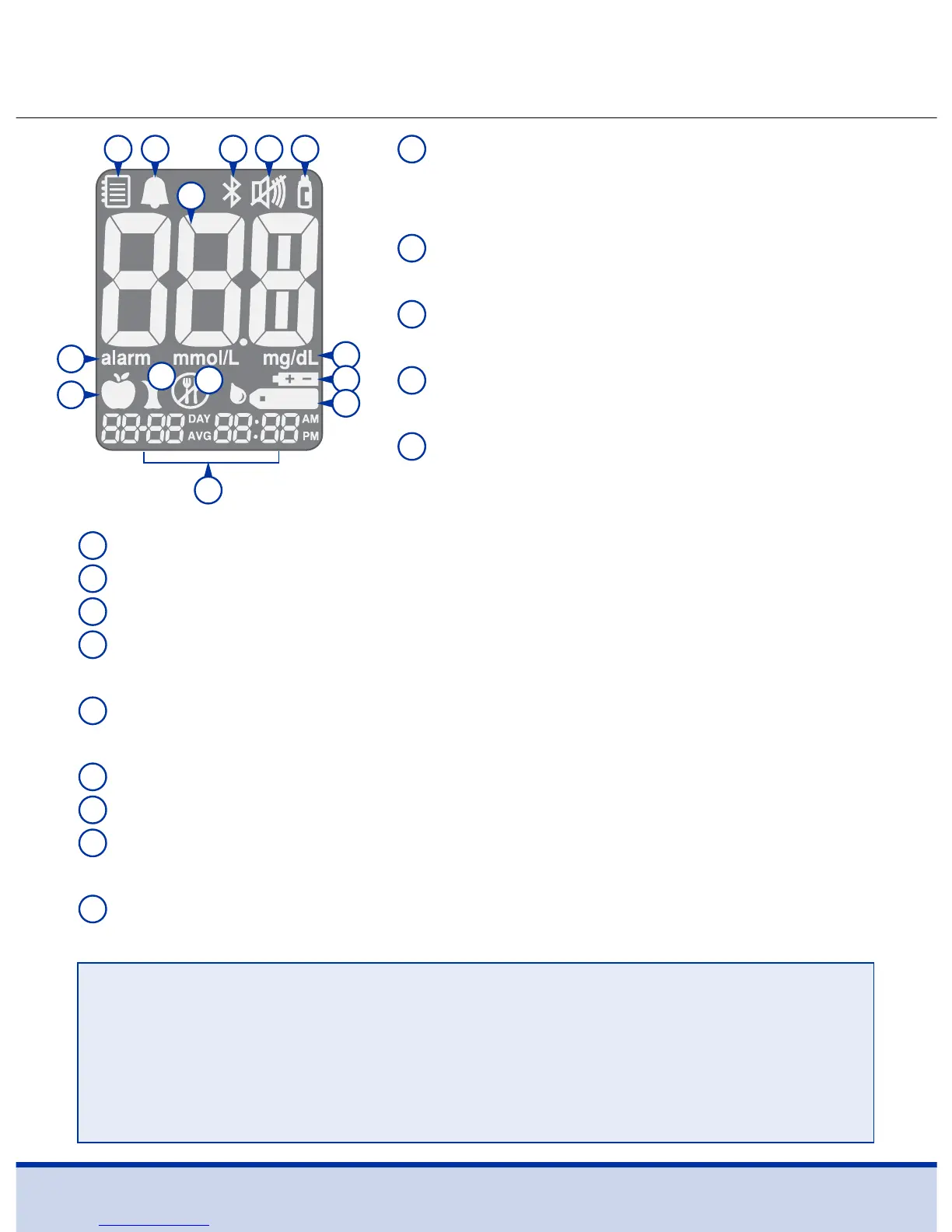
ReliOn™ Premier BLU Blood Glucose Meter Display
1
Memory recall mode: appears
when test results stored in the
memory are displayed
2
PP2 alarm: appears when the post-
meal alarm has been set
3
Bluetooth® symbol: appears when
Bluetooth® is turned on
4
Mute symbol: appears only when
the sound is set to OFF
5
Control Solution flag: appears
when the control solution test
results are saved or displayed
6
Test results: test results display panel
7
alarm: appears when the time alarm has been set
8
mg/dL: unit for measuring blood glucose
9
Battery symbol: indicates meter battery is running low and
needs to be replaced
10
Blood insertion symbol: indicates meter is ready for the
application of a drop of blood or control solution
11
Pre-meal test flag: used for tests done before eating
12
Post-meal test flag: used for tests done after eating
13
Fasting test flag: used for tests done after fasting for at
least 8 hours
14
Month/Day/Hour/Minute
1
2 3 54
6
7
11
12
13
14
8
9
10
NOTE
• It is recommended to check if the display screen on the meter
matches the illustration above every time the meter turns on.
• Do not use the meter if the display screen does not exactly
match the illustration as the meter may show incorrect results.



 To Next Page