GB.7
Displays
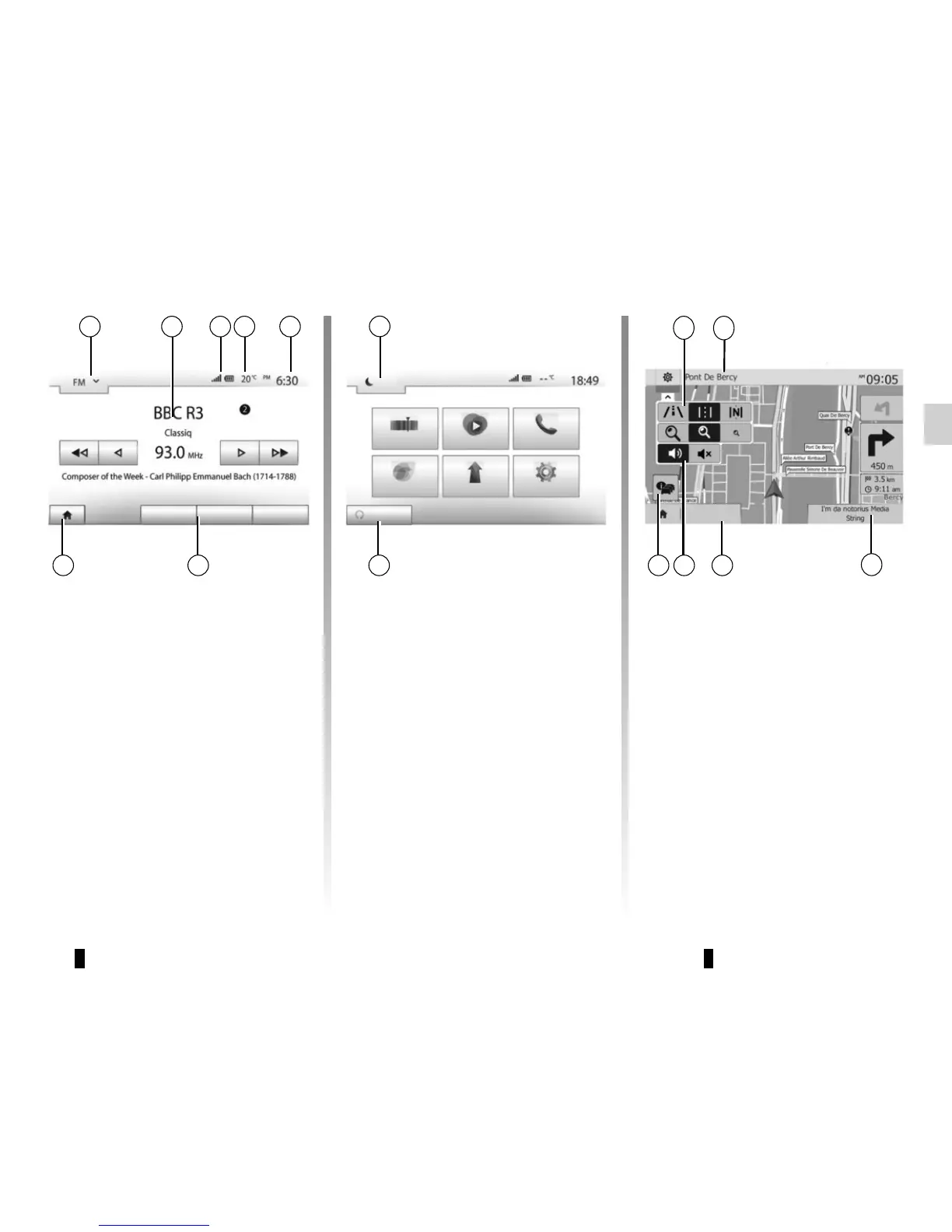
Menu screen
1 Mode selection area:
– displays the selected mode;
– when the mode selection area
is touched, a drop-down menu will
appear.
2 Area Table of Contents:
– shows the contents of a menu
item and related information.
3 Telephone information area:
– if the Bluetooth® system is acti-
vated, the reception and battery level
of the connected device will be dis-
played.
4 Exterior temperature.
5 Time area.
6 Menu area:
– display subordinate menu of
mode;
– shows current menu as high-
lighted.
7 Area Home or return to navigation.
Depending on the mode you are in,
this area displays:
– the Home button: returns you to
the welcome screen;
– the Back button: goes back to the
previous screen;
– the Flag button: goes back to the
navigation screen.
8 Mode standby and clock display
9 Area for selecting programmed
engine start-up
Navigation screen
10 Map mode (2D/3D and 2D North).
11Name of the next street to take on
your route.
12 Current audio information.
13 Options for route and map setting.
14 Voice guidance On/Off.
15 Traffic InformationTMC.
6
10
11
12
13
GENERAL DESCRIPTION (3/3)
7
321
14
Player List Options
Destination
4 5
8
Radio Media Phone
Driving eco2 Nav Setting
Dark
9
Set Time
Presets
15



 To Next Page