GB.29
AUDIO SETTINGS (2/2)
4
8 7 6
BAL/FAD
OK
Bass +3
Mid +0
Treble -2
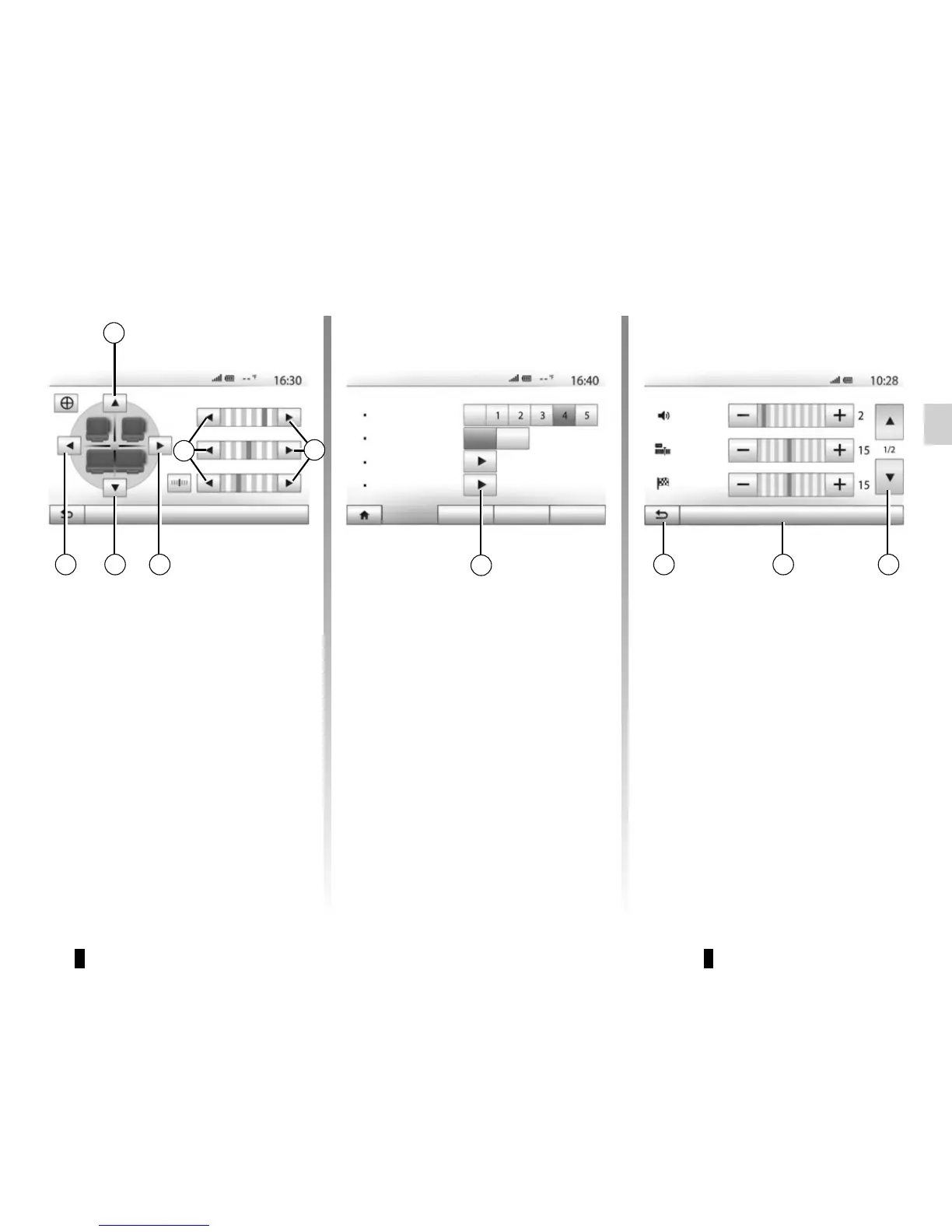
Right/left and front/rear balance
Tap 6 or 8 to adjust the sound the left/
right balance.
Tap 4 or 7 to adjust the sound the front/
rear balance.
After setting balance, press “OK” to
confirm.
Bass, Mid, Treble
Press the 5 arrows to adjust the bass,
medium and treble.
Once the adjustments have been
made, press “OK” to confirm.
Audio preferences
Display the audio preferences menu by
pressing 9.
You can adjust the volume of each
sound independently.
– “Audio”;
– “TA”;
– “Navigation”;
– “Phone”;
– “Ring” (telephone).
To do this, press “+” or “-”.
Press 11 to reset all the audio prefer-
ences.
Press 10 to move to the next page.
Tap 12 to go back to previous screen.
Audio Display SystemConnectivity
Loudness
Sound
Off
Off
On
Audio Settings
Vol/Speed
BAL/FAD
9
12 1011
Audio
AT
Nav
Reset to defaults
5
5



 To Next Page