GB.30
VIDEO (1/2)
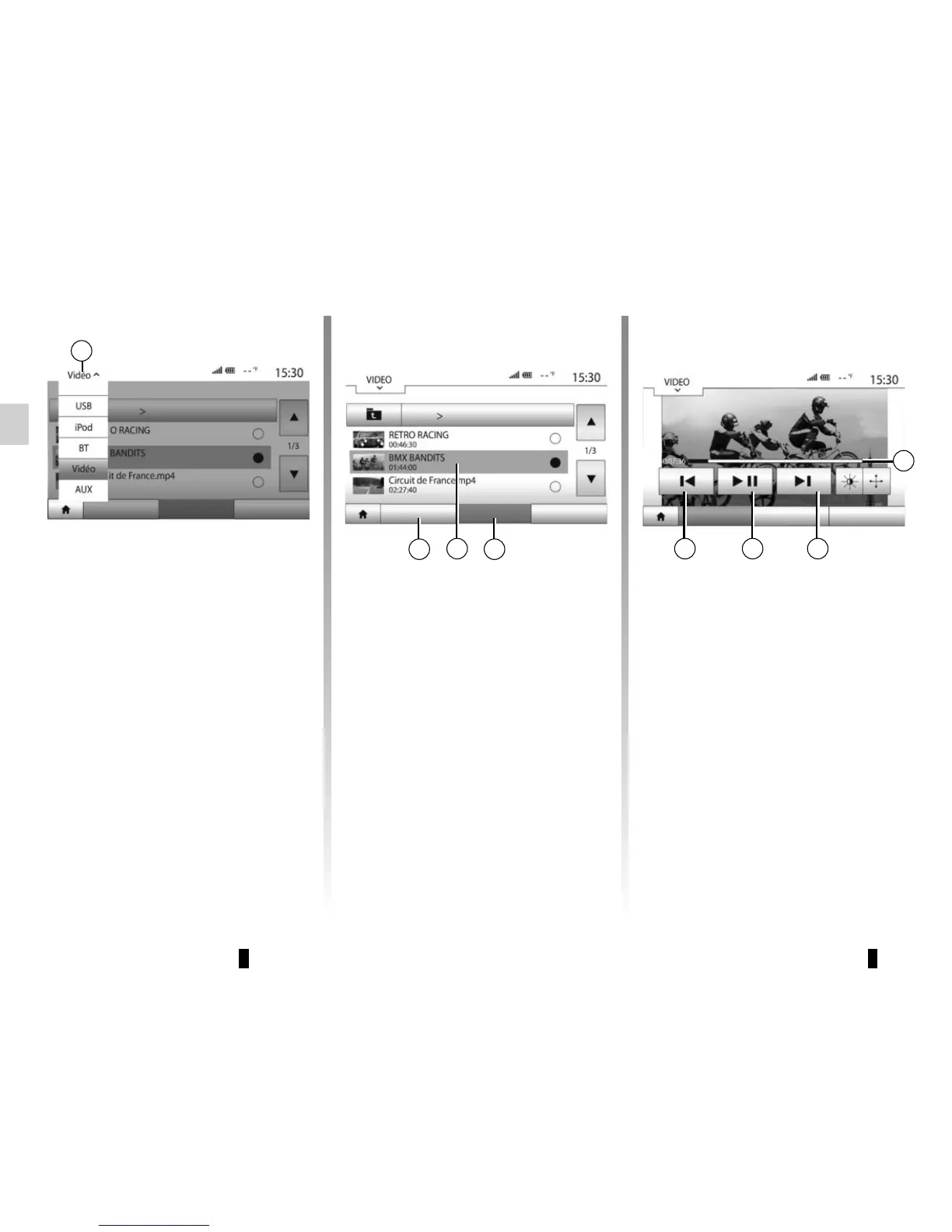
When playing a video, you can:
– press on 8 to play the video from the
beginning, press again on 8 to play
the previous video, press and hold to
fast rewind the current video;
– pause by pressing 7;
– access the next video by pressing
on 6 or press and hold to fast forward
the current video;
– use the scroll bar 5;
“List” mode
Press the “List” tab 2 to view the videos
available. Select the video you would
like to view by pressing the area 3.
“Player” mode
Press the “Play” tab 4 to launch the
video selected.
Your system enables you to view videos
via USB flash drive.
Insert your USB flash drive into the mul-
timedia system.
From the “Media” menu, select “Video”
mode 1.
Note: some video formats may not be
readable by the system.
Note: the USB key used must be for-
matted to FAT32 format and have a
minimum capacity of 8GB and a maxi-
mum capacity of 32GB.
Note: the input sources described
above may vary.
1
ListPlayer Options ListPlayer Options
Video
24
3
ListPlayer Options
8 7 6
5



 To Next Page