GB.42
GUIDANCE (1/6)
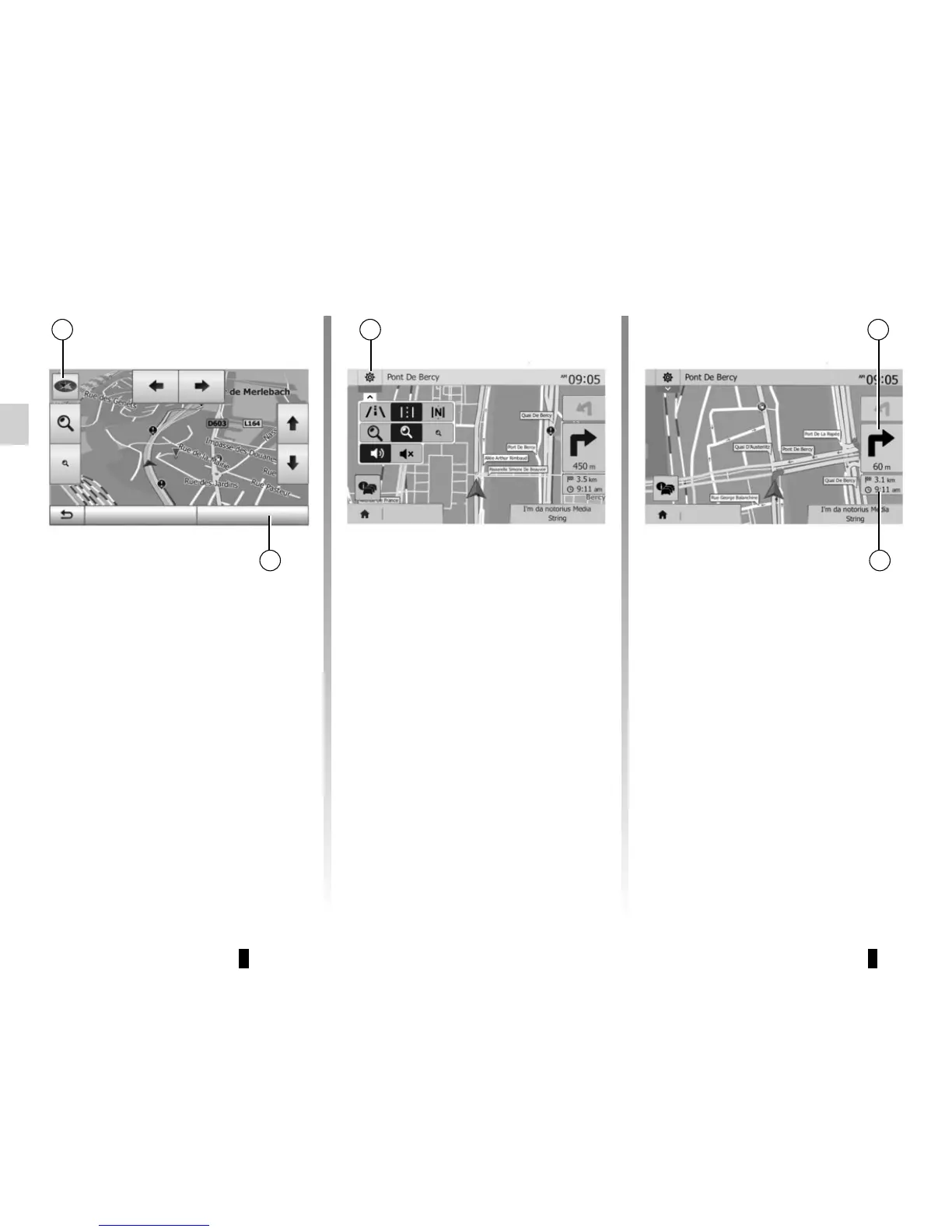
Activating guidance
Press 2 or wait 10 seconds after enter-
ing a destination. Guidance will begin.
Note: You can interact with the map at
any time by sliding it in the desired di-
rection or by pressing the screen.
Guidance screens
The system will offer several different
navigation maps.
Press 3 to change the map display and
open the drop-down menu. Then select
one of the different displays:
– 2D;
– 3D;
– 2D North.
You can also change the map display
by pressing the compass 1 on the map.
Full-screen mode (2D, 3D or 2D
North)
This mode allows you to view the navi-
gation map on the entire screen.
The information on the arrival time and
the distance remaining to the destina-
tion are indicated in 5.
The indication for the next change of di-
rection is located in 4.
Destination
2
3
Destination
4
5
Options OK (10)
1



 To Next Page