GB.21
LISTENING TO THE RADIO (1/4)
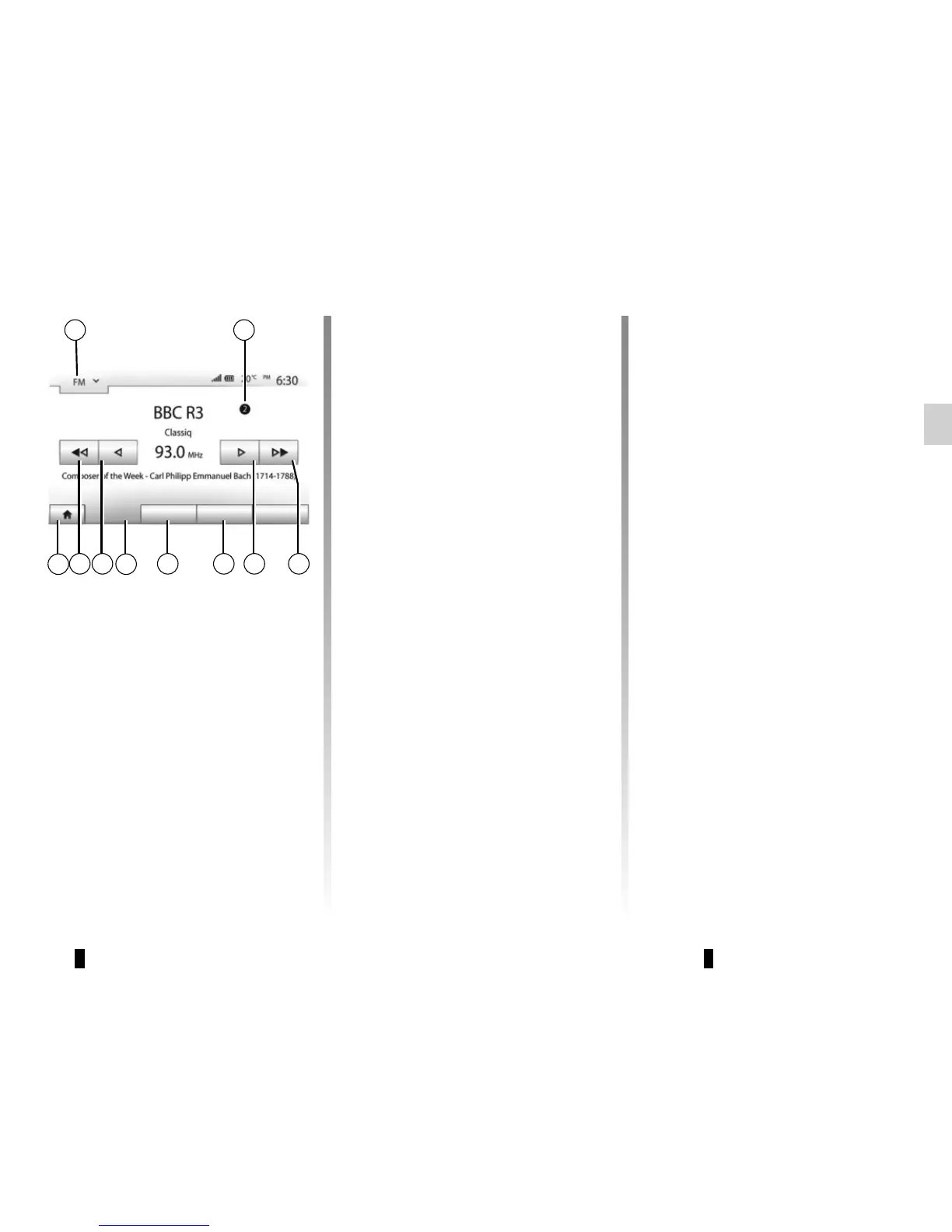
Selecting a wavelength
To choose a waveband:
– press 1;
– choose the waveband “FM”, “AM” or
“DAB” by pressing on the required
band.
1
Main List Presets Options
69 8 4 35
2
7
“Main” mode
This mode allows stations to be
searched for either manually or au-
tomatically by scanning the se-
lected range of frequencies. Select
“Frequency” mode by pressing 7.
To scan the frequency range:
– manually run through the frequen-
cies in steps by repeatedly press-
ing 4 or 8;
– automatically go to the next station
by pressing 3 or 9;
Repeat the operation each time the
search stops if necessary.
You can also move the control knob on
the steering column control to move to
the next station.
Note: to go back to the welcome
screen, press the 10 button.
Choose a radio station “FM”,
“AM” or “DAB”.
There are different modes for choosing
a radio station.
After having selected the wavelength,
select the mode by pressing tabs 5, 6
or 7.
Three search modes are available:
– “Main” mode (tab 7);
– “List” mode (tab 6);
– “Presets” mode (tab 5).
These modes can be changed using
the steering column control.
Note: the 2 marker indicates the posi-
tion in your saved list of the radio sta-
tion currently playing.
10



 To Next Page