GB.22
LISTENING TO THE RADIO (2/4)
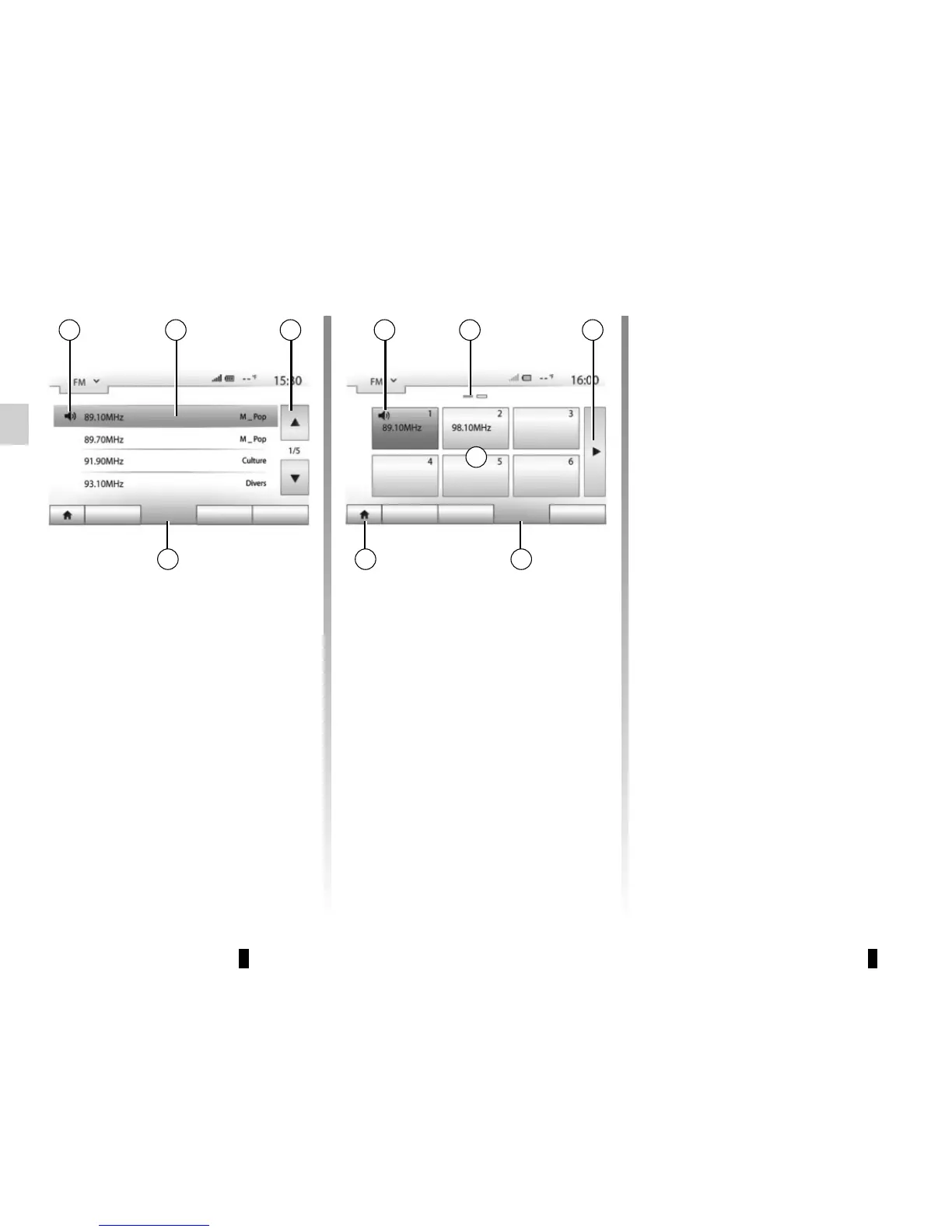
Press one of the buttons in zone A to
choose the saved stations.
Note: to go back to the welcome
screen, press the 10 button.
Storing a station
Select a radio station by using one of
the modes described above. Press and
hold one of the buttons on the zone A.
You can save up to twelve stations per
waveband.
Note: the 15 symbol indicates the sta-
tion you are currently listening to.
Marker 16 indicates the number of
pages in this section.
To move to the next page, press
button 17.
A
Main List Presets Options
15
The names of the radio stations that
do not use RDS will not appear on the
screen. Only their frequency is dis-
played and sorted at the end of the list.
“Presets” mode
Select “Presets” mode by pressing 18.
This mode allows you to recall on
demand those stations which you have
already stored (refer to information on
“Saving a station” in this section).
“List” mode
Select “List” mode by pressing 14.
This operating mode allows you to find
a station easily by name from an alpha-
betical list (on “FM” and “DAB” only).
Select the station required by pressing
zone 12.
Press 13 to scroll through all the sta-
tions.
Note: the 11 symbol indicates the sta-
tion you are currently listening to.
12 1311
Main List Presets Options
14 1810
16 17



 To Next Page