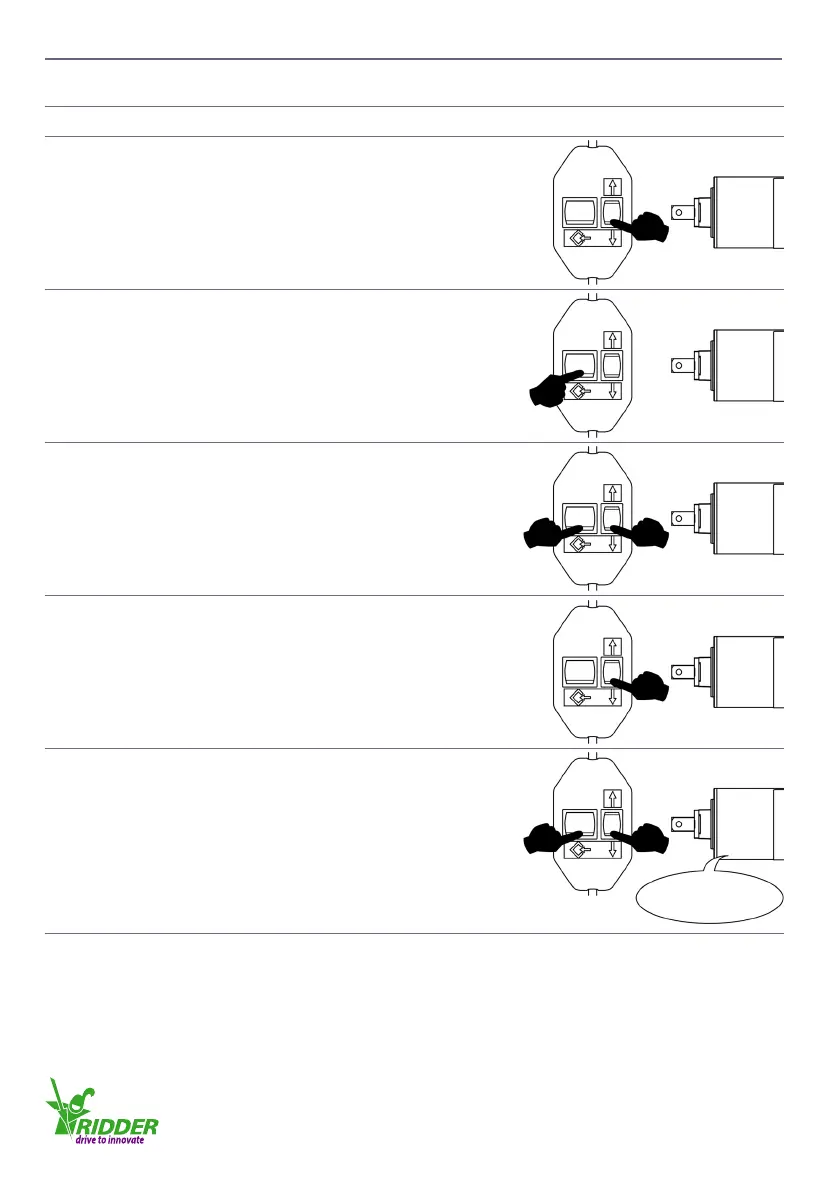
7.5 Erasing one end posion
u
Descripon
1
Connect the tube motor to the adjusng switch.
2
Push the related Up-Down buon and let the tube
motor turn to the end posion that has to be erased.
3
Push and hold the programming buon. Wait for a
minimum of 1 second and then go to step 4.
4
Push and hold the Down buon also. Wait for a
minimum of 1 second and then go to step 5.
5
Hold the Down buon and release the programming
buon. Wait for a minimum of 1 second and then go to
step 6.
6
Push the programming buon. The end posion is
erased aer the tube motor gives a “double click”.
Release the two buons.
Click - Click
7
Obey the procedure in §7.4 to set the erased end posion again!
Ridder Drive Systems
T +31 (0)341 416 854 F +31 (0)341 416 611 I www.ridder.com
30


 To Next Page