4.5 Aach the cable carrier
The cable carrier prevents that the roller-screen system causes damage to the power cable during
movement of the tube motor.
Do the procedure that follows.
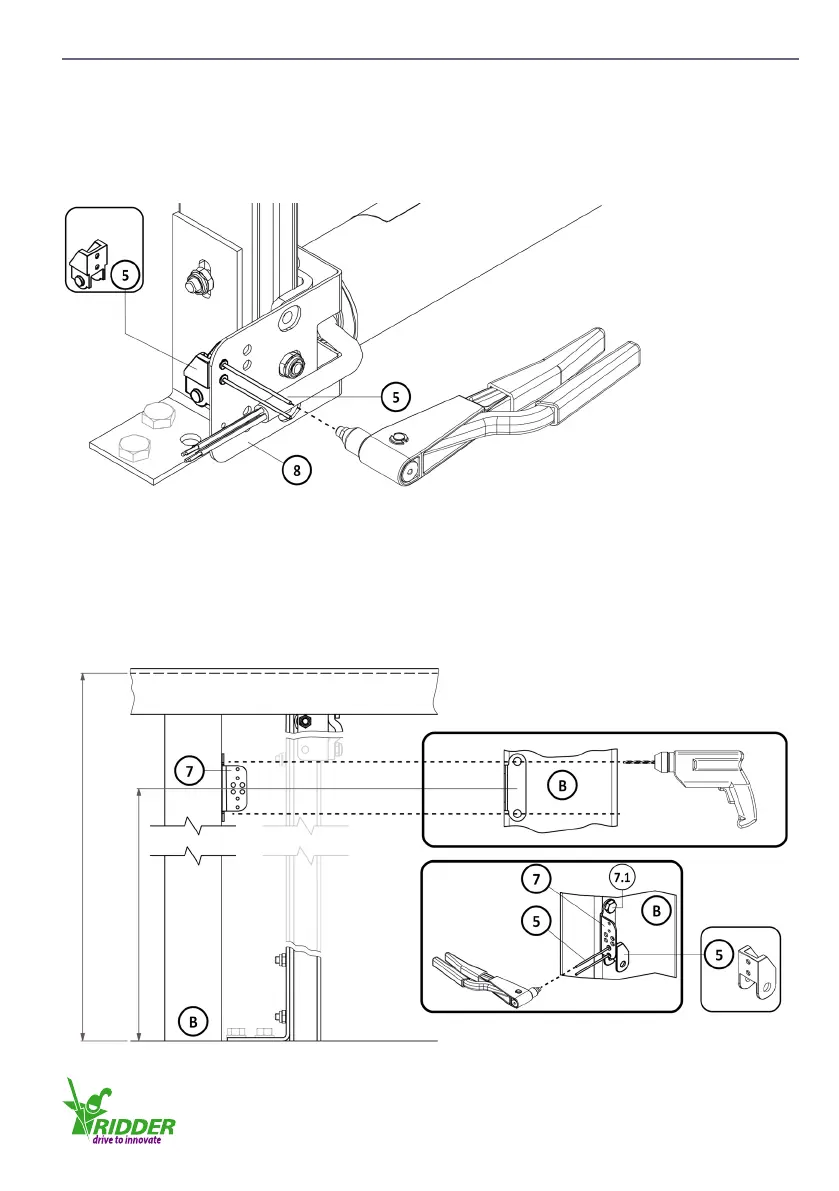
1. Use the pop-rivets (5) to aach the end connector (MCP) to the cable-carrier bracket (8).
2. Make marks of the position of the cable-carrier mounng-bracket (7) on the post (B). This
posion is equal to the length l1 multiplied by 0.5 to 0.6. Drill the holes for the applicable
screws (7.1) or bolts (7.1), into the post (B).
3. Use the screws (7.1) or bolts (7.1) to install the cable-carrier mounng-bracket (7).
4. Use the pop-rivets (5) to aach the end connector (FCP) to the cable-carrier mounng-bracket
(7).
4.5.1
MCP
0.5-0.6 x l1
l1
4.5.2
FCP
Ridder Drive Systems
T +31 (0)341 416 854 F +31 (0)341 416 611 I www.ridder.com
17


 To Next Page