RIGOL
© Copyright RIGOL Technologies, Inc. 2007. 2-27
User’s Guide for DS1000 Series
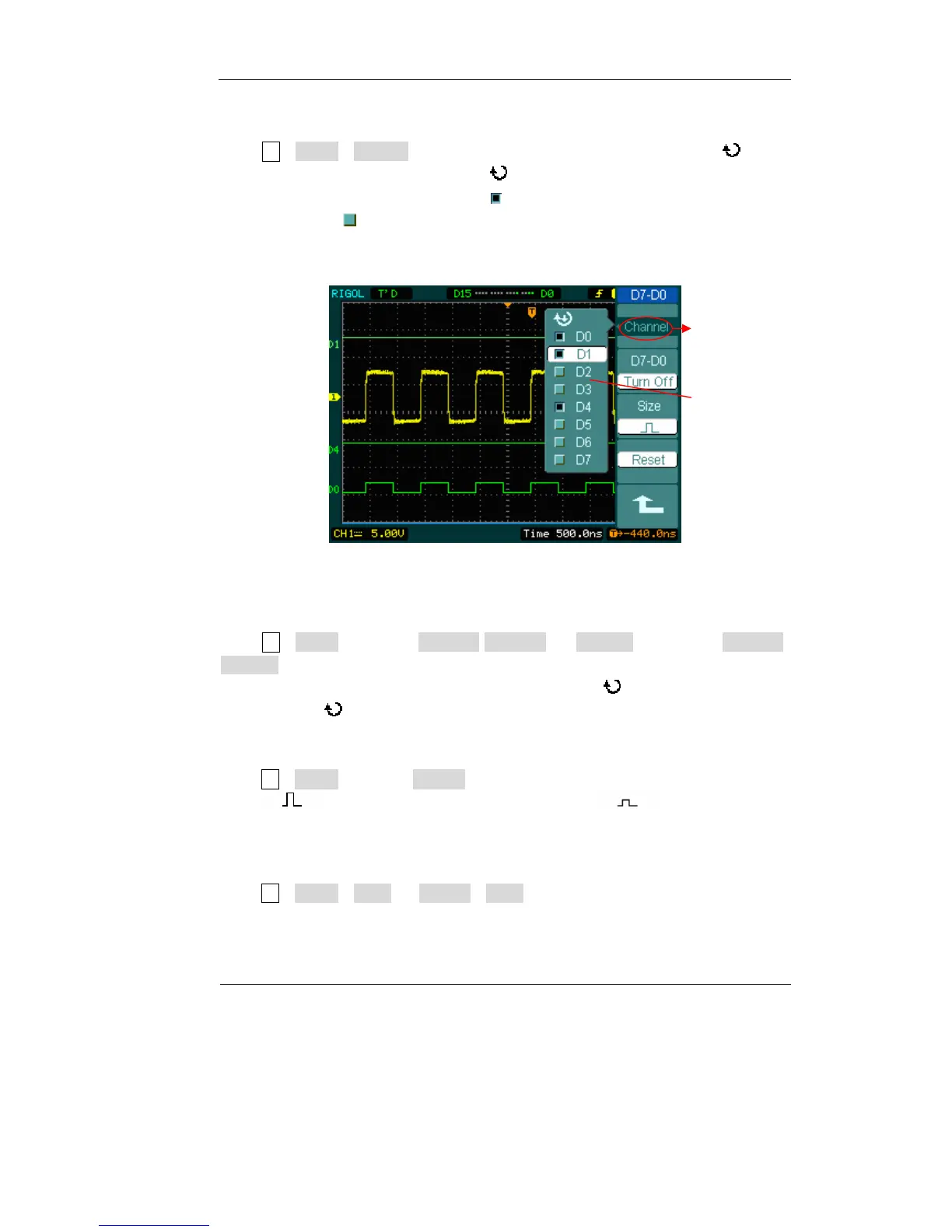
1. Turn on or off a single logic channel
Press LA→D7-D0→Channel, and choose the wanted channel by turning ( ) knob.
Press No. 1 soft button or push down ( ) knob to turn on /off the channel. When
the channel is on, we can see the mark (
). When the channel is turned off, the mark
will be shown as (
).
As figure 2-36 shows.
Figure 2-36
2. Force turn on or off all logic channels
Press LA→D7-D0→D7-D0→Turn On / Turn Off (or D15-D8 →D15-D8→Turn On /
Turn Off) will force to turn all the channels on/off. If you want to turn on/off any
single channel instead, select the Channel by turning (
) knob, then press No. 1
soft button or (
) knob.
3.Set up the viewing size of logic channels:
Press LA→D7-D0→Size, or D15-D8→Size, to select wave size of logic channels.
Select to view 8 channels on the screen;Select to view all of the 16
channels on the screen.
4.Reset the logic channels display:
Press LA→D7-D0→Reset, or D15-D8→Reset to reset the display of logic channels.
On-off
channels
Channel list
and status of
on-off












 To Next Page