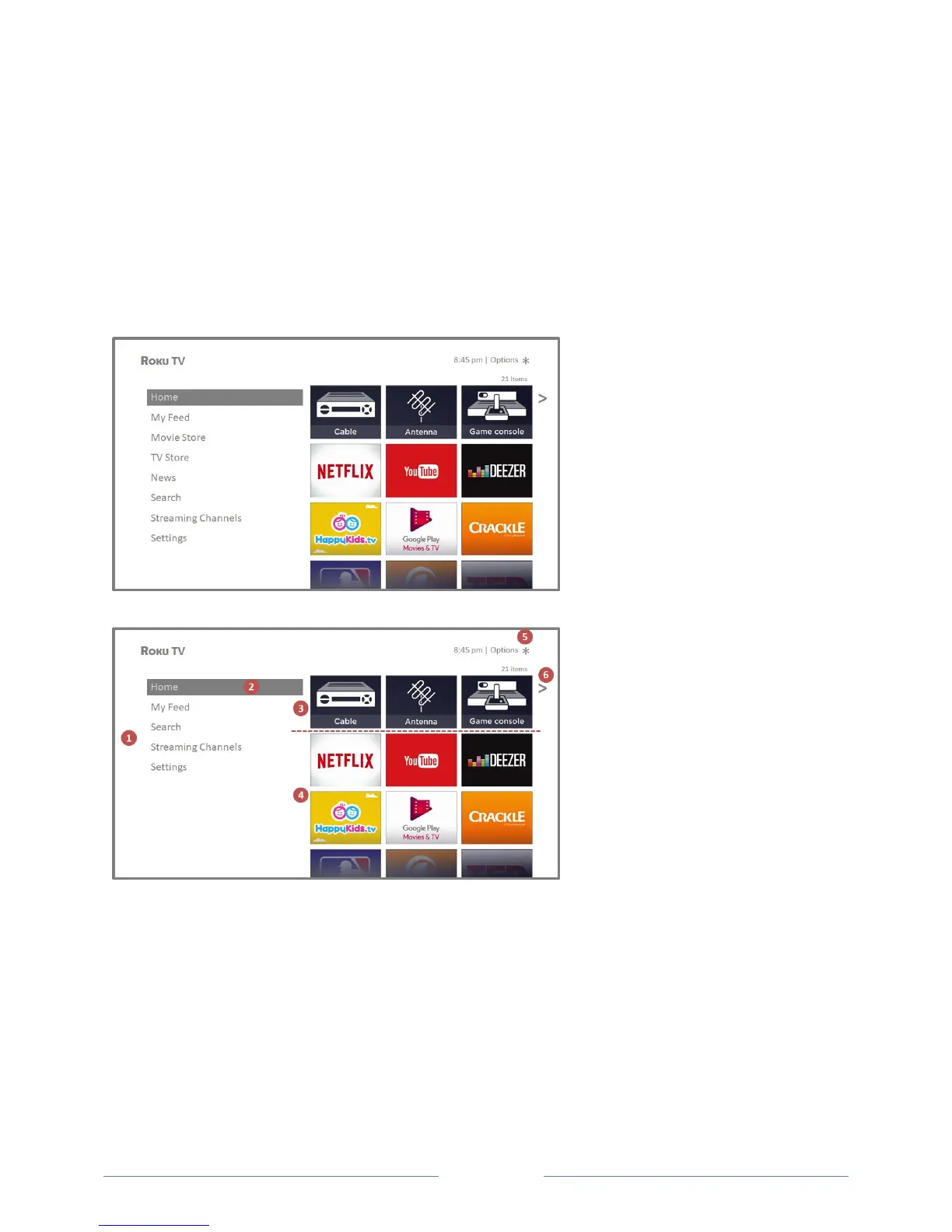
Home screen
The following illustrations show typical Home screen, which vary depending on location, connected
mode, selected theme, number of TV inputs, and streaming channels and apps added.
Note: A paid subscription or other payments may be required for some channel content. Channel
availability is subject to change and varies by country. Not all content is available in countries or regions
where Roku® products are sold.
Typical connected Home screen, United States
Typical connected Home screen, Canada
1. Home menu—shows options available to you when you are on the Home screen.
2. Highlighted option—press OK on the remote control to select.
3. TV input tiles—select an input to watch the connected device.
4. Streaming channel and app tiles—select a tile to go to the indicated streaming channel or
application.
5. Options hint—press on the remote control for options when this symbol is present.
6. Next screen hint—press the RIGHT arrow button on the remote control to see the next screen.



 To Next Page