Viewing program information
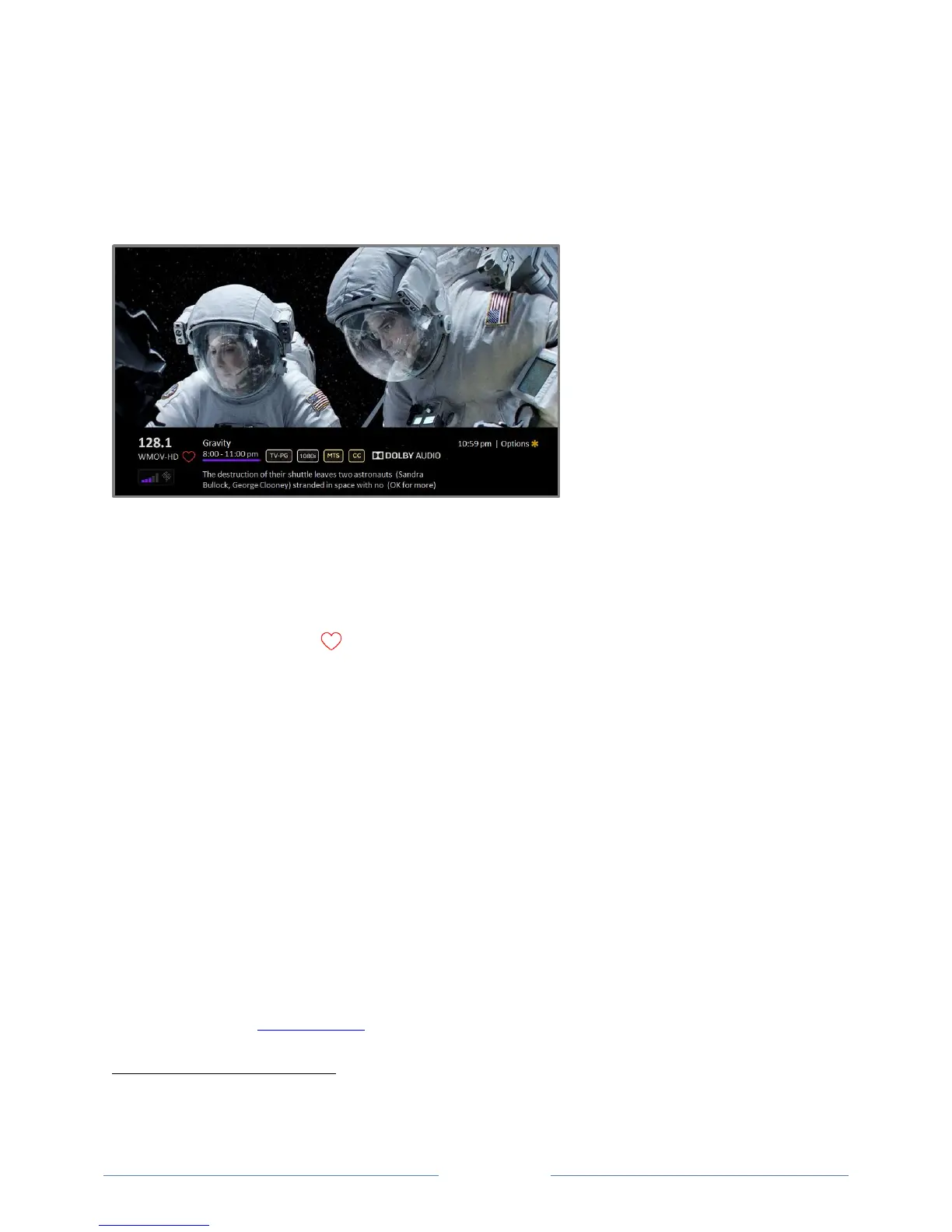
To view information about the current program, press OK. The TV displays a banner at the bottom of the
screen with as much information as is available in the program data stream, as shown in the following
example.
Program information banner
Program information, subject to availability within the broadcast information, includes:
Channel number
Channel call sign
Favorite channel icon
Signal strength
Program title
Start time, end time, and graph of program length showing current position
Content rating
Video resolution (480i, 480p, 720p, 1080i, 1080p, 4K)
Frame rate (24Hz, 30Hz, 60Hz for television sources, 60Hz, 70Hz, 72Hz, 75Hz for computer
sources)
Audio format (Mono, Stereo, Dolby Audio™ logo)
Audio features (SAP/MTS)
Only on select 4K models: HDR or Dolby Vision™
logo (HDMI® and streaming sources)
Closed captioning (CC)
Current time
Program description. If the entire description does not fit, press OK to expand the size of the
banner and see the entire description.
Tip: If you’ve set up Live TV Pause and you’re watching broadcast TV, you’ll also see a progress bar
showing the current playback position within the rolling 90-minute pause time. For more
information, see Pausing Live TV.
The Dolby Vision™ logo appears only on Dolby Vision™-certified models when displaying Dolby Vision™ content.



 To Next Page