Rosemount Model 3095 Multivariable
™
Level Controller
2-20
Install RTD Assembly
The external RTD assembly is optional and not required for Level
Controller operation. The RTD Assembly allows you to read
temperatures as a HART variable only.
To install the Series 68 or Series 78 RTD Assembly:
1. Mount the RTD Assembly in the desired location. Refer to the
appropriate differential producer standard concerning
recommended RTD installation location.
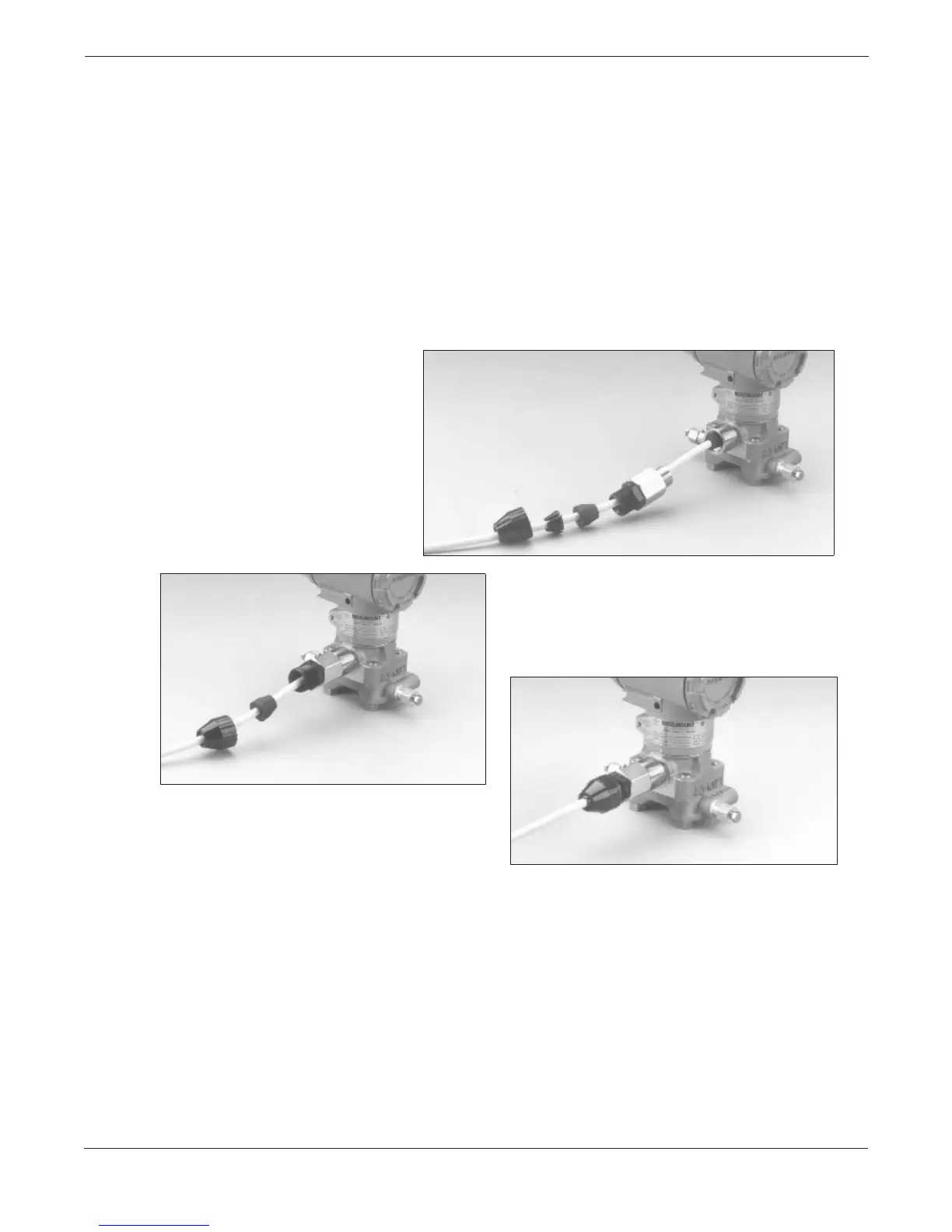
2. Connect the RTD cable to the Level Controller RTD connector.
First, fully engage the black cable connector, then screw in
and tighten the cable adapter until metal to metal contact occurs
(see photos).
3. (Optional) If using an armored, shielded cable, install the
armored cable compression seal as illustrated below, and use a
pliers to tighten the cap onto the compression fitting
4. Make all necessary wiring connections inside the RTD Flat
Connection Head as explained in the Sensor Wiring Instructions
included with the RTD.
3095-069AB, 068AB, 067AB
FIRST, FULLY ENGAGE
THE BLACK CABLE
CONNECTOR
SECOND, SCREW IN AND
TIGHTEN THE CABLE ADAPTER
UNTIL METAL TO METAL
CONTACT OCCURS
THIRD, SCREW IN AND TIGHTEN
THE STRAIN RELIEF CLAMP


 To Next Page