Rosemount Model 3095 Multivariable
™
Level Controller
5-14
REASSEMBLY
PROCEDURES
Follow these procedures carefully to ensure proper reassembly:
Attach the Sensor Module
to the Electronics Housing
1. Inspect all cover and housing (non-process-wetted) O-rings and
replace if necessary. Lightly lubricate with silicone to ensure a
good seal.
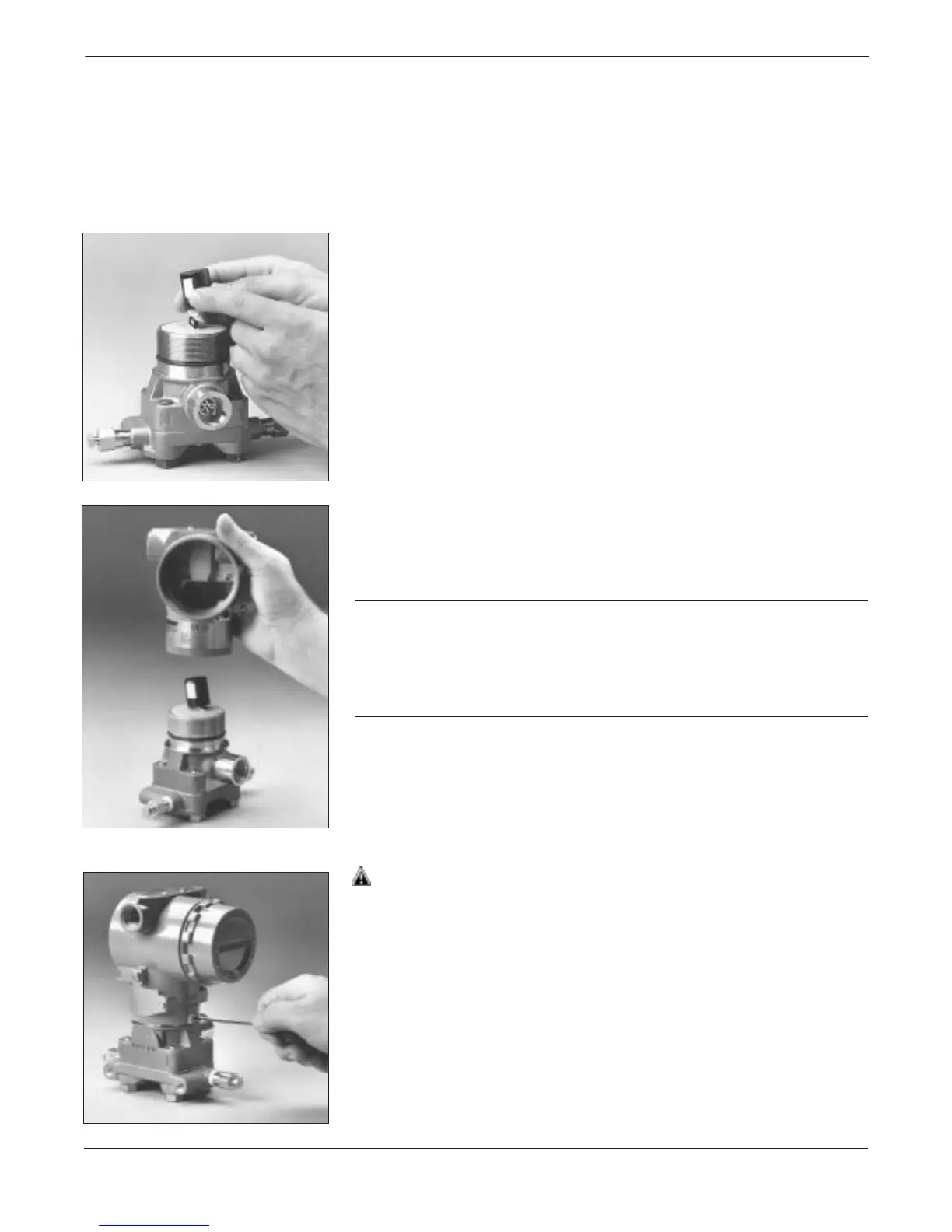
2. Carefully tuck the cable connector completely inside the internal
shroud. To do this, turn the shroud and cable counterclockwise
one rotation to tighten the cable.
3. Lower the electronics housing onto the module, and guide the
internal shroud and cable through the housing and into the
external shroud.
4. Fasten the housing to the module by turning clockwise.
CAUTION
To prevent damage to the cable connector, watch the cable and shroud
as you attach the housing to the module. Make sure the cable connector
does not slip out of the internal shroud and begin to rotate with the
housing. Reinsert the cable connector into the shroud if it escapes
before the housing is fully fastened.
5. Inspect the threaded connections.
6. Tighten the housing rotation set screw. The bottom of the
electronics housing must be within
1
/16 in. of the sensor module to
maintain explosion-proof requirements.
3095-031AB3095LC073095LC06


 To Next Page