3.4.5
Checking
route
alternatives when
planning
the
route
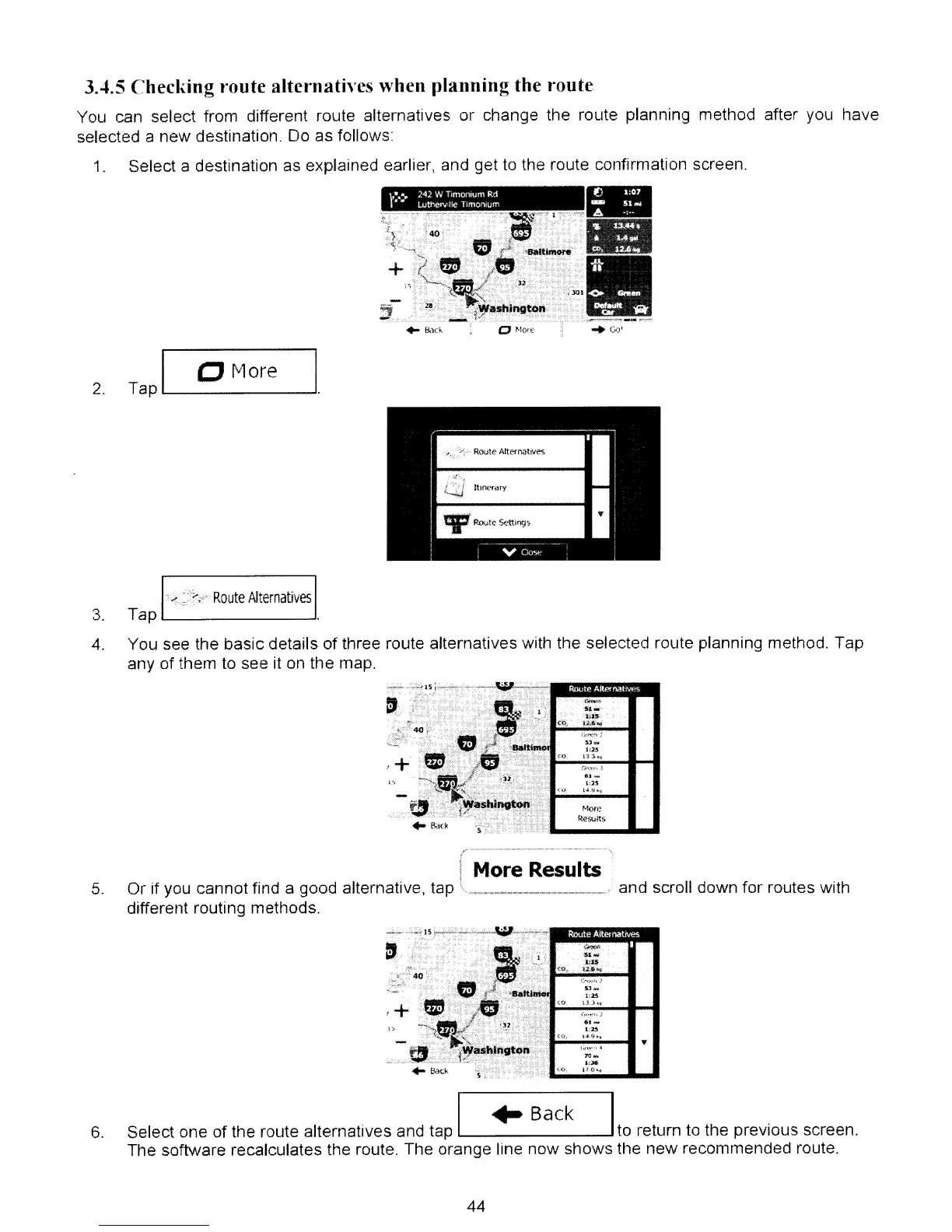
You can select from different route alternatives or change the route planning method after you have
selected a new destination. Do as follows
"'Go'
\.-......
242 W TlmoI',um Rd
,$
..
Luttlerv
lie
T
mo,",
Jm
Select a destination as explained earlier, and get to the route confirmation screen.
-
~}~~~II
. .
~WaShlrio~oD'·ll(;.·.·l
•.
,"
..,
_ .
.....
..,
....:..
..
j(.
'.
......
.
.;1·L.._~=
__
~
..
&1(k
1.
2.
I
e More I
Tap
__
.
Route
Alternatives
3. Tap
L...-
--'
4.
You see the basic details
of
three route alternatives with the selected route planning method. Tap
any of them to see it on the map.
11.~
:a::IS
<OJ
u,
....'
,,~
1;25
en
D,3~'l
l"'~:"
J
IU
....
LlS
-J.I'
t~."'''~
More
Results
5.
,,-----------~
....
f '
I More Results
Or if you cannot find a good alternative, tap \ . ' and scroll down for routes with
different routing methods.
sf
Roule
AII"malM><
-~
....
'eU
(Ch_
.u,a~
S;J_
1;25
CO
~_J
.
.J
...
..
-
l:25
,J,;.;'o;,."
"';'';;;;''';;;.''
_
...
.",..,
1:;)6
":''0,
P.t)..,
6.
I
..
Back I
Select one of the route alternatives and tap to return to the previous screen.
The software recalculates the route. The orange line now shows the new recommended route.
44



 To Next Page