ROSEN'
.
www.rosenentertainment.com
(")
o
~
-
.,
o
en
3.
SYSTEM
SETTINGS
MENU
»
3:
-
"
3:
3.1.1 Settings Menu
Enter/Exit
iiiIi
..
"'tJ
o
c..
Touchl>.r
to
enter
the
main
menu
interface.
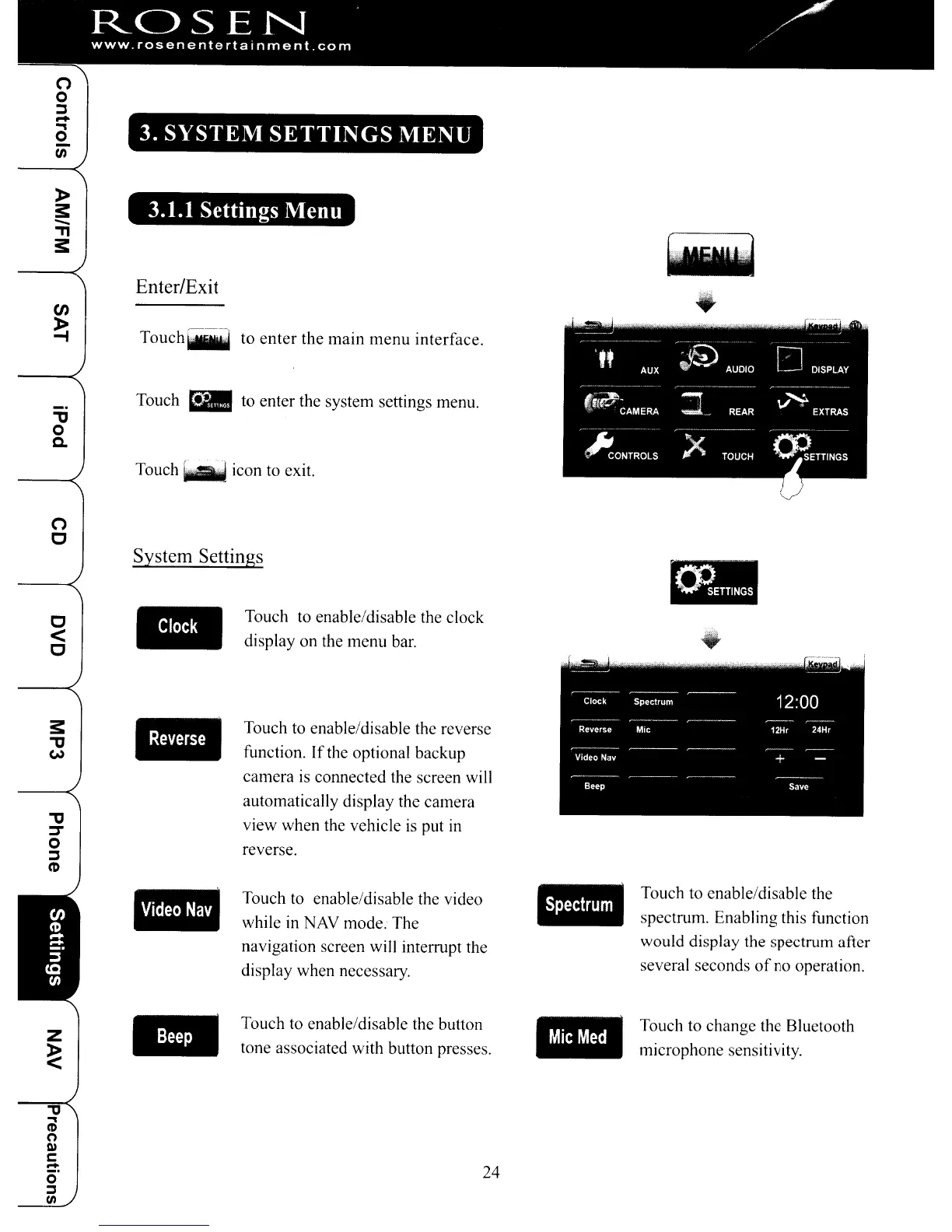
Touch _ to enter the system settings menu.
Touch
~]Ad
icon to exit.
System Settings
..
Touch to enable/disable the clock
display on the menu bar.
Touch to enable/disable the reverse
function.
If
the optional backup
camera
is
cOlmected the screen will
automatically display the camera
view when the vehicle
is
put
in
reverse.
..
(")
C
c
<
C
"'tJ
::::r
o
~
(t)
..
Touch to enable/disable the video
while
in
NAV mode. The
navigation screen will interrupt the
display when necessary.
Touch to enable/disable the button
tone associated with button presses.
..
Touch to enable/disable the
spectrum. Enabling this function
would display the spectrum after
several seconds
of
no operation.
Touch to change the Bluetooth
microphone sensitivity.
24
ROSEN'
.
www.rosenentertainment.com
(")
o
~
-
.,
o
en
3.
SYSTEM
SETTINGS
MENU
»
3:
-
"
3:
3.1.1 Settings Menu
Enter/Exit
iiiIi
..
"'tJ
o
c..
Touchl>.r
to
enter
the
main
menu
interface.
Touch _ to enter the system settings menu.
Touch
~]Ad
icon to exit.
System Settings
..
Touch to enable/disable the clock
display on the menu bar.
Touch to enable/disable the reverse
function.
If
the optional backup
camera
is
cOlmected the screen will
automatically display the camera
view when the vehicle
is
put
in
reverse.
..
(")
C
c
<
C
"'tJ
::::r
o
~
(t)
..
Touch to enable/disable the video
while
in
NAV mode. The
navigation screen will interrupt the
display when necessary.
Touch to enable/disable the button
tone associated with button presses.
..
Touch to enable/disable the
spectrum. Enabling this function
would display the spectrum after
several seconds
of
no operation.
Touch to change the Bluetooth
microphone sensitivity.
24



 To Next Page