ROSEN
"
www.rosenentertainment.com
4.1 N
AV
Touch
Screen
Calibration
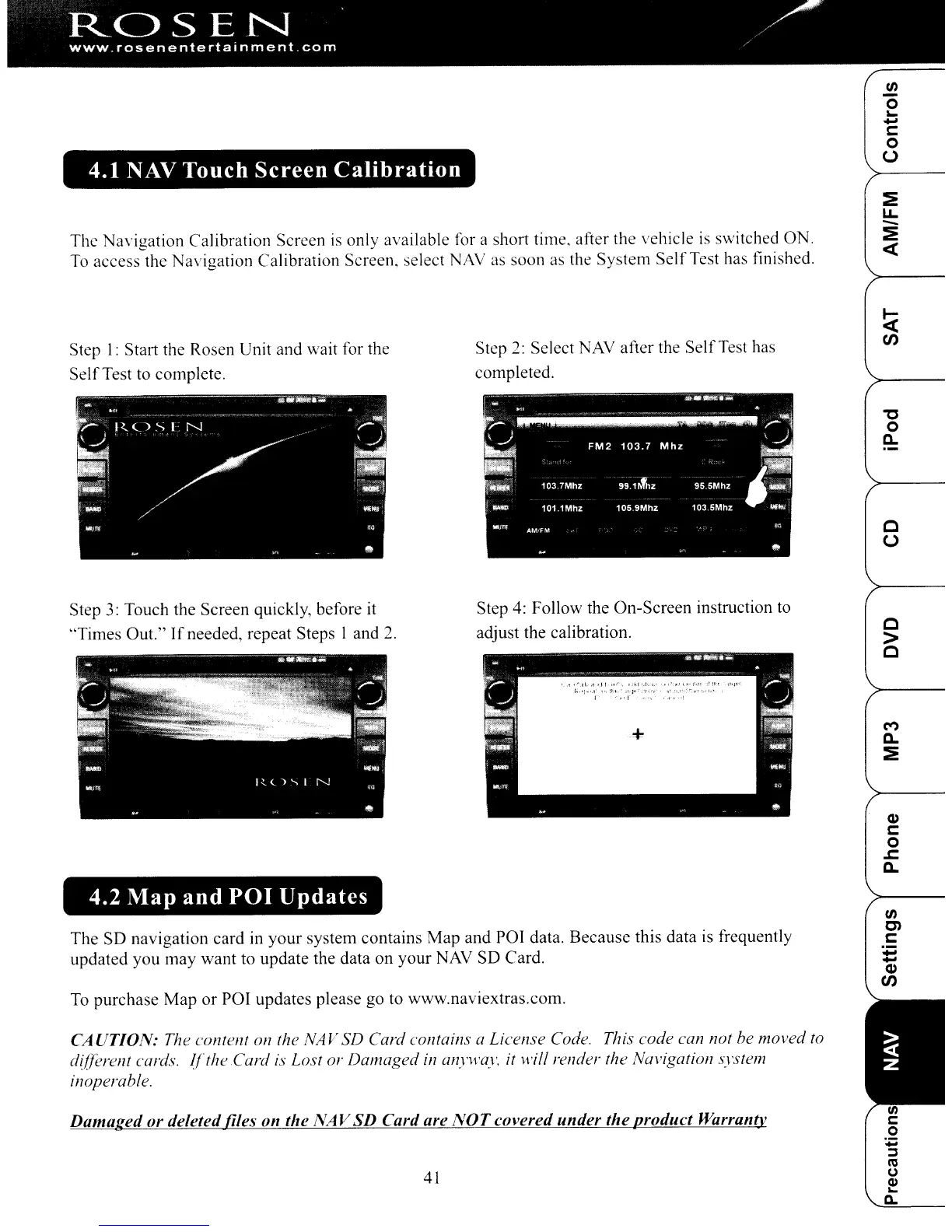
The Navigation Calibration Screen
is
only available for a short time, after the vehicle
is
switched ON.
To
access the Navigation Calibration Screen. select
NAY
as
soon as the System
Self
Test has finished.
(/)
o
~
...
c:
o
(,)
Step I: Start the Rosen Unit and wait for the
Self
Test to complete.
Step
3:
Touch the Screen quickly, before it
'Times
Out."
If
needed, repeat Steps 1 and
2.
4.2 Map and
POI
Updates
Step
2:
Select NAY after the
Self
Test has
completed.
Step
4:
Follow the On-Screen instruction
to
adjust the calibration.
"'C
o
a..
o
(,)
o
>
o
M
a..
:!:
Q)
c:
o
.c:
a..
The SD navigation card in your system contains Map
and
POJ data. Because this data is frequently
updated you may want to update the data on your NAY SD Card.
To purchase Map
or
POI updates please go to www.naviextras.com.
CAUTION:
The content on the NAV SD Card contains a License Code. This code can not be moved
to
d{fferent cards.
l{theCard
is
Lost or Damaged
in
anyH·ay.
it will render the Navigatioll system
inoperable.
Damaged or deleted files
on
the
NAV
SD
Card are
NOT
covered
under
the
product
Warranty
41
(/)
en
c:
...
...
Q)
CJ)
ROSEN
"
www.rosenentertainment.com
4.1 N
AV
Touch
Screen
Calibration
The Navigation Calibration Screen
is
only available for a short time, after the vehicle
is
switched ON.
To
access the Navigation Calibration Screen. select
NAY
as
soon as the System
Self
Test has finished.
(/)
o
~
...
c:
o
(,)
Step I: Start the Rosen Unit and wait for the
Self
Test to complete.
Step
3:
Touch the Screen quickly, before it
'Times
Out."
If
needed, repeat Steps 1 and
2.
4.2 Map and
POI
Updates
Step
2:
Select NAY after the
Self
Test has
completed.
Step
4:
Follow the On-Screen instruction
to
adjust the calibration.
"'C
o
a..
o
(,)
o
>
o
M
a..
:!:
Q)
c:
o
.c:
a..
The SD navigation card in your system contains Map
and
POJ data. Because this data is frequently
updated you may want to update the data on your NAY SD Card.
To purchase Map
or
POI updates please go to www.naviextras.com.
CAUTION:
The content on the NAV SD Card contains a License Code. This code can not be moved
to
d{fferent cards.
l{theCard
is
Lost or Damaged
in
anyH·ay.
it will render the Navigatioll system
inoperable.
Damaged or deleted files
on
the
NAV
SD
Card are
NOT
covered
under
the
product
Warranty
41
(/)
en
c:
...
...
Q)
CJ)



 To Next Page